
Community Tip - Did you know you can set a signature that will be added to all your posts? Set it here! X
Hello,
I am a senior year student in university, aiming to implement my previous work experience using Creo Parametric/Schematics to generate electrical wire harnesses for our Formula SAE team. This way we will better know items and wire lengths needed to make our yearly wire harness for competition, both IC and EV. I personally love Creo and hope to help future members learn this program since it's seemingly necessary to work in some high level industries.
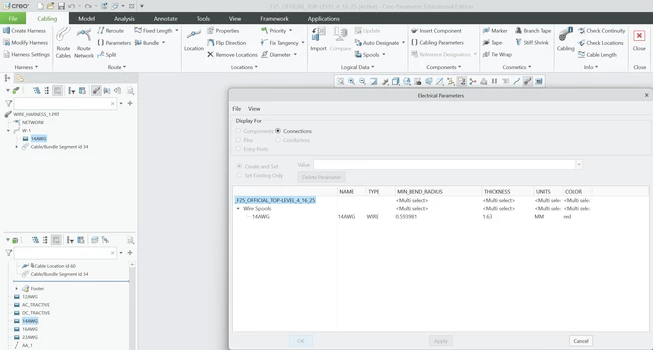
With only a university free account, trying to prove that Creo is more than useful for our efforts my previous experience is somewhat mitigated for reference. I am hoping to maybe learn of some alternative means to generate the parametric intelligent wire generation. Also is colored cabling disabled for a free account? I've attached an image of my default parameterized spool below, adjusting the name to lowercase as per some support ticket entries I read prior but to no avail.
For one person on our team hoping to join a specific company, is there a way to translate a schematic generated in RapidHarness? For some reason RapidHarness experience is necessary for them to be taken seriously.
All in all I am hoping to solve for some way to implement Creo's Cabling application as to further showcase this CAD program's usefulness.
Thank you for your time.
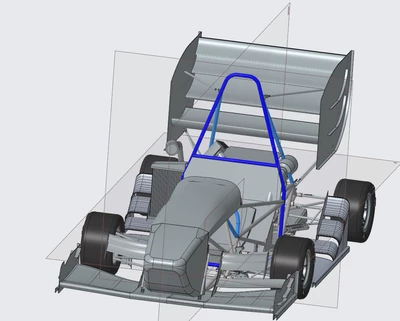
P.S. Here is the NX assembly I imported into Creo to maybe prove my credentials/standing or something of that matter.
Hi @Angel_Hearted,
Thank you for your question.
Your post has not yet received any response. I am replying to raise awareness. Hopefully, another community member will be able to help.
Also, feel free to add any additional information you think might be relevant. It sometimes helps to have screenshots to better understand what you are trying to do.
Best Regards,
Vivek N
Thank you for helping bring attention to this. Fortunately I connected with a couple members from my past internship and they helped direct me to the Sponsored Team resources which I was able to attain a license or two for Schematics!
Once I figure out how to properly install it on my computer I should be good. Although I am still wondering how the spool designation for color does not translate to the modeled item bearing that color. I will follow up later about my progress with this.
The Spool color needs to be in the appearance.dmt file in order to work. So in your case you have "red". Then in your appearance.dmt file you need a line that starts with:
material_name "red"
and then includes all of the rest of the appearance information for that color. The appearance.dmt file needs to be called exactly that and is set with the config option:
pro_colormap_path C:\folder\subfolder
If you were working in a corporate world, I would encourage you to use more descriptive spool color names. Also be aware that Creo sorts appearances alphabetically. Our appearances all start with _XXX_ so that we can sort the most commonly used ones at the top. Since spool colors can be dictated by the spool file those colors are at the bottom.
Thank you for the guidance.
I found the appearance.dmt file and want to make sure for that I simply replace the text in, material_name "ref_color2" ref_colorX with whatever color callout name I will hope to use.
Although, is this tied to a single spool or is it overreaching for that color I called out for my spools. On that note after changing the name how does it know what color to actually set? Is rgb or hex code within the section for each one?
For referencing the colormap within the config, is this line sufficient?
pro_colormap_path "D:\PTC\Creo 11.0.0.0\Common Files\graphic-library\appearances\appearance.dmt"
In my .spl spool file, the last line reads:
! Color
COLOR <_91_white_cable_wire>
In my appearance.dmt file I have:
# material name
material_name "_91_white_cable_wire"
# material label
material_label "<_91_white_cable_wire>"
# material description
material_description "_91_white_cable_wire"
# material keywords
material_keywords "white cable wire"
shader_type rubber_shader "generic_rubber"
color_param 0.874510 0.858824 0.815686 "diffuse"
float_param 0.190000 "reflectivity"
float_param 0.090000 "refl_gloss"
shader_enabled 1
# ambient color
ambient_color 0.874510 0.858824 0.815686 1.000000
# diffuse color
diffuse_color 0.874510 0.858824 0.815686 1.000000
# specular color
specular_color 0.600000 0.600000 0.600000 1.000000
There's more lines but you get the idea. All of the data above in the appearance.dmt file controls the color, reflection, texture, etc of the color.
The line in the spool file is just a reference to the appearance.dmt color. I am not positive, but I would guess that the color gets stored in the harness file so I don't think changing the appearance would "update" all of your existing spools. You might have to do that manually. I am not actually a harness guy so I am not positive.
The pro_color_path is just the folder directory. No quotes, no appearance.dmt at the end. It should look just like my previous example.
Fortunately my team has been supplied a sponsorship team package of Creo and MathCAD, this includes schematics 😁
Now I am developing schematic library blocks with dxf exports of connector model drawings.
Adding notes tied to some parameters of the objects will be done later for more informative diagramming, and the size for each block isn't a concern right now.
I will have to make some wire types for all the wires we use. Right now the ports I chose to use are these and I'm unsure how to duplicate this initial option with the wanted qualities. I assume there is some .txt file with relevant information for maybe cloning the file or adding more items to a list. I will try to locate where this catalog option resides within the program files.
I used the items titled block because of my initial process :') I might adjust their porting when I have to go through and add note labels for each part if maybe a better way to go about this. Also making my own connection port shouldn't be too difficult but I wonder how these blocks are marked so that they work with different routing options. Such as the initial sample wires option for routing doesn't tie to my initially used ports for my connectors.
Hopefully what I've done is sufficient. Perhaps I have the option of changing properties within some .txt file as one of my connections taught me for when I initially went about this process just in Creo, duplicating spools there.
Also is there a way to set the working directory in the config.pro file? I see file_open_default_folder working_directory and wonder maybe if I can set working_directory before this line to my preferred location.
I'm not unfamiliar with configs but I wonder if there's some quick guide out there for people to generate some commonly liked lines of code.
Once again, thank you for your time and wisdom. 😌
Your working directory can be set with the "start in" location of the shortcut that you are using to launch Creo. Right click on the shortcut and choose properties.
Seems strange to me that this would be the main way of going about this. I believe adding the line of code for the config worked fine itself but went on to adjust the shortcut parameters too afterwards. My issue with it is that the Shortcut may vary depending on the several copies launched in different areas such as I use the start menu shortcut, but if I made a shortcut on my desktop based off the original .exe it would maybe not necessarily generate that same value. Thank you for the quick referral nevertheless.
I've managed to get to the section where I am to develop some template datatable for my wire and connectors we expect to use.
My issue at the moment is implementing my go to Creo help videos located at https://www.youtube.com/watch?v=E0RUBz-4zhs
Right now when I attempt to import the datatable and mapkey? the process fails. It had worked earlier, with just my 276 lines of specific wires, but trying to adjust the reference for the datatable seems to have faulted it.
The datasettype I noticed wasn't in line with the wires I already used for the connector ports I used initially creating my connector blocks. I changed the last column to what is shown below. I will add both excels to this post as files.
I tried to have the last line reflect the currently used applicable wirings whose parameters may be seen below, but as I said this seems to have broken the ability to accept this datatable in Schematics.
Solving this issue alongside some guidance for making datatables for connectors will be of great help. Again this is not for a business but for a student team for Formula SAE. After resolving the datatables I hope to implement the automatic wire to connector application with my relative understanding of a term_table file my last place of employment implemented for recognizing wires to their respective connectors not taking into account Schematics specific identities it may give to each one within a design. A bit of a yap there but I understand what I'm trying to do, I'm just getting caught up on a thing or two developing this from scratch.
I forgot to add the mapkey so I'll add it here but I'm somewhat certain the issue relies in the change in the datatable
