
10-Marble
February 6, 2025
Question

Filling body with lattices

  • February 6, 2025
  • 3 replies
  • 1827 views

Dear PTC Community,


I frequently encounter the following problem and I can't wrap my head around it. I'd appreciate if some of you experts would like to shed some light into the situation.


I am trying to fill a portion of a component with lattice structures. I have separated the part to be filled as a separate component (you can find the part attached to this post as .prt, .igs, .stp). I am using Creo Parametric 9.0, and it only allows me to fill the part with formula-based lattices. When I try to fill it with beam lattices (e.g., hexagonal, see screenshot), I get a feature error. I also attempted to cut the body from a lattice cube using a Boolean operation, but without success. I tried this with many similar bodys, and can not get it to work properly.


Does anyone have a suggestion as to why this is not working?


My lattice Options:
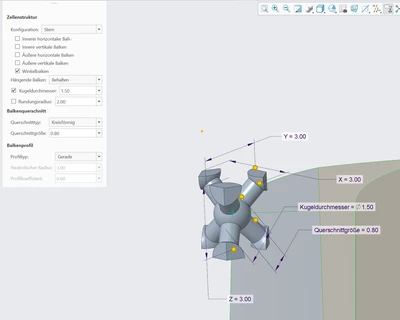
Option for hexagonal beam latticeOption for hexagonal beam lattice


Best regards,

Garbean

3 replies

Dale_Rosema
23-Emerald III
23-Emerald III
February 6, 2025
Dale_Rosema
23-Emerald III
23-Emerald III
February 6, 2025
Garbean10-MarbleAuthor
10-Marble
February 7, 2025

Thank you dale. I could not get it working with the shell method either, see my response below for further information.

tbraxton
22-Sapphire II
22-Sapphire II
February 6, 2025

This knife edge geometry is likely a problem. Try shelling out your model and then apply the lattice following the method that @Dale_Rosema posted.


tbraxton_0-1738846515251.png


Garbean10-MarbleAuthor
10-Marble
February 7, 2025

Thank you for your input. The Knife edge is crucial in this design and can not be avoided. I have, however, tried  the above mentioned method on a similar geometry that does not contain a knife edge without success. I assume this is the limits of the complex calculation required behind creating these lattices.


All the best,

Garbean

Dale_Rosema
23-Emerald III
23-Emerald III
February 7, 2025

I do not have a lot of experience with lattice structures, but could you initially stop short of the knife edge and after adding the lattices, add the knife edge back to the part? Just a suggestion.

16-Pearl
February 16, 2025

Is this checked in the cell's settings?

ProFeature_0-1739735573186.png


Garbean10-MarbleAuthor
10-Marble
February 18, 2025

A good idea, thank you for your reply. I have tried with the box checked and it ends the process without an error now. However, the result is not statisfying. Multiple lattices are missing.

I am coming to the conclusion, that this is a program limitation and the task is too complex to calculate because of the winding surfaces of the target body.

Garbean_0-1739867288397.png


10-Marble
February 24, 2025

Hi @Garbean 


@tbraxton  drew your attention to the fact that you have knife-edge geometry, and you are drawing a (wrong) conclusion about Creo's capabilities.
Notice that you're attempting to fit a 3x3x3 mm grid into a space that can only hold 1.8-2.2 mm.

YY110032788_0-1740381127221.png

Furthermore, I don't understand why the lattice is required to reach the blade's tip rather than remaining a solid that maintains the entire geometry. Even assuming this is the design intent, I'm not sure how you'd print such a part with such a thick lattice, let alone the issues that would arise from adding the ball at the cell nodes. Judging by the geometry, this appears to be an academic activity.

I recommend that you discuss this with your supervisor.