
14-Alexandrite
July 31, 2024
Solved

MULTI CONSTRAINT PATTERN

  • July 31, 2024
  • 2 replies
  • 1588 views

Hi,

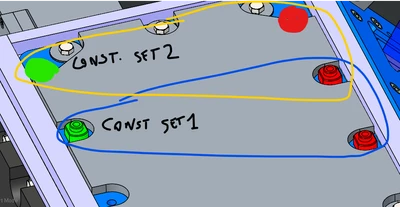
the green object has two constraint sets (1 and 2). I want that the pattern of the green object (1 green + 2 red), follow the first object (green) in his new set constraints (constraint set 2): what is the procedure to obtain this?
 

MB_10508968_0-1722421530291.png


Best regards

Best answer by tbraxton

There are probably multiple ways to deal with this. If you were to add both sets of components to the assembly and then use a conditional relation (if then else) to determine which set is suppressed would that solve the issue. This would allow you to toggle between the two by changing a relation in the assembly.


Simplified reps may meet your needs and of course you could use an assembly family table to control which set is in each instance. Without context it is hard to say what would be best.

2 replies

tbraxton
22-Sapphire II
22-Sapphire II
July 31, 2024

I am not clear on exactly what you need. Are you attempting to pattern the placement of assembly components in assembly mode? What version of Creo are you using?


The general approach to this type of pattern is to create a group that contains the elements to be driven by the pattern and then pattern the group. I am not sure this will work for your scenario as it looks like you would end up with overlapping instances of the red element.

14-Alexandrite
July 31, 2024

Hi tbraxton,

I'm using CREO parametric 9 , in assembly design mode and I want that a pattern can stay in position 1 (contraint set 1 - green) OR position 2 (constraint set 2 - red).


MB_10508968_0-1722429070523.png

MB_10508968_1-1722429163119.png


I can do this by the flexible parameters in superior assembly, but I have to change every tyme the selected constraint set on every object of the pattern.


MB_10508968_2-1722429322146.png


Is there a smarther method?


Thanks a lot


tbraxton
22-Sapphire II
tbraxton22-Sapphire IIAnswer
22-Sapphire II
July 31, 2024

There are probably multiple ways to deal with this. If you were to add both sets of components to the assembly and then use a conditional relation (if then else) to determine which set is suppressed would that solve the issue. This would allow you to toggle between the two by changing a relation in the assembly.


Simplified reps may meet your needs and of course you could use an assembly family table to control which set is in each instance. Without context it is hard to say what would be best.

14-Alexandrite
August 1, 2024

You can do this using pro program which needs additional licence but is only clean solution I know or family table I guess. You can also try this approach which is not exactly clean but it is straight forward and simple.
In assembly put in this code(change the distances by yourself)

if variant == 1
coord_x = 18
coord_y = 120
else
coord_x = 578
coord_y = 120
endif

and when constraining the main nut use parameters coord_x and coord_y.

Radovan_DT_4-1722487319024.png

Dont use hole references or point for patterns , This way you can swap it very fast

Radovan_DT_0-1722487141136.png

Radovan_DT_3-1722487234986.png