cancel
Showing results for 
Search instead for 
Did you mean: 
cancel
Showing results for 
Search instead for 
Did you mean: 

Community Tip - Your Friends List is a way to easily have access to the community members that you interact with the most! X

Translate the entire conversation x

modal analysis of composite structure

Rosta_Spicl
4-Participant

modal analysis of composite structure

Dear experts

I'm just frustrated about very primitive exercise in Creo Simulate 12. See the sketch below. In creo there is an assembly contains 2 composite parts, in real glued together. The cored composite board (composites 1) is bonded on composite frame L profile (composite 2). The target is to see how the rigidity of L profile affects the modal frequencies of board.

Only composite quilts are supported in Simulate, it means the virtually gap is observed, the layup guilts are not in touch, bonded connection is not supported in this case. I have tested a lot of procedures, rigid link, spot weld...etc., but only bonded interface is closest to real surface - surface bonding.

Another test I have made, in assembly the 3rd part - glue was created, the thickness was a gap, but there is a material interference - glue + laminate in real. 

Does anybody have an idea how to fix that? What is the correct connection feature between two composite parts, or generally between two shells?

Thx a lot, Rosta 
2 REPLIES 2

Hi @Rosta_Spicl

Thank you for your question. 

Your post appears well documented but has not yet received any response. I am replying to raise awareness. Hopefully, another community member will be able to help.
Also, feel free to add any additional information you think might be relevant. It sometimes helps to have screenshots to better understand what you are trying to do.


Best Regards,

Vivek N
Community Moderation Team

Hi, Great question!

The correct way is to make sure of bonding using review geometry.

SweetPeasHub_5-1769436686000.png


SweetPeasHub_6-1769436712272.png

HOW?

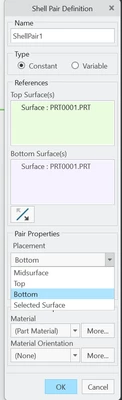
1. Use thin solids made shells with shell pairs. Do not assign the shell property to just a mid-surface quilt.

2. Make sure default interface is bonded, or define the desired interfaces-bonded.

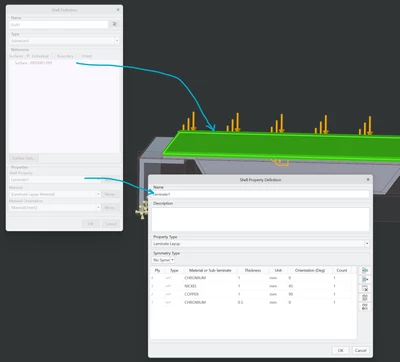
3. Apply the laminate shell property to one side face(s) of the thin solid. The property will be transferred to the midplane. Note: Loads and constraints on shell pairs are also transferred to the midplane.

4. AutoGem will show the bonding elements.

5. If you want to see the bonding elements in the results, turn them on.


SweetPeasHub_7-1769436904364.png

Note: the "core" was modelled as a thick solid part, with a wrap of laminate.


SweetPeasHub_2-1769435927565.png

SweetPeasHub_8-1769436999236.png

Also please refer to the last note in this help page and further pages on bonding elements linked from there.

It is all about a subtle wording difference between "shell", and "shell pair".


-Please mark this as a solution if this is the correct and best answer. Thanks!


Announcements

Top Tags