
Community Tip - You can Bookmark boards, posts or articles that you'd like to access again easily! X
Hi all!
I need to (as an author) set orientation of page manually depending on element.
It is required so that I can have large images/tables on Landscape pages,
I have created two page sets. One for Portrait and other for Landscape.
I am currently using outputclass=landscape or Portrait to start new pages on elements like concept and Task.

Now this works but in order to add these conditions to these elements, I have converted the elements from Unstyled (default) to Division 2-4. This causes an issue in my header which is supposed to display only header level 1 or division 2 using Division Reference.
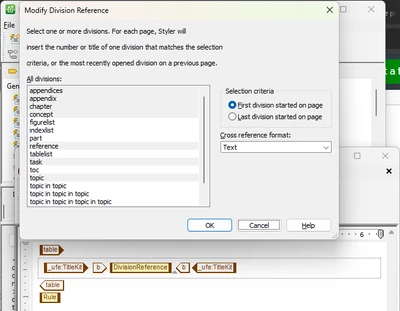
However, it displays the first task/concept element irrespective of the division level. Note that this issue only occurs for the unstyled elements that are now Division style.
Either Concept/Task is not being converted/recognized correctly,
or I converted them incorrectly or the system is broken.
Any suggestions?
How do you achieve this?
Solved! Go to Solution.
In DITA, unstyled elements inherit the style of the element they are specialized from, i.e. unstyled <concept> gets styled by the style for <topic>.
In this case, you should be able to apply your styling to <topic> and have it format the things that inherit from topic (task, reference, concept). Try reverting the styles you've applied to <concept> and <task> back to unstyled, and add your pageset conditions to <topic> and see if that gives better results.
In DITA, unstyled elements inherit the style of the element they are specialized from, i.e. unstyled <concept> gets styled by the style for <topic>.
In this case, you should be able to apply your styling to <topic> and have it format the things that inherit from topic (task, reference, concept). Try reverting the styles you've applied to <concept> and <task> back to unstyled, and add your pageset conditions to <topic> and see if that gives better results.
Amazing!
It was working like you said, However I couldn't understand why.
Your clarification helps a lot 🙂
Big Thanks!
Quick Question.
How do I find such information about other elements?
Like,
I have had to add style to Step element to change the Numbering format.
Should I have kept it as is and changed some other element?
Thank you 🙂
I'm glad that worked for you. In general with DITA, if an element is styled explicitly, you should make your modifications there. If it is unstyled, then that element is a specialization of a more general base element, and you'll have to make a choice:
To find out which base element something is specialized from, find the element in Styler and look at what it shows under "Style"--it should tell you not only that it's unstyled, but the tooltip will tell you what it's specialized from:
In this case, <step> is specialized from <li>, so that's where you would want to make your changes.
