Community Tip - You can change your system assigned username to something more personal in your community settings. X
Hello,
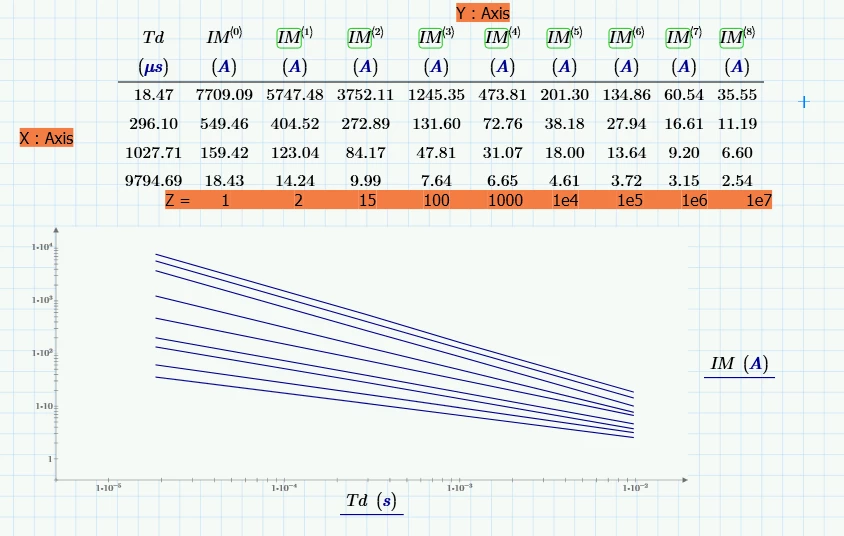
I'm trying to generate a 3D curve from a table or matrix of (X, Y) values along with a vector Z, which contains one value for each (X, Y) pair with Mathcad 11.0.
I tried using createmesh, but without success.
Do you have any suggestions on how to achieve this?
Thank you for your help.
Update : Added Excel file to import the matrix.
Update : Link to the mathcad file
Emilien
Solved! Go to Solution.
Prime's 3D plot only allows units for the z-axis, x- and y-axis values must be dimensionless.
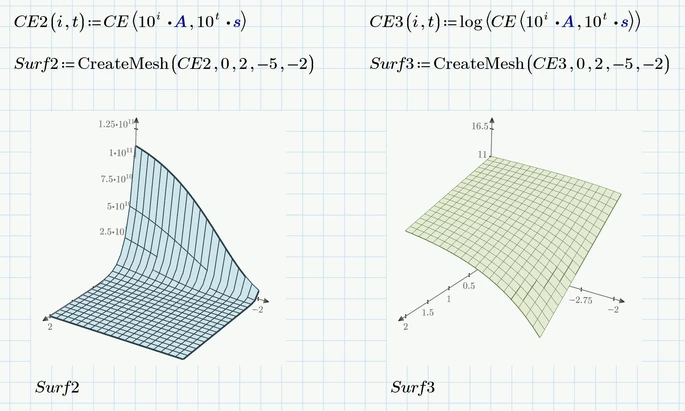
Here are two attempts to plot your function CE. Both use log scale for the x- and y-axis. As Luc already wrote Prime does not support log scales in 3D plots, so the functions have to take care of this. The right plot also uses log scale for the z-axis as well.
In both cases current i is running from 1 A to 100 A (i = 0..2) and time from 10 µs to 10 000 µs (t=-5..-2)
I don't think that Prime can plot reliably and meaningful a single 2D matrix (its also missing the corresponding x- and y-values).
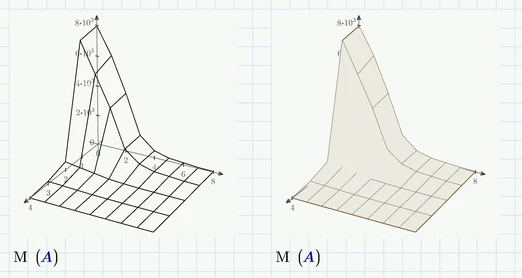
Here is what I get when I plot the matrix M at the end of your sheet. Values at x- and y-axis are simply the index numbers.
Bonjour Emilien,
It's always wise to state what version of Prime you are using: in your case it's 11.
The Matrix is NOT available at the end of the worksheet, because you did not supply the Excel sheet with the component data.
To use CreateMesh, you need a function describing the surface. You don't have a function.
But you do have a matrix from the table data, it's called IM. And you should be able to plot that in a 3D plot.
I don't think that the 3D plots in Prime can have logarithimc axes, you should take the log of those axis data.
Success!
Luc
Hi Luc,
Thank you for your answer!
I’ve updated both files.
I also have a function CE(IM, T), but I’m not able to plot this graph in 3D, maybe due to units ?
Thank you, Emilien
Prime's 3D plot only allows units for the z-axis, x- and y-axis values must be dimensionless.
Here are two attempts to plot your function CE. Both use log scale for the x- and y-axis. As Luc already wrote Prime does not support log scales in 3D plots, so the functions have to take care of this. The right plot also uses log scale for the z-axis as well.
In both cases current i is running from 1 A to 100 A (i = 0..2) and time from 10 µs to 10 000 µs (t=-5..-2)
I don't think that Prime can plot reliably and meaningful a single 2D matrix (its also missing the corresponding x- and y-values).
Here is what I get when I plot the matrix M at the end of your sheet. Values at x- and y-axis are simply the index numbers.
Hi Warner,
Thank you for the solution !
It's not so easy to trace the curve with all the constrants I have in my file.
Have a nice day, Emilien.
It's not so easy to trace the curve with all the constrants I have in my file.
Not sure what you mean with this.
Here is an attempt of a 3D plot just using the data from the table on the first page of your sheet (along with the z-values given) using linear interpolation.
All three axes show log scale.
Also shown in the plot are the lines for z=106 (red) and z=8 (green)
Hello Werner,
Thank you very much for your example.
I will learn a lot of useful tips from it.
Regarding my comment: "It's not so easy to trace the curve with all the constraints I have in my file."
What I meant is that I'm not a mathematician, so there isn’t a direct function to do the job without going through several intermediate functions.
Emilien