
1-Visitor
October 19, 2020
Solved

How to insert data files in Mathcad 15 using a script

  • October 19, 2020
  • 2 replies
  • 2913 views

Hi all,

I am trying to read several .dat files from a certain folder by specifying the path in Mathcad 15.

I wonder if there is any script function to do that instead of inserting all the files one by one?
 

Best answer by LucMeekes

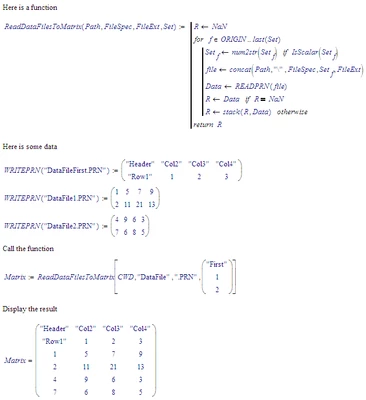
Something like this:

LucMeekes_0-1603127060250.png

Success!
Luc

2 replies

16-Pearl
October 19, 2020

If your files are sequential in their name - "data_1.dat", "data_2.dat", etc., you can write a program loop that will read the data from each file and place them all in a matrix. This approach worked very well for me.


Hope this helps!

mzarrabi1-VisitorAuthor
1-Visitor
October 19, 2020

Hi @ChrisKaswer. Thank you for your reply. Do you have a template to share?

LucMeekes23-Emerald IVAnswer
23-Emerald IV
October 19, 2020

Something like this:

LucMeekes_0-1603127060250.png

Success!
Luc

16-Pearl
October 19, 2020

Yes - what Luc has shared is very similar to what I have implemented. You can get a bit more complicated by monitoring the size of any data file and reading files that have different row and column counts. Units can be read-in as well with some other tricks (of course the data needs to be set-up to accommodate this), but Luc has captured the fundamental approach well.


Good luck!