Hello Everyone.
From :
To :
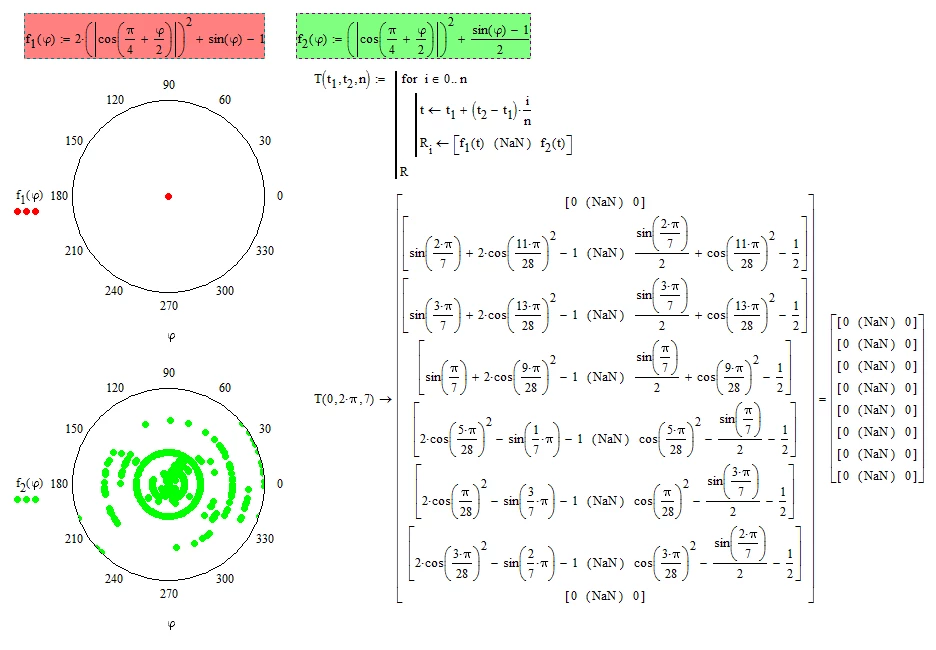
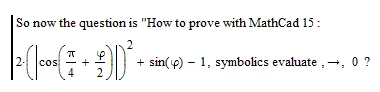
How to prove f.1(phi) symbolic evaluate ----> 0 ?
------------------------------------------------------------
Thanks in advance.
Regards.

Solved! Go to Solution.
1) Before you symbolically evaluate you have to write phi:=phi to make phi unknown to the symbolics. Otherwise it tries to use the defined range variable phi (and therefore the result is too large ...).
2) The graph is not that unusual if you look at the scale of the y-axis. What you see are just minor numerical round-off errors in the range of +-10-15. This is to be expected with numerical evaluation - after all that's the usual precision of values in IEEE format which is used by Mathcad and most other numerical number cruncher.
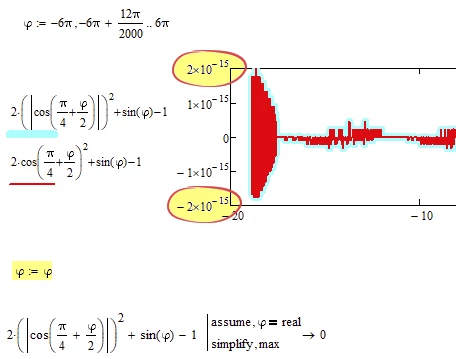
Here is what you see when you manually scale the y-axis from, let's say -0.1 to +0.1
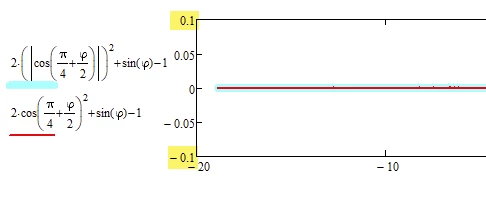
As you are squaring anyway you can do without the absolute value operator
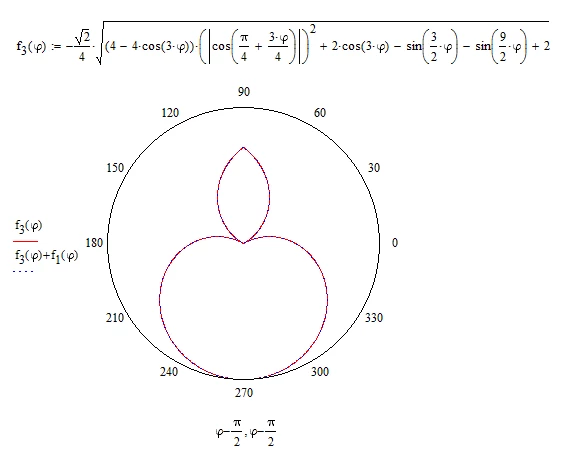
Thanks, Werner. How about f.2(phi) ? Too many (green) points, See the graph above. And we should compare the above with the following :
Since :
Regards.
Not sure what you mean and I am too lazy to retype 😉
Why you think that you should get zero for any angle phi?
And why do you need Mathcad to confirm?
And what about f4 and f5? They obviously are not equal.
They are equal only when the sine is positive which is the case for -pi/0 <= phi <= pi/3 and you may add or subtract integer multiples of 8 pi /9 to the limits.
@Werner_E wrote:
Not sure what you mean and I am too lazy to retype 😉
You have known that we could not upload .xmcd presently ...
Werner, Do you ever think :
?
So, on my side, I don't think :
!
Best Regards.
You CAN upload files if you put them into an archive (ZIP, 7Z, RAR, ARJ, ...)
And, yes, both expressions are equivalent!
|x|2 = x2
Examples:
|0|2 = 02 = 0
|-3|2 = (-3)2 = 9
|+3|2 = 32 = 9
...
Or can you spot any differences here:
MC15 file attached in zip archive 🙂
@Werner_E wrote:
You CAN upload files if you put them into an archive (ZIP, 7Z, RAR, ARJ, ...)
I'm appreciated with help, Werner. 😊 😊 😊
( I don't the reason that I could not "save as" or "save" when my MC15 running for ever... )
|x|2 = x2 is valid only in case x is a real number.
Mathcad can confirm this
but is overwhelmed by slightly more complex expressions
As you already have noticed on numerous occasions, the symbolics in Mathcad is not the strongest on the market.
But at least its capable enough for this simplification:
EDIT: Although Mathcad does not want to confirm the equality, it is able to confirm that the difference is zero.
(Adding modifier "max" is mandatory!)
And the GRAPH above is unusual...
The above is NOT OK.
But the the following is OK... I don't know what the reason is...
But :
However, in the polar coordinate that it was not accepted only unique point... see the GRAPH for f.2 above (green).
Regards
1) Before you symbolically evaluate you have to write phi:=phi to make phi unknown to the symbolics. Otherwise it tries to use the defined range variable phi (and therefore the result is too large ...).
2) The graph is not that unusual if you look at the scale of the y-axis. What you see are just minor numerical round-off errors in the range of +-10-15. This is to be expected with numerical evaluation - after all that's the usual precision of values in IEEE format which is used by Mathcad and most other numerical number cruncher.
Here is what you see when you manually scale the y-axis from, let's say -0.1 to +0.1
@Werner_E wrote:
1) Before you symbolically evaluate you have to write phi:=phi to make phi unknown to the symbolics. Otherwise it tries to use the defined range variable phi (and therefore the result is too large ...).
I'm appeciated for your explanation, Werner. 🙂 🙄 🤔 . . . I got it.
Best Regards.
f2 is again a scaling matter.
While it may look that the radii run from 0 to 0 (whatever that should mean)
they actually span a very very tiny range (within the to be expected precision of numeric calculations)
If you set these limits manually, you see what you had expected - a plot that looks like a single point.
f1 and f2 both show similar tiny round-off errors. I am not sure why Mathcad's auto-scaling in the plots used different limits for the radii in the plots of f1 and f2.