3-Newcomer
May 2, 2024
Solved

MathCAD Prime 10 - TextBox Advanced Controls - Output Type

  • May 2, 2024
  • 3 replies
  • 4014 views

Hi all,

The advanced controls are a dream come true for me, but has probably opened up a rabbit hole of documentation.


I added a textbox with the intent that users could enter dimensional strings in a user-friendly format like:

10'-2 3/8"

and the output would be an inches value of

122.375


I'm having two issues, first being the output is a string "122.375" and not a numerical value, and ideally the value would actually be defined with MathCAD's units: 122.375*in

Any assistance on how to get this working would be appreciated

function TextBoxEvent_Start(Inputs, Outputs) {
 // TODO: Add your code here
};

function TextBoxEvent_Exec(Inputs, Outputs) {
 var input = TextBox.Text(); // Get the input value from the first input
 var inches = parseDimension(input); // Convert the dimensional string to inches
 Outputs[0].Value = inches.toFixed(3); // Output the value in decimal inches to 3 figures
};

function parseDimension(dim) {
 var parts = dim.split("-"); // Split the string by feet and inches parts
 var feet = parseFloat(parts[0]);
 var inches = 0;

 if (parts.length > 1) {
 var inchesParts = parts[1].split(" ");
 if (inchesParts.length > 1) {
 inches += parseFloat(inchesParts[0]); // Convert feet to inches
 var fraction = parseFraction(inchesParts[1]); // Convert fraction to inches
 inches += fraction;
 } else {
 inches += parseFloat(inchesParts[0]);
 }
 }

 return feet * 12 + inches;
}

function parseFraction(fractionStr) {
 var parts = fractionStr.split("/");
 if (parts.length === 2) {
 return parseFloat(parts[0]) / parseFloat(parts[1]);
 } else {
 return 0;
 }
}

function TextBoxEvent_Stop(Inputs, Outputs) {
 // TODO: Add your code here
};

.

 

Best answer by Werner_E

Documentation is certainly a major problem concerning the new controls. 


In JScript a bold method to convert the text to a number is to simply multiply it by 1:


Outputs[0].Value = 1*inches.toFixed(3); // Output the value in decimal inches to 3 figures 


But probably using parseFloat is the better way to go


Outputs[0].Value = parseFloat(inches.toFixed(3)); // Output the value in decimal inches to 3 figures


Unfortunately, I don't know whether and how it is possible to add units in the script.

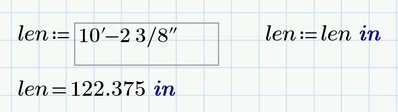
I simply did it using an extra region (which could be hidden in a collapsed area)

Werner_E_0-1714665620745.png

My guess is that the new controls can't handle units at all - but I sure would like to be convinced of the opposite 😉

3 replies

Werner_E25-Diamond IAnswer
25-Diamond I
May 2, 2024

Documentation is certainly a major problem concerning the new controls. 


In JScript a bold method to convert the text to a number is to simply multiply it by 1:


Outputs[0].Value = 1*inches.toFixed(3); // Output the value in decimal inches to 3 figures 


But probably using parseFloat is the better way to go


Outputs[0].Value = parseFloat(inches.toFixed(3)); // Output the value in decimal inches to 3 figures


Unfortunately, I don't know whether and how it is possible to add units in the script.

I simply did it using an extra region (which could be hidden in a collapsed area)

Werner_E_0-1714665620745.png

My guess is that the new controls can't handle units at all - but I sure would like to be convinced of the opposite 😉

23-Emerald IV
May 2, 2024

Can you multiply the control with the unit? That would obviate the extra assignment to len.


Success!
Luc

3-Newcomer
May 2, 2024

@LucMeekes wrote:

Can you multiply the control with the unit? That would obviate the extra assignment to len.


Success!
Luc


Doesn't seem like it wants to let you enter anything before or after. the box. Given MathCAD also abandon's units with integration with excel, that's not surprising. @Werner_E's suggestion to just redefine the variable off-page seems like the best work-around.

3-Newcomer
May 2, 2024

I ended up using @Werner_E 's parseFloat method, along with the redefinition of the variable to add units.

I'll add the updated code below in case anyone finds this tread and wants to utilize the script. Also updated some of the code comments. Admittedly I used AI to point me in the right direction, because I know zero JScript (more of a VBA guy), and I had to do a little tweaking of the AI's output, because it made some really silly errors (it was multiplying the whole inches by 12 for some reason, also was trying to call the textbox's text value incorrectly).

Note to others leveraging AI to help with scripting these advanced controls, ChatGPT3.5 is currently better than Gemini. I had to repeatedly remind Gemini I was using JScript, and not JavaScript, and the more time I spent debugging the code with it, the worse the code got.


function TextBoxEvent_Start(Inputs, Outputs) {
 // TODO: Add your code here
};

// Text Box Control - Human Readable dimensional length to numerical inches with 3 significant figures
function TextBoxEvent_Exec(Inputs, Outputs) {
 var input = TextBox.Text(); // Get the input value from the first input
 var inches = parseDimension(input); // Convert the dimensional string to inches
 Outputs[0].Value = parseFloat(inches.toFixed(3)); // Output the value in decimal inches to 3 figures
};

function parseDimension(dim) {
 var parts = dim.split("-"); // Split the string by feet and inches parts
 var feet = parseFloat(parts[0]);
 var inches = 0;

 if (parts.length > 1) {
 var inchesParts = parts[1].split(" ");
 if (inchesParts.length > 1) {
 inches += parseFloat(inchesParts[0]); // Append whole inches to var inches
 var fraction = parseFraction(inchesParts[1]); // Convert fraction to inches
 inches += fraction; // Appen fractional inches to var inches
 } else {
 inches += parseFloat(inchesParts[0]); // Append whole inches to var inches
 }
 }

 return feet * 12 + inches; // Convert feet to inches and add resulting value of var inches
}

function parseFraction(fractionStr) {
 var parts = fractionStr.split("/");
 if (parts.length === 2) {
 return parseFloat(parts[0]) / parseFloat(parts[1]);
 } else {
 return 0;
 }
}

function TextBoxEvent_Stop(Inputs, Outputs) {
 // TODO: Add your code here
};


3-Newcomer
May 10, 2024

In regards to rounding a number in JScript to 2 decimal places:

As @Werner_E suggested, you could use parseFloat(inches.toFixed(2)) or inches.toFixed(2)*1 to convert it to a number, or you could also use...

  inches.toFixed(2)+0

  +inches.toFixed(2)

  Number(inches.toFixed(2))

  parseInt(inches.toFixed(2)*100)/100

  Math.round(inches*100)/100

  ** capitalization of "Number" and "Math" are intentional


In regards to Feet-Inch inputs:

If I want to input a dimension as feet-inches in MCP9, I just type a string and give it the units FIF. Strangely enough this appears to only work if the FIF unit is used on the left side of the = sign, not the right side of the = sign (??)

FIF.jpg


In regards to adding units to the JScript output:

Can you not just type units right after the text box? (I don't have access to MCP10 yet - waiting on IT - otherwise I would check myself)

23-Emerald IV
May 10, 2024

"Can you not just type "*in" right after the text box?"

No, you cannot. Prime will not accept it. See my remark above: https://community.ptc.com/t5/Mathcad/MathCAD-Prime-10-TextBox-Advanced-Controls-Output-Type/m-p/947538#M211603


Success!
Luc

3-Newcomer
May 10, 2024

Ah, I missed that, thanks @LucMeekes!  Unfortunate, it seems like that would be very intuitive considering you can tack the units onto Excel component outputs as well as user defined function results.