
Community Tip - Did you get an answer that solved your problem? Please mark it as an Accepted Solution so others with the same problem can find the answer easily. X
Hello Mathcad community,
I ran into an error while using the root() function on a linfit() polynomial in Prime 10.0.1.0.
I approximated a function by using the linfit() function on two vectors for the x- and y-coordinates respectively. The resulting coefficient vector for a cubic polynomial approximation is shown below.
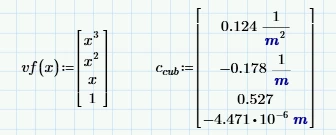
The approximating function can now be written as below (as a dot-product):

I need to find the z-coordinate for a given value of s(z), so I want to use the root() function to do this. When entering the function as specified above, the root() function gives me the error "these matrices must have compatible units".

However, when I use the individual polynomial coefficients from c_cub to specify the s(z) function directly by expanding the dot-product, everything works fine.

Any idea why this behaves differently? What am I missing?
Thanks for any insights on this.
Joost

Solved! Go to Solution.
In my opinion it should work exactly the way you had written it.
So it seems to me that you found a bug which may be worth reporting to official PTC support.
As a workaround you could use the root function by providing a guess value (which interestingly works OK)
Or you could evaluate the function definition symbolically which basically results in what you did by using the individual coefficients manually.
You have to turn on "Units/Constants in symbolics" in the calculation options first as otherwise some of the "m" will not be labelled as being units.
In my opinion it should work exactly the way you had written it.
So it seems to me that you found a bug which may be worth reporting to official PTC support.
As a workaround you could use the root function by providing a guess value (which interestingly works OK)
Or you could evaluate the function definition symbolically which basically results in what you did by using the individual coefficients manually.
You have to turn on "Units/Constants in symbolics" in the calculation options first as otherwise some of the "m" will not be labelled as being units.
Thanks for the response.
I had also noticed in other parts of the worksheet that the dot-product version of the function behaves differently than the expanded version. I have to sometimes vectorize the dot-product version when using it in chart components.
I like your suggestion to use the guess value. It keeps the formulas short; I think I will incorporate that as a work-around.
Funny enough, I only found out recently while digging through the documentation that you could use the dot-product. I was using the expanded notation up to now, but they get long sometimes when using descriptive variable names. So I came across the error very recently.
Anyway, thanks for your help!
I will reach out to PTC support for a bug report.
Cheers,
JL
Here is an even more compact definition of your function without the need of defining the vector function vf(x).
And as luck would have it, the bug you found does not occur with this definition (don't ask me why) 😉
The degree of the function is determined by the number of elements in the coefficient vector.
If the entries are entered there in reverse order, the function could be formulated a little shorter (simply z^k instead of z^(last(c)-k) )
BTW, instead of using the dot product you could again use a sum and that way you also can avoid the bug
I use the vector function to seed Linfit(), so I have it anyway, but this is quite elegant! And it will keep the expressions short, so they stay printable in a report. Nice!
Not sure if there is a performance hit doing this. The polynomials get used in a complex set of functions that feed an AdamsBDF solver for a system of ODEs. I might play around with that a bit to see the effect.
I tried the dot-product notation with a quadratic polynomial, but same error. So the degree of the polynomial has no effect. At least the bug shows consistency there. I submitted a bug report. See where that goes.
Thanks for puzzling out this short form!
