

cancel
Showing results for 
Search instead for 
Did you mean: 
cancel
Showing results for 
Search instead for 
Did you mean: 

Community Tip - Did you get called away in the middle of writing a post? Don't worry you can find your unfinished post later in the Drafts section of your profile page. X

Translate the entire conversation x

Mathcad Virtual Conference 2022 worksheet files

DJNewman
18-Opal

Mathcad Virtual Conference 2022 worksheet files

We just finished the Mathcad Virtual Conference 2022! Hooray!

It was very nice seeing some of the PTC Community regulars in the Q&A.


I promised many people in the Q&A that the Design of Experiments in Mathcad Prime (Anji Seberino's presentation) and Developer's Perspective on Prime 8's Engine Updates (Anna Novikova's presentation) worksheets will be available on the PTC Community. (As well as the conference replay page and via PTC rep follow-up.)

This post has those worksheets attached.


Also, please let me know what you thought of the conference! It was a massive effort to put together.


The replays-on-demand for the conference should be up at the conference page on Mathcad.com (see link in first sentence) starting by Sept 15 if you missed it.

The raffle worksheet will be available a bit later in a Mathcad.com blog article. I'm going to start reaching out to the 25 raffle T-shirt winners next week, since I'm going on a vacation for the rest of this week.
I know this was only up for 15 seconds so you might've missed it:
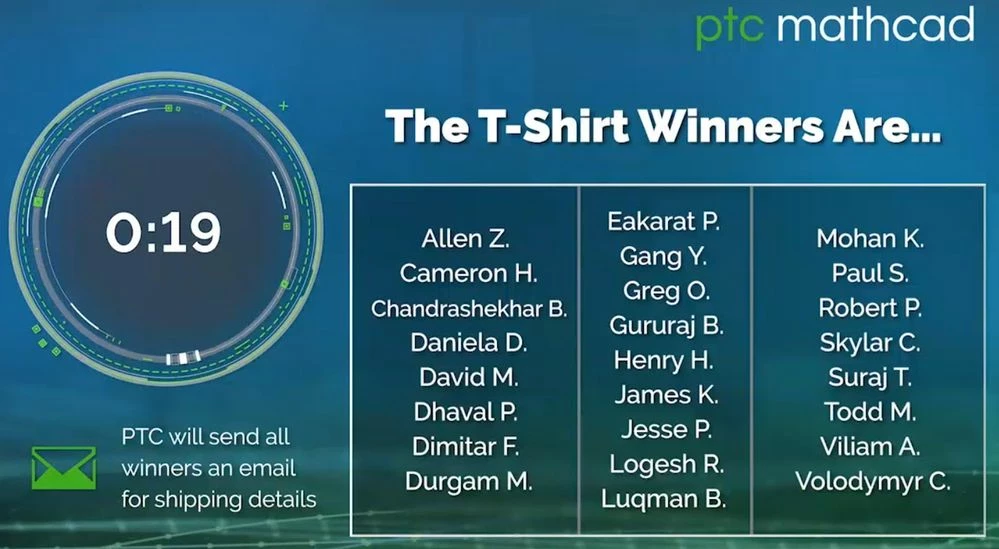
mathcad-virtual-conference-2022-t-shirt-winners-billboard.jpg

I manage the Creo and PTC Mathcad YouTube channels for PTC, as well as all PTC Mathcad marketing in general.
3 REPLIES 3

Thanks for sharing. I found a lot of interesting information here.

You're welcome, and welcome to PTC Community.

I manage the Creo and PTC Mathcad YouTube channels for PTC, as well as all PTC Mathcad marketing in general.

How to Make a Raffle Program in Mathcad


One of the most exciting parts of the Mathcad Virtual Conference 2022  was our live raffle for our brand-new, 100% cotton PTC Mathcad T-shirts—the first new Mathcad merchandise in a very long time. When registration opened in August, the form asked if registrants wanted to participate in the raffle. We met our cap of 500 valid entries (aka no PTC employees, Mathcad resellers, or duplicate entries) in five days!

T-shirt Raffle Requirements

Our biggest requirement, crucial to any successful raffle, was that the drawing had to be as random as possible. We wanted to ensure that the process would be transparent and credible for the audience.

We had a predefined number of entrants (500) and a predefined number of winners (25). After removing invalid entries, we exported the list of the 500 entrants into an Excel file from our marketing database software. Each entrant was given a unique ID.

As well as accommodating the data import from Excel and spitting out 25 winning IDs, we also had to prevent anyone from winning more than once. Since we would be doing the raffle drawing live, we absolutely had to ensure the raffle drawing was fool proof. An error or a duplicate name/ID could have undermined the entire event we had worked so hard on.

Given the high expectations from entrants and ourselves, we knew we had to develop the raffle program in PTC Mathcad Prime. Read on to learn how we made it and how it worked so you can understand the program and modify it for your own purposes. Check out the raffle drawing itself here:


The Mathcad Prime Raffle Program

See the attachment on this post to download the Mathcad worksheet used for the raffle,, with a sample Excel data file (sample.xlsx) included in the .zip. (This takes the place of the original registrants.xlsx file from the live raffle.) You will need Mathcad Prime 8 or later to open the file, though you can also replicate it in earlier versions of Mathcad Prime. Please unzip the file and save both the worksheet and sample.xlsx in the same directory.

Raffle Input Variables

At the very beginning of the worksheet, we set a variable for the desired number of winners (25). This is an arbitrary input that you can change for any raffle you’re doing. We have an existing Excel data file (registrants.xlsx or sample.xlsx) that we imported into Mathcad Prime as a matrix with READEXCEL(), with the 500 raffle numbers set to a registrants variable, and we use the rows() function to confirm this list has exactly 500 entrants. (PTC sent out an email to the 500 eligible entrants before the conference with a “CPTCP0000########” format. We omitted the “CPTCP0000” prefix at the .xlsx file level that was common to every raffle number for the purposes of clarity.)

 
DJNewman_0-1763570667629.png

The Program Structure

We defined our program, rT_shirts(), to take two arguments: the number of winners (n), as well as a list (our eligible entrants matrix, which will be our registrants variable).

The star built-in function in the program is the rnd() function, which pulls a quasi-randomly generated number. Random numbers in software like PTC Mathcad Prime are based off uniformly distributed sequences of numbers, where if you run them enough times, you’ll repeat seed values and can predict outcomes. If you always reset to the same Seed() value, the rnd() function will repeat the same result no matter how many times you recalculate. That’s why the program begins by setting a Seed() to a number based on an always-changing time() value, which is based around your computer system time at the current time and the date. This is how we make the ensuing random numbers truly unpredictable. Even if you run the program at the same time of day on two different days, the fact that the date is also accounted for means there is no way we can know which random number seed will be used ahead of running the program.

With that randomness in mind, the program generates a two-column matrix. The first column has the raffle number IDs, and the second column (thanks to the “for loop”) has a random number between zero and one.

Then, the program executes the csort() function to sort the two-column matrix in ascending order by the second column of random numbers. Then it takes a submatrix (“w”) of that now-sorted matrix of the first “n” number of rows (only the winners) and only the first column with the winning ID numbers. This is how we avoid generating duplicate winners. Rather than pulling winners one at a time, we pulled them simultaneously by picking the “n” number of winners associated with the lowest randomly generated numbers. Every raffle ID has an equal chance of having its associated random number be a low enough number to be selected in the winning “n” number of rows.

Having created the submatrix of winning IDs, the program lastly focuses on the aesthetics of the output by having a “square”-shaped matrix as opposed to a one-column, 25-row output. Our program calculates the floor of the square root of the number of winners, and then uses that to create a matrix with that number of columns of the same information as the submatrix “w.” This means the winning numbers are now distributed horizontally as well as vertically within a 5x5 matrix to make it easier to read, since we intended for the raffle entrants to look at the matrix during the conference session for their winning number.

So, in summary: The PTC Mathcad Prime program explained here takes an imported data list of any arbitrary row length and randomly selects an arbitrary number of “winning” rows using Mathcad’s random number generator and list/matrix manipulation functions, and then outputs that selection in an aesthetically pleasing matrix.

Still want a PTC Mathcad T-shirt?

We still have some in various sizes in our merch closet at the Boston office, so ask nicely, maybe?


This is a repost of the how-the-raffle-worked blog article that was published on mathcad.com. You can see what that originally looked like here.

I manage the Creo and PTC Mathcad YouTube channels for PTC, as well as all PTC Mathcad marketing in general.
Announcements

Top Tags