Community Tip - Did you get an answer that solved your problem? Please mark it as an Accepted Solution so others with the same problem can find the answer easily. X
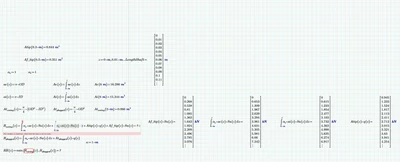
Hello, I'm still new to mathcad and I'm trying to understand why this error occurs. Because my z is defined but don't seems to work in my integer. Could somebody explain it to me ?
Please upload the worksheet? Drag and drop or use the browse button below the input area.
Cheers
Terry
1) The error you experience stems from the fact that you are defining a function f.coring and try to numerically evaluate it in the same region (the "=" at the end).
You cannot numerically evaluate the definition of a function. The same goes for your definition of function RR.
Here a simple example:
2) You defined z as being a range. The inline evaluation in the definition (the "=" at the end which displays the range) has no effect. In versions of Prime prior to 10 doing an inline evaluation turned the range into a vector of values. This is not the case in Prime 10 and above.
So R.coring(z)=... or even RR(z)=... may show numeric results, what you see is actually an invalid data type - its not a range and not a vector either. You cannot assign these 'results' to a variable like Rmin:=RR(z) and you cannot access individual values (because you have not created a vector).
Solution is to create z as a vector or turn the range z into a vector and then call your functions vectorized. That way the results are vectors, too, and can be handled as such.
Here is a simple function which turns a range into a vector
Use it like z:=range2vec(z).
Its only starting with Prime 11 that Prime offers a function "vec" which does this job and also can be used to create a vector right away without having to create a range.
And, yes, for future question please always attach your worksheet, not just a picture.
Hi @NK_13742597,
I wanted to see if you got the help you needed.
If so, please mark the appropriate reply as the Accepted Solution or please feel free to detail in a reply what has helped you and mark it as the Accepted Solution. It will help other members who may have the same question.
Please note that industry experts also review the replies and may eventually accept one of them as solution on your behalf.
Of course, if you have more to share on your issue, please pursue the conversation.
Thanks,
