cancel
Showing results for 
Search instead for 
Did you mean: 
cancel
Showing results for 
Search instead for 
Did you mean: 

Community Tip - Your Friends List is a way to easily have access to the community members that you interact with the most! X

Translate the entire conversation x

solving system of non linear equations

Lenin
10-Marble

solving system of non linear equations

Dear PTC Community,

I am working on a system of coupled nonlinear equations and attempting to solve it using a Mathcad Prime 7.0.0.0 Solve Block. The solve block runs without errors and returns numerical values for my unknowns. However, when I validate the solution outside the solve block, I find that one of the variables ( J), which appears in two different model equations, gives two different values when recalculated. I expected these equations to converge to a consistent solution for J, but they do not.

In other words, even though the solve block returns values for three different variables (J, E, ε), the two J expressions do not evaluate to the same value of J when I recompute them using the solved ( E and ε).

I have attached my Mathcad file.
Could someone please review it and help me understand why the solve block returns a result but the two governing equations do not match when checked afterwards?

I would be very grateful for your insight.


Kind regards,
Tadele
ACCEPTED SOLUTION

Accepted Solutions

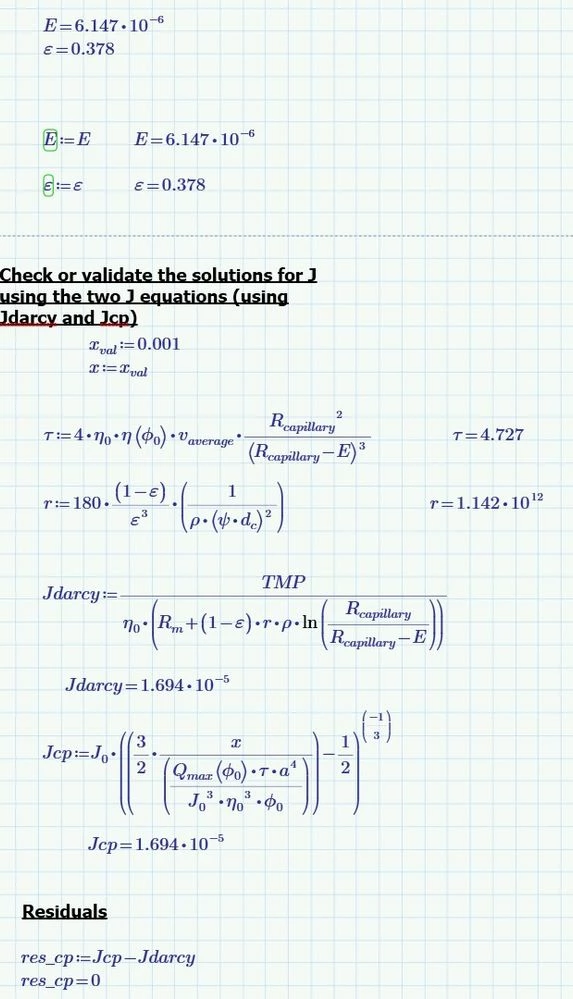
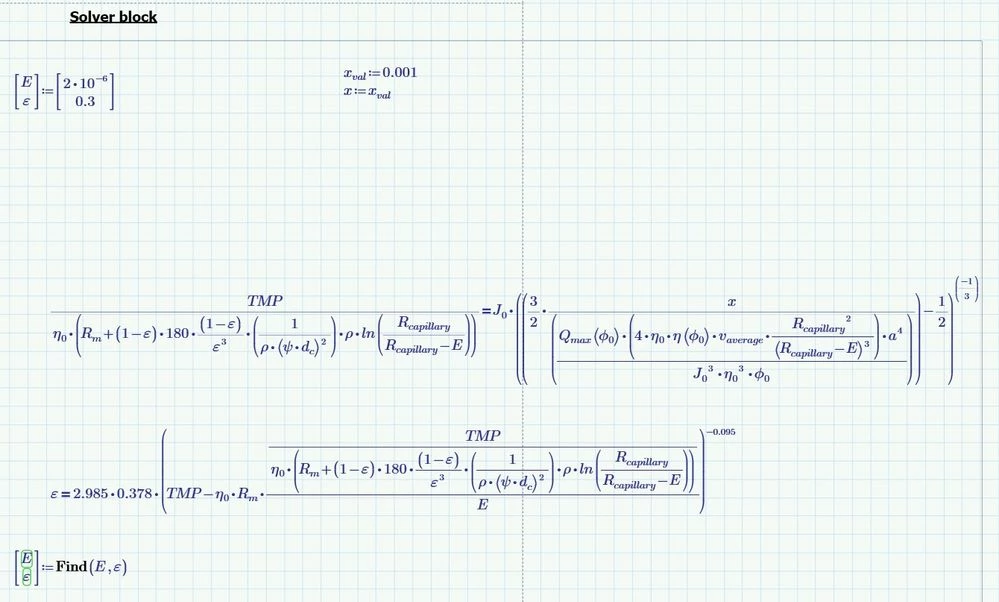
I do not have version 7 to hand at the moment so solved it in version 11 and will use screenshots.

Amend the solve block so it has only two variables E and ε.

Equate the two equations for J and substitute equations for Tau and r into the two equations that are left.

Capture.JPG

Then the correct J's can be calculated.

Capture2.JPG

Cheers

Terry

View solution in original post

5 REPLIES 5

I do not have version 7 to hand at the moment so solved it in version 11 and will use screenshots.

Amend the solve block so it has only two variables E and ε.

Equate the two equations for J and substitute equations for Tau and r into the two equations that are left.

Capture.JPG

Then the correct J's can be calculated.

Capture2.JPG

Cheers

Terry

Thank you very much, Terry! It helps a lot. As I begin to expand this model, I hope you can help if I have any additional questions.

Kind regards,

Lenin

Werner_E
25-Diamond I
(To:Lenin)

The reason you get wrong results is because of your definition of variables tau and r. These calculations just use the guess values you provided for E and epsilon and do never change!

I would suggest to turn tau and r into functions (in front of the solve block) and use them in your equations. As I don't have Prime 7 installed I can only provide screenshots, but I attach the Prime 11 file in case some kind soul is able and willing to convert it to P7 format.

Werner_E_0-1764671854191.png


You may also consider turning Jcp and Jdarcy into function and  use them in your solve block:

Werner_E_1-1764672228658.png


You may use functions until your task does depend on one variable only, I had chosen variable E. So you just have to search for the value of E and can use this value to calculate J (and if necessary also epsilon). For equations in just one variable you could also use the "root" command.

You have to decide if this approach makes the calculations less clear or not.

Werner_E_2-1764673272524.png


Lenin
10-Marble
(To:Werner_E)

This amazing, Werner. As it gives more flxibility in usage. I still have to expand this model and I can rely on your reply. I hope you might want to help if I have further question related to this calculation.


Kind regards,

Lenin

Werner_E
25-Diamond I
(To:Lenin)

You are welcome!

Feel free to open a new thread and ask your questions if you encounter problems with the usage of Mathcad when you expand your model.

Announcements

Top Tags