
21-Topaz II
June 28, 2021
Solved

two straight lines projection on a sphere

  • June 28, 2021
  • 2 replies
  • 2643 views

Hello to all the community experts,
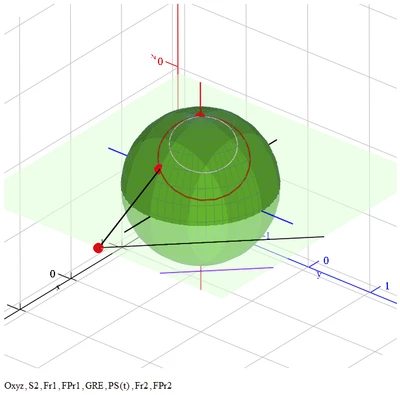
I would like to carry out the stereographic projection on the sphere of the two parallel straight lines, fr1 and fr2, both lying on the plane z = 0. So I should see the segment P0P1 connecting the pole with a point on the straight line fr1 and the segment P0P2 connecting the pole with the straight line fr2 whose projections on the sphere are two circles passing through the pole. I've been trying for a few hours but without success. Anyone here, is able to do this?
Thank you in advance.
Attached is the file for one projection.
Best answer by Werner_E

Simply do with the second line the same as with the first one and add it and its projection to the plot:

Werner_E_1-1624942247677.png


P.S.: Maybe you are not aware of an old bug in the 3D plot of Mathcad. If you add a scatter plot, you may get an error (usually). Simply change the type to vector plot and then back to scatter plot to make it work.


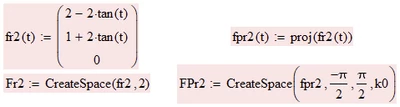
BTW, to draw a line, 2 points are all you need. Not necessary to create 6000 points. And the circles look good enough for me with just 200 points, so I changed k0 accordingly. Furthermore the range for t has nothing to do with pi so I changed the range to run from -10 to +10 for a nearly full circle. For a really full circle you may change t for tan(t) in the parametrization of the straight line and let t run from -pi/2 to pi/2 as shown for the second line:

Werner_E_2-1624942300572.png


MC15 sheet attached

2 replies

ttokoro
21-Topaz I
21-Topaz I
June 29, 2021

Only make second line functions to plot.


image.pngimage.png

t.t.
ttokoro
21-Topaz I
21-Topaz I
June 29, 2021

Two lines with perpendicular. Three lines to make triangle inside and outside.


image.pngimage.pngimage.png

t.t.
-MFra-21-Topaz IIAuthor
21-Topaz II
June 29, 2021

Note that the pole represents the line to infinity.

Werner_E25-Diamond IAnswer
25-Diamond I
June 29, 2021

Simply do with the second line the same as with the first one and add it and its projection to the plot:

Werner_E_1-1624942247677.png


P.S.: Maybe you are not aware of an old bug in the 3D plot of Mathcad. If you add a scatter plot, you may get an error (usually). Simply change the type to vector plot and then back to scatter plot to make it work.


BTW, to draw a line, 2 points are all you need. Not necessary to create 6000 points. And the circles look good enough for me with just 200 points, so I changed k0 accordingly. Furthermore the range for t has nothing to do with pi so I changed the range to run from -10 to +10 for a nearly full circle. For a really full circle you may change t for tan(t) in the parametrization of the straight line and let t run from -pi/2 to pi/2 as shown for the second line:

Werner_E_2-1624942300572.png


MC15 sheet attached