

CAD Data Managememt: Custom Checkin "Models & Viewables"
Hi,
Have you ever wondered when Windchill will complete your CAD conversions to Creo View format so you can view them online? You can always open the WVS Job Monitor to see the status of your own jobs, but you cannot see where they are in comparison to everyone else's jobs. This makes it difficult to know for sure when all the jobs that could be ahead of you will complete.
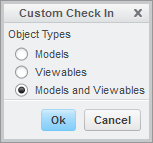
If you want to have immediate access to your CAD models in Windchill, there is a great way to do this in Creo. File, Checkin, Custom Checkin and then "Models and Viewables". This will create all the Creo View files on your local machine while the files are open and submit them along with the CAD to be updated in Windchill. It is a super fast way to create all the required Creo View files and they will be available on the server immediately.
If you want to share your CAD models with others, outside Windchill, use the File, Save As, Save a Copy option and choose Creo View (pvz) from the Type menu. Now you'll have a single, portable file you can share with anyone using Creo View on their computer or iPod/iPad.
Don't have Creo View Mobile for iPod/iPad? Check it out in the iTunes...