1-Visitor
November 14, 2018
Solved

Model Visibility Issues

  • November 14, 2018
  • 1 reply
  • 2931 views

Not sure if this is a bug or ignorance. I am trying to hide a model upon the start of my application and at a certain point make it visible.


I have the visibility box unchecked for the model, but it still shows at the start of the app. Also setting '      $scope.app.view.Maintenance.wdg.Testing.visible = false;' or even True does absolutely nothing. Any help would be greatly appreciated. 
Best answer by tmccombie

Is this a HoloLens project? You can use the 'force hidden' parameter to hide the model on experience start by doing something like this in the Home.js file:


//test visibility
$scope.Test = function() {
 $scope.setWidgetProp('model-1', 'ForceHide', 'true');
};

$scope.Test();

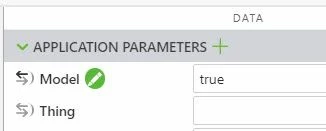
To show the model, you can use an application parameter and a small function. First, create a new app parameter. I created one called 'Model' and set it to true.

modelAppParam.jpg

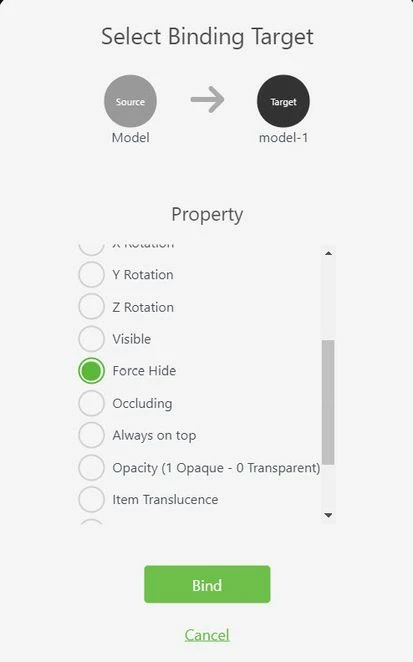
Next, bind your new app param to the Model's 'Force Hide' property. 

ForceHide.jpg

Then, add the below code to your Home.js file:

$scope.showModel = function() {
 $scope.app.params['Model'] = 'false';
};

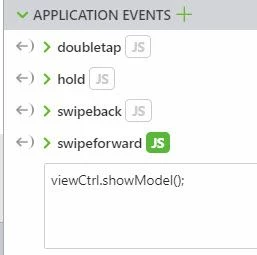
You can then call this function on any event within your experience. I called it on the 'swipeForward' Application Event.

showModel.jpg

Your model will be hidden until you call the showModel function. 

1 reply

tmccombie21-Topaz IAnswer
21-Topaz I
November 14, 2018

Is this a HoloLens project? You can use the 'force hidden' parameter to hide the model on experience start by doing something like this in the Home.js file:


//test visibility
$scope.Test = function() {
 $scope.setWidgetProp('model-1', 'ForceHide', 'true');
};

$scope.Test();

To show the model, you can use an application parameter and a small function. First, create a new app parameter. I created one called 'Model' and set it to true.

modelAppParam.jpg

Next, bind your new app param to the Model's 'Force Hide' property. 

ForceHide.jpg

Then, add the below code to your Home.js file:

$scope.showModel = function() {
 $scope.app.params['Model'] = 'false';
};

You can then call this function on any event within your experience. I called it on the 'swipeForward' Application Event.

showModel.jpg

Your model will be hidden until you call the showModel function. 

ncifelli1-VisitorAuthor
1-Visitor
November 16, 2018

Not a HoloLens project. This method worked for me.

I did notice that if a sequence is applied to the model that the visible checkbox does not do anything. With no sequence my original code worked.

16-Pearl
November 18, 2018

If you have a sequence defined, then the sequence settings will usually override the Studio settings.  To make sure that doesn't happen, you can use JS to toggle off the sequence property:


$scope.seqon = function (widget) {
  $scope.view.wdg[widget]['sequence'] = "Uploaded/l-Creo 3D - Figure 1.pvi"; 
}


$scope.seqoff = function (widget) {
  $scope.view.wdg[widget]['sequence'] = "";
}


Note that this doesn't work on HoloLens at the moment.