Hi @vivekse
I think JavaScript expression in your project is not quite correct !
$scope.moveOnYAxis = function() {
$scope.setWidgetProp( "model-1", "ty", $scope.getWidgetProp( "model-test", "ty") + 1.0);}
>> the following problems:
1.) translation axis coud be "x", "y" and "z" and rotations respectively "rx", "ry" and "rz" -> property “tx" does not exist
2.) so far I know we have setWidgetProp but we do not have getWidgetProp !
You need to use the syntax $scope.view.wdg[WidgetName][propertyName] instead
Another problem is that this code will have as result a jump. But so far, I understand you need continuous movement. Right?
A correct approach could be this one (add this code 1:1 in your project Home.js) :
/////////////////// function translateOnAxis definition with arguments
//function Arguments:
// WidgetName --> e.g. "model-1"
//Axis --> could 2x", "y" or "z"
//distance --> in meter m=1 is 1meter
//speed --> in meter per second
///////////////// translateOnAxis function body
$scope.translateOnAxis = function(WidgetName,Axis,distance,speed) {

var debug=false; // when true prints in the console but make slow!
var interval = 0.05*speed // distance for 0.05 sec
var count=0;
var ready = false;
//=== loop for the movement
for(v=0;v< distance;v+=interval)
 {count++ // this counts the step
 let movedDistance=($scope.view.wdg[WidgetName][Axis]+ interval*count)
 //check if we arrieved on the final destination
 if (movedDistance > distance) {moved_distance=distance; ready = true;}
 //print this to console if we want to debug
 if(debug)console.log("v="+v+" interval="+interval+ " call delay = "+count*30 +" moved distance ="+movedDistance)

 $timeout( ()=>{
 $scope.$apply(()=> {$scope.setWidgetProp( WidgetName, Axis, movedDistance)})
 },count*50);
if(ready) break; }
}
//============ end of $scope.translateOnAxis
//definition of the click function
$scope.testModel1Click= function(){
//translate model "model-1"
// 1 meter about along the "y" axis
// speed is 0.1 m/sec - not exact
$scope.translateOnAxis("model-1","y",1,0.1)
}
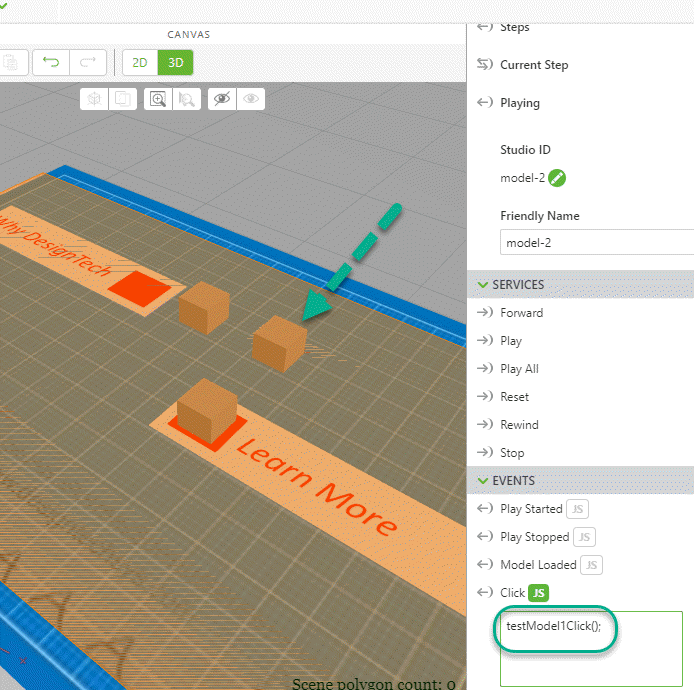
The function testModel1Click we can use then for model-1 - click event
And then when testing it :
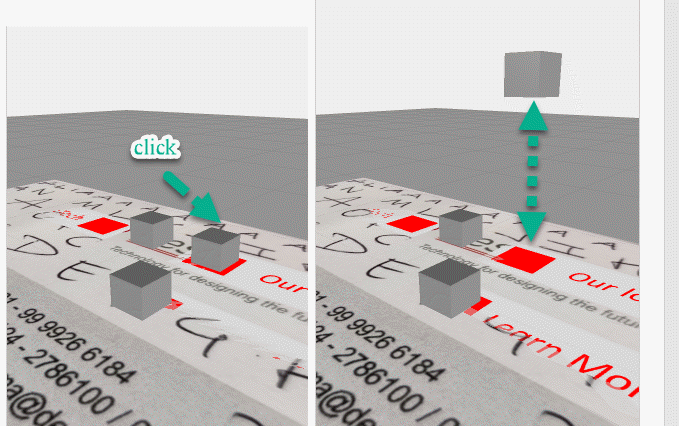
Analogous you can define testModel2Click() for the translation of model-2 and testModel3Click() for the translation of model-3
At the end I want to mention that my opinion, moving modelItem widget is better as movement of model widget but it is up to you how to design it.

