
17-Peridot
March 22, 2017
Question

Removing Instances from Family Tables that are in Windchill

  • March 22, 2017
  • 2 replies
  • 12770 views

Family Tables are a headache with Windchill. One many of many issues is it's very easy for Creo users to remove Instances from Family Table by simply hitting Delete Row inside of Creo but this can create undesirable scenarios if the objects are already in Windchill. Since the Deleted Instance is now longer attached to the latest Generic model, if a previous Assembly in Windchill used the Deleted Instance, you are unable to update to the latest Generic rev in a workspace. You're stuck with out of date objects in your workspace. However Creo lets you delete instances without telling you that could be bad for Windchill. Our 'standard' has been to tell users not to delete instances from Family Tables once they're in Windchill and simply filter the undesirable instances off the drawing. New users have a habit of finding out the hard way that they shouldn't delete instances. I was curious what other people do... Not worry about it? Found a way to prevent users from deleting instances from Creo? Found any easy fix to get the Creo/Windchill instances associated back together with the generic?
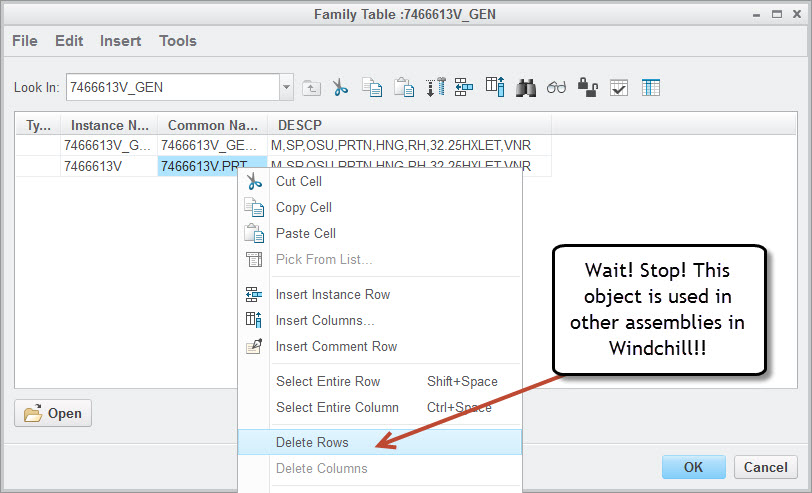
Delete Instances.jpg

2 replies

23-Emerald III
March 22, 2017

Limit family tables to library type of parts (nuts, bolts, screws, washers), put the files in the Part Library and have a librarian who you trust to know how to treat family tables.

Make Library objects come into user workspaces as read-only parts.

Do NOT let all users have access to edit family tables.

NEVER delete a line from a family table that FT has been used.

22-Sapphire I
March 22, 2017

can be done - but nothing is more fraught with peril

GregoryPERASSO
16-Pearl
March 23, 2017

I haven't done that for a long time, but

In WC 9.1,   we have a particular method that allow to remove a PRT from the familly table and transform it as a "standalone" classic PRT EPMDocument

To allow assemblies working well , without using the last version of generic that does not contain anymore the PRT as instance

something like:

download the Full FT in the Workspace

Open the instance in Creo session  (important to have the instance in session)

Open the Generic in Creo session

activate the Generic and remove the instance and save

activate the instance and save it.

should be now a standalone classic PRT

Windchill keep history iteration so we can see that old itérations are instances.

and if get old assemblies "as_stored", get the instances, not the last standalone PRT

Don't know is still work in 10.2 or 11....

17-Peridot
March 23, 2017

Correct. We use WC 10.1 and this still works. We usually use this method to make the obsolete instances standalone.

So ideally the entire family table along with the drawing will be revised together to the next revision before making the instance standalone.