In Prime (on contrary to real Mathcad like MC15) you can't evaluate a solve block symbolically. Fortunately this is not necessary anyway. As you have specific values you don't need a symbolic solution. You should use Primes numeric methods (solve block or the root command.
Furthermore you type a square bracket. Just use normal parentheses as a square bracket creates a vector/matrix which you sure did not had in mind. Incidentally, that's the reason for the "undefined" message.
Deleting the square bracket gives you a solution, but a wrong, non-real one, because you defined alpha with 43.2 and not with 43.2 deg! alpha:=43.2 means alpha is 43.2 radians!
Remark: When you look at prints made from real Mathcad (MC15&below) you will often see square brackets which actually are typed parenthesis which are simply displayed by Mathcad as square brackets.
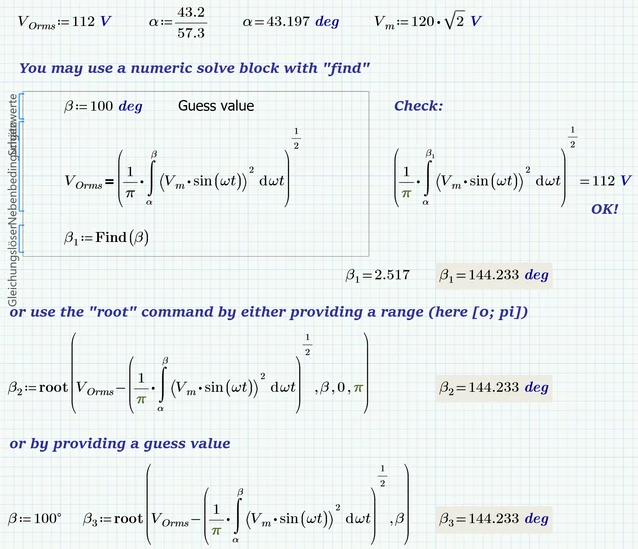
Worksheet in format P4 attached
And, yes. Fully agreed on - Prime is quite mediocre compared to real Mathcad (=Mathcad 15 or below).
@unknown: You can use units in a solve block with "find" in MC15, too. The problem is when you want to use units in a solve block with "odesolve". Here Prime has a small advantage among all its many disadvantages.
In our case here its especially easy because the unit Volt immediately cancels anyway:
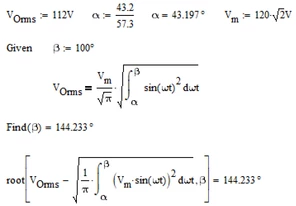


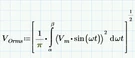 . I cannot get a solution for β. In the problem statement it mentions that α in degrees is 43.2 which in radians is 43.2/57.3 = 0.75. Then, the problem mentions that β = L/R (inductance divided by resistance), with R = 10 ohm, and Vm (maximum value of sine) is 120Vrms * √2 = 169.7Vpeak. When I substitute these values in, and try to solve for β I get an undefined solution (see attached worksheet). Please help me find what am I doing wrong. Thank you.