14-Alexandrite
March 4, 2024
Solved

Assign zone to a point

  • March 4, 2024
  • 4 replies
  • 10160 views

Hello @Werner_E and crew,

I've recently returned from a hiatus from the forum due to a busy schedule.

I'm back with a new project and seek your guidance.

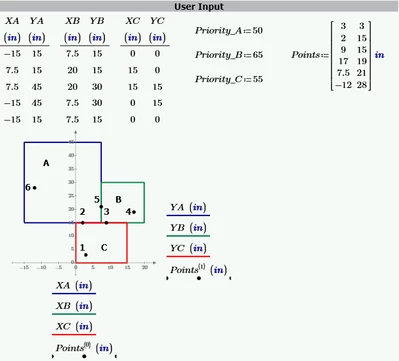
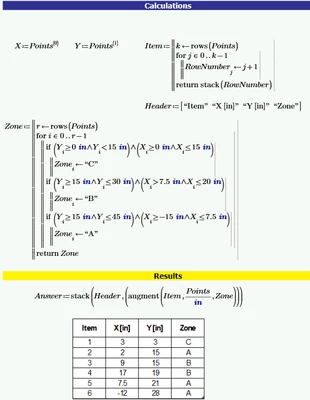
I'm presenting the following scenario: I'm dealing with three rectangles or zones: A, B, and C. Each zone has a priority level. I have a list of points that I need to plot and require the program to determine the zone in which each falls. Should a point land on the boundary shared by two or three rectangles, the program should assign it to the zone with the highest priority. I've been working with Mathcad Prime 9 and have devised a solution, but I feel it's lacking because I haven't effectively incorporated the priority level. Could you recommend a more refined approach? Below are snapshots for easier reference. In the real world scenario, there will be many more zones and huge list of points.
Perez_0-1709519916364.pngPerez_1-1709519964701.png


Best answer by Werner_E

I added the ability to provide the data for the various areas in different ways as the nested matrix used in first place may not be the most optimal structure.

Of course it depends on the way the area data is available in your actual application. I don't think that you are supposed to manually type it all in and using a separate Prime table for each of the example areas seems not to be an appropriate approach for a larger number of areas anyway.

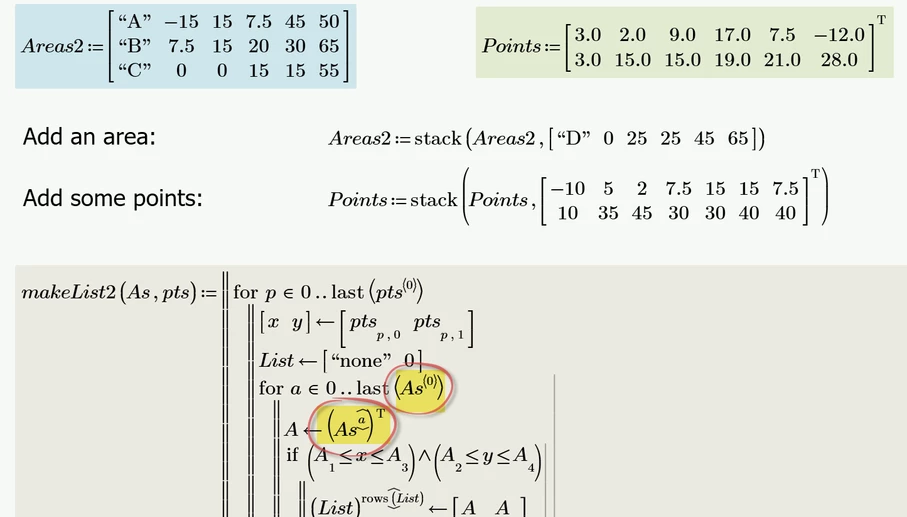
Instead of the areas being a vector of vectors, you may also provide them using a matrix - each row of it representing an area, defined by a name (has not to be just one character of course), the coordinates of the lower left and upper right corner and its priority.

There are only two changes in the makeList() function necessary to accommodate for this structure:

Werner_E_0-1709577041679.png

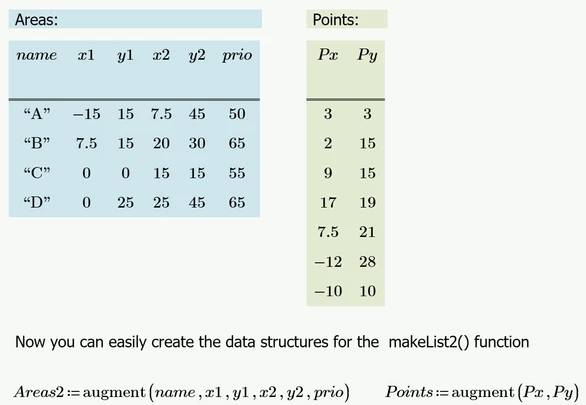
It would also be possible to provide the data using Prime's tables.

But I guess that tables are not really helpful when it comes to larger data sets. Anyway, here is an approach using tables for input:

Werner_E_2-1709577496169.png


Modified Prime 9 sheet attached

4 replies

25-Diamond I
March 4, 2024

What should happen if the point belongs to two areas with equal priority - either because it lies on the border of the two or because the areas may overlap?

How should a point belonging to no area at all should be treated.

Perez14-AlexandriteAuthor
14-Alexandrite
March 4, 2024

Hello @Werner_E , overlapping can be ignored because all the rectangles will be defined so that they wont overlap.

If a point belongs to two areas with equal priority because it lies on the border of the two, then we need to decide on a consistent rule to determine which zone to assign. One common approach is to assign the zone based on a predefined ordering of the zones (for example, alphabetical order: if a point falls on the edge of zones A and B with equal priority, always choose A).

For points that belong to no area at all, you can return a value that indicates this, such as "None" or "Outside".

21-Topaz II
March 4, 2024

Hi,

I am limited to Express at the moment so no programming.

Here are two function OnRect and InRect that return true 1 if is On Rectangle or In Rectangle.use OnRect() first then InRect

Cheers

Terry

ttokoro
21-Topaz I
21-Topaz I
March 4, 2024

image.pngimage.pngimage.pngimage.pngimage.pngimage.png

image.pngimage.png

t.t.
25-Diamond I
March 4, 2024

@ttokoro 

Your approach is missing the priority values!

I may be wrong, but as I understood incorporating them was the main reason of this question.


Furthermore @Perez  wrote


In the real world scenario, there will be many more zones 


and I guess it would be a bit cumbersome and lengthy to adapt your approach to a greater variety of areas 😉


ttokoro
21-Topaz I
21-Topaz I
March 4, 2024

Changing B's x from 0 to 20 and C's y from 0 to 20, we get same result by the priority of if function. A>B>C>D...

image.png

Add star as first priority.

image.png


t.t.
13-Aquamarine
March 4, 2024

Does the input have to be the way it is now? As the areas are rectangles you only need xmin, xmax, ymin and ymax to define them. When you add to that two columns (label and priority), you have a matrix with the required input. Your new problem becomes sorting that by priority taking into account the original order in case of equal priority. After that choosing the area, where point belongs, becomes trivial - you just check the modified input row by row and the first hit is the area for that point.


You can naturally use the current input to form the new one as a second choice.


21-Topaz II
March 4, 2024

Hi,

Here is the sorting in Prime Express Only


Cheers

Terry

Werner_E25-Diamond IAnswer
25-Diamond I
March 4, 2024

I added the ability to provide the data for the various areas in different ways as the nested matrix used in first place may not be the most optimal structure.

Of course it depends on the way the area data is available in your actual application. I don't think that you are supposed to manually type it all in and using a separate Prime table for each of the example areas seems not to be an appropriate approach for a larger number of areas anyway.

Instead of the areas being a vector of vectors, you may also provide them using a matrix - each row of it representing an area, defined by a name (has not to be just one character of course), the coordinates of the lower left and upper right corner and its priority.

There are only two changes in the makeList() function necessary to accommodate for this structure:

Werner_E_0-1709577041679.png

It would also be possible to provide the data using Prime's tables.

But I guess that tables are not really helpful when it comes to larger data sets. Anyway, here is an approach using tables for input:

Werner_E_2-1709577496169.png


Modified Prime 9 sheet attached

Perez14-AlexandriteAuthor
14-Alexandrite
March 5, 2024

Hello @Werner_E , I'm reviewing your latest file WE_20240304(3)_PointLocator_V1.0 and running some tests but it seems the function makeList2() is working as expected so far. I should be able to accept as solution by the end of the week. Thank you for looking into this.

25-Diamond I
March 5, 2024

All the makeList() functions are doing the same and can be modified so that each point is assigned just one area only as described above.

The difference is just the way the areas data is provided. This essentially depends on the form in which you have this data at hand and how you import it into Prime. It is also conceivable to define the areas by the coordinates of one corner along with height and width.
However, my first chosen data structure with the nested vectors is probably rather unfavorable. The matrix, which was also suggested by JKT, is probably the most practical structure, I guess.