1-Visitor
April 19, 2022
Solved

Can it be plotted in MATHCAD Prime 8?

  • April 19, 2022
  • 2 replies
  • 3217 views

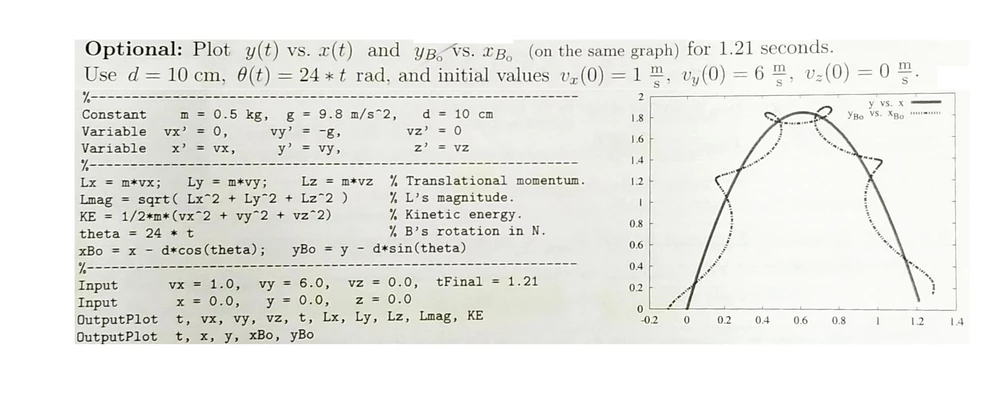
Hello, I'm new to MATHCAD. I was wondering if the following Dynamic Motions problem can be plotted in MATHCAD prime. If so, please show me how! The plot would need to be just like in the picture. Tennis racquet graph.png
Best answer by Werner_E

@HOOD wrote:

Hello, I'm new to MATHCAD. I was wondering if the following Dynamic Motions problem can be plotted in MATHCAD prime. If so, please show me how! The plot would need to be just like in the picture. Tennis racquet graph.png


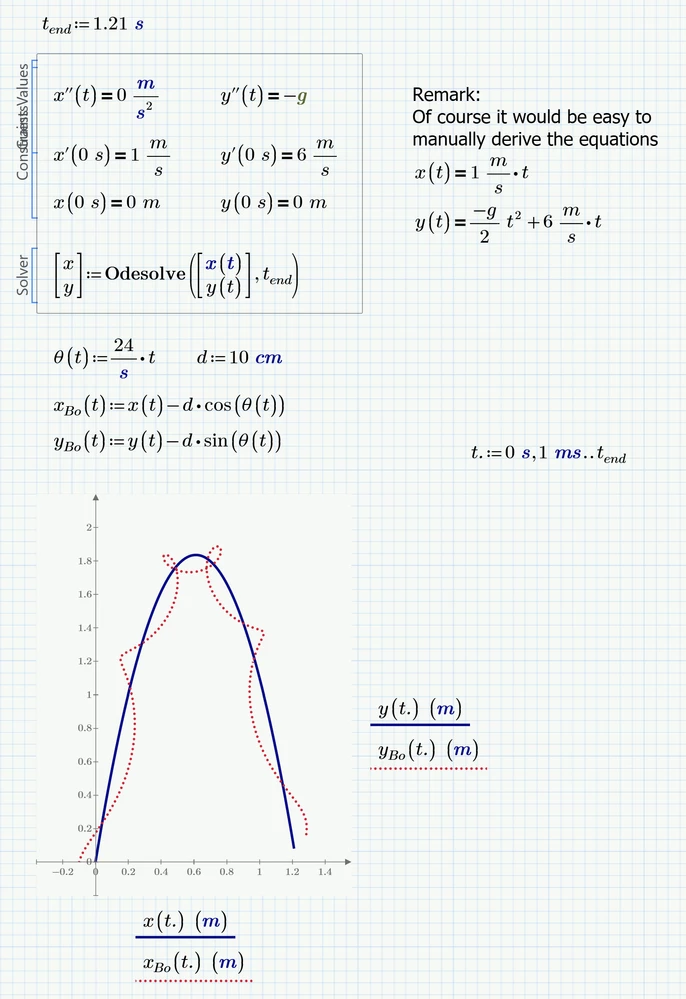
For those simple functions using "odesolve" is kind of overkill and was done for demonstration purposes only 😉

Werner_E_1-1650393270646.png


2 replies

24-Ruby IV
April 19, 2022
HOOD1-VisitorAuthor
1-Visitor
April 19, 2022

Thanks Valery for the link! I'm currently trying to get my kids interested in MATHCAD. They (myself included) may find it easier to understand with the help of your book.


Cheers!

24-Ruby IV
April 20, 2022

See please animations of this chapter

Celestial-Mechanics - PTC Community


Werner_E25-Diamond IAnswer
25-Diamond I
April 19, 2022

@HOOD wrote:

Hello, I'm new to MATHCAD. I was wondering if the following Dynamic Motions problem can be plotted in MATHCAD prime. If so, please show me how! The plot would need to be just like in the picture. Tennis racquet graph.png


For those simple functions using "odesolve" is kind of overkill and was done for demonstration purposes only 😉

Werner_E_1-1650393270646.png


HOOD1-VisitorAuthor
1-Visitor
April 19, 2022

Werner, thank you very much! I greatly appreciate the "overkill" as well!


I have had MATHCAD for about a year now, but am just now finding the time to tinker with it. 


Cheers!

25-Diamond I
April 19, 2022

One additional remark: Your pic uses vx and vy for the first derivatives of x and y. This can be done in Prime, too. But in this case you would have to solve not only for x and y but also additionally for vx and vy:

Werner_E_0-1650400465826.png

I considered this unnecessary as we could as well define

Werner_E_1-1650400561406.png

after the solve block in case vx is needed as a separate function.