1-Visitor
January 3, 2024
Solved

Comparing vector elements and updating element values

  • January 3, 2024
  • 1 reply
  • 1643 views

Hello,


I have been using mathcad for years as a basic user, but do not have much experience using it for matrix operations or programming. 


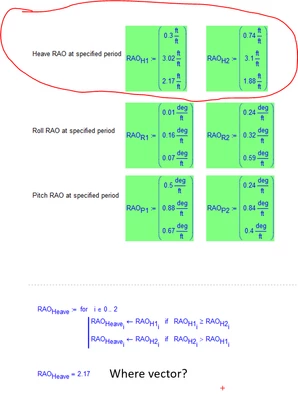
I am trying to create a worksheet that will allow me to feed in data in to several 3x1 matrices and then compare values of the elements of each matrix and then create a new matrix of only the largest values. 


However, the resulting output of what I have at the moment is a scaler. How do I instead get a vector result? Please note that I am using Mathcad 15 (and not Mathcad Prime).


Thanks!
 

JC_10909206_0-1704311812673.png


Best answer by LucMeekes

You get a scalar result from your function because a function always returns the result of the last statement executed.


You can define this function (I use a capital M, to distinguish it from the built-in function max ) :

LucMeekes_0-1704315071277.png

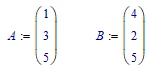
Then you can use it to compare two arrays/vectors, e.g.:

LucMeekes_1-1704315117406.png

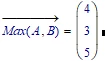
like this:

LucMeekes_2-1704315128612.png

Note that the vectorise operator is used (the arrow over Max(A,B), you get it by selecting the function and pressing [CTRL _], that is Control-underscore ), if not you'll get an error message.

The vectors need to be the same size, but can be any length.


Success!
Luc

1 reply

LucMeekes23-Emerald IVAnswer
23-Emerald IV
January 3, 2024

You get a scalar result from your function because a function always returns the result of the last statement executed.


You can define this function (I use a capital M, to distinguish it from the built-in function max ) :

LucMeekes_0-1704315071277.png

Then you can use it to compare two arrays/vectors, e.g.:

LucMeekes_1-1704315117406.png

like this:

LucMeekes_2-1704315128612.png

Note that the vectorise operator is used (the arrow over Max(A,B), you get it by selecting the function and pressing [CTRL _], that is Control-underscore ), if not you'll get an error message.

The vectors need to be the same size, but can be any length.


Success!
Luc

1-Visitor
January 4, 2024

Many thanks! My version of mathcad did not like that if statement syntax, but I did get it to work as needed.

23-Emerald IV
January 5, 2024

I did not use an if-statement, but the if-function... And Mathcad 15 should be happy with that as well.


Luc