The last row number should be 19, not 20.
If we can assume that the values in the “size” column are sorted in ascending order, this expression should deliver the desired result.
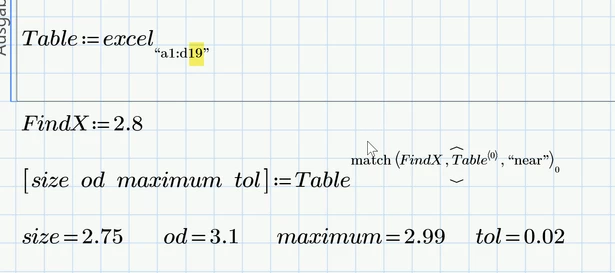
The result of match always is a vector, even if it contains just one element. Therefore we have to use the vector index 0 (=ORIGIN) to get the row value itself. This value is then used in the row operator to extract the desired data row. I found that easier than extracting every value one by one from its data vector (Size, OD, Max, Tol).
The modifier "near" will find 2,75 when the input is 2.8 and 3 if the input is 2.99.
Don't know what you will use it for, but sometimes its necessary to choose the nearest value which is less than or equal to the input value (so 2.99 should yield 2.75) or to choose the nearest value which is greater or equal to the input (so 2.8 would yield 3). Her you would use the modifiers "leq" and "geq".
I turned the calculation into a small utility function which also shows how to deal with "leq" (you can't simply chose the first element in the vector of indices but must reverse that vector first).
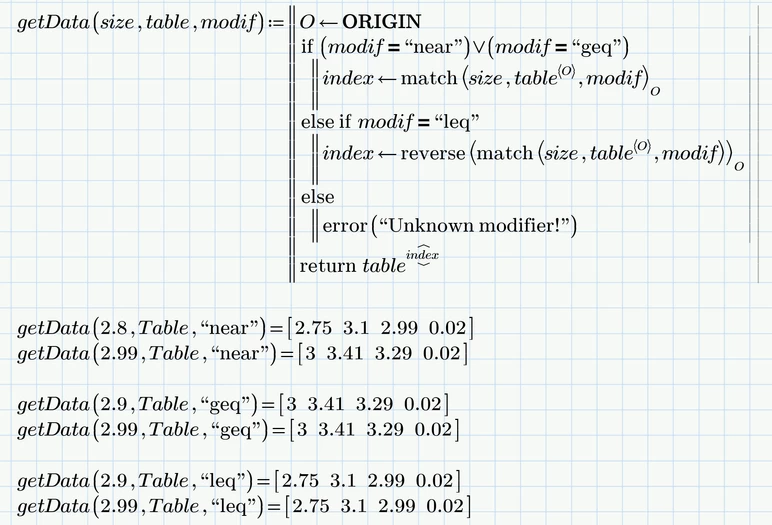
Again the function assumes the values in the first column to be in ascending order.
If they are not, you could add table <-- csort(table,O) on top of the program, but if you do so, the table that is transferred must not have a header row with text but only data values, otherwise "csort" would throw an error.
Remark: If the input value is exactly (or within the usual tolerance) in-between two data values, the "match" function with "near" would return the indices of both and because our approach uses index 0, the lower value would be returned.
Don't have Prime 8 installed. You have to work from the pictures. But I attach the Prime 10 file for whatever it may be worth.


