Marco Mori wrote: I use this sintax but it doesn't work. |
Wrong! It works pefectly and the same way as in your smaller example at the top!
Because the nested vector is so big, Mathcad (display style is set to automatic) changes the style to table as this display format is scrollable. You may set display format it to matrix but you won't be happy if you do 😉
As you create a nested set of Matrices, in table mode Mathcad won't expand the inner matrices and just show their size ([264,1] means 264 rows, 1 column).
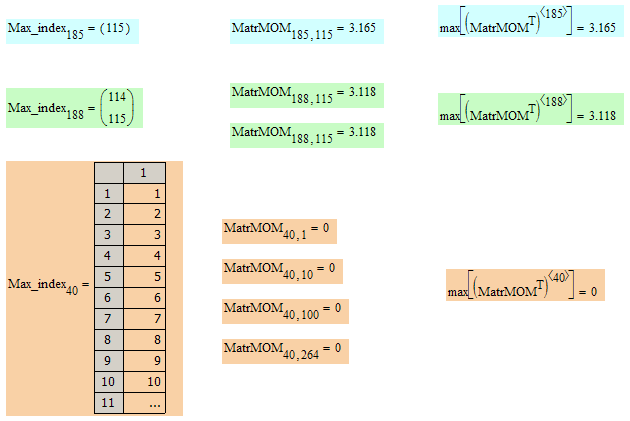
Look at the screenshot for selected rows:
row 185, a 1x1 matrix containing the index (115) of the max element of that row
row 188, a 2x1 matrix, because the maximal element (3.118) occurs twice in that row and match will return both indices (144 and 115) in a vector. Thats the reason you have nested arrays and thats also the reason match returns a 1x1 matrix and not a single scalar if the value is found only once. You may have noticed in my post above that I had added "[0" at the end. As you have changed ORIGIN to 1 in your sheet, you will have to change it to "[1" and it will select the first element of the vector returned by match, That way your Max_index will be a vector consisting of just 264 scalars. Maybe that it what you want to have, I don't know.
Now for the funny part, row 40 (and this applies to every of the first 40 rows). These rows consists of zeros only, so the maximum is zero and match() returns a 264x1 vector because the maximimum occurs at 264 positions. Could it be that that was the reason you thought it didn't work?