
1-Visitor
September 3, 2012
Solved

Function Composition

  • September 3, 2012
  • 1 reply
  • 2527 views

I have been playing around with Mathcad Prime 2.0 and have been rather impressed with how simple and intuative it is to use compared to previous versions of Mathcad. I love the mathematical notation because I don't have to learn an awful c-based programming language (eg Matlab), to do my work. That was until I discovered that to compose the functions f(x) and g(x), instead of the intuitive mathematical notation f.g(x), you have to resort to f(g(x)), which looks more like programming and less like maths. It looks particularly horrible when used on multiple functions f(g(h(k(m(n(x)))))) and has you counting parentheses (somewhat reminiscent of lisp, but without the awesomeness) versus the more elegant and correct f.g.h.k.m.n(x)

Surely, this can't be that hard to implement?
Best answer by AdrianBaker

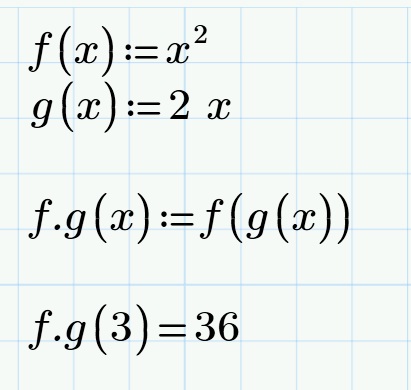
I've discovered that I can fake it with a little bit of syntactic sugar!

fcomp.jpg

1 reply

24-Ruby IV
September 3, 2012

More simple example.

I can have in Mathcad 15 sin x as postfix operator.

I must have in Mathcad Prime sin(x) not sin x as in Math.

AdrianBaker1-VisitorAuthorAnswer
1-Visitor
September 3, 2012

I've discovered that I can fake it with a little bit of syntactic sugar!

fcomp.jpg

23-Emerald V
September 3, 2012

You can also partially get round it by creating a function to apply a function to a variable (or result of another function application) and then assigning the function to a symbol (eg, middot character).

It would be a nice feature to have, though ...

Stuart

collab - 12 09 03 function composition 01.JPG