1-Visitor
July 23, 2022
Solved

How do I show the value of a variable in a text block?

  • July 23, 2022
  • 2 replies
  • 2917 views

I'm wanting to generate spice models in MathCad Prime worksheets. The problem I'm having is I can't seem to find a way to substitute the value of a variable into a text block.

I calculate some variables such as:


Model_Name:="HDS10M"

Nf=2.4

Isf=1.86e-7


Then I want to create a text block that contains something like this.


.model Model_Name diode(N=value(Nf) Is=value(Isf)... )


but I want this to be displayed in the worksheet so I can just copy and paste it into a text file to have a model..


.model HDS10M diode(N=2.4 Is=1.86e-7)


This would be very useful when there are a bunch of parameters like in a FET model or in a subcircuit to eliminate opportunity for human error. Is there any way to do this?


Best Regards,

Chris
Best answer by LucMeekes

Prime will not let you do that in a  text block, but don't despair.

A text block is a nasty thing to copy text from, especially if it contains live math.

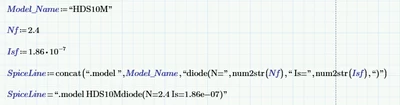
What Prime does offer is manipulation of strings. So you can build your SPICE line in an expression.

It might look like this:

LucMeekes_0-1658609916540.png

The interesting part is that you can have Prime write such text strings to a file, so you could build your entire SPICE deck from within Prime.

Assuming that you may be using multiple diode models, you can use a function to build the SPICE line:

LucMeekes_1-1658610254685.png

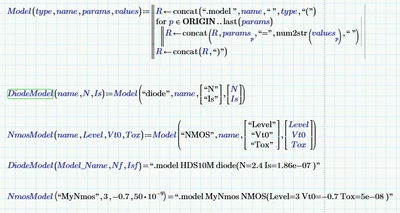
And you can take it a step higher by defining a more general function Model, from which you can create DiodeModel and other models:

LucMeekes_2-1658611433916.png


Success!
Luc


2 replies

21-Topaz II
July 23, 2022

Hi,

Like this:-

Capture8.JPG

Cheers

Terry

1-Visitor
July 25, 2022

Hi Terry,

  Great answer, I can make that work in combination with Luc's answer below. 

Have a great week!

Best Regards,

Chris

LucMeekes23-Emerald IVAnswer
23-Emerald IV
July 23, 2022

Prime will not let you do that in a  text block, but don't despair.

A text block is a nasty thing to copy text from, especially if it contains live math.

What Prime does offer is manipulation of strings. So you can build your SPICE line in an expression.

It might look like this:

LucMeekes_0-1658609916540.png

The interesting part is that you can have Prime write such text strings to a file, so you could build your entire SPICE deck from within Prime.

Assuming that you may be using multiple diode models, you can use a function to build the SPICE line:

LucMeekes_1-1658610254685.png

And you can take it a step higher by defining a more general function Model, from which you can create DiodeModel and other models:

LucMeekes_2-1658611433916.png


Success!
Luc


1-Visitor
July 25, 2022

Thanks Luc,

   That will work, Thanks allot for posting this solution. Have a great week!

Best Regards,

Chris