
10-Marble
January 9, 2025
Solved

How do you solve an equation for a term that isnt a single variable?

  • January 9, 2025
  • 2 replies
  • 1092 views

I want to solve the following equation at the bottom and get T_react/T_com on one side and the rest on the other side. Is there a way to rearrange the equation like that?


I am using Version 10.0.1.0
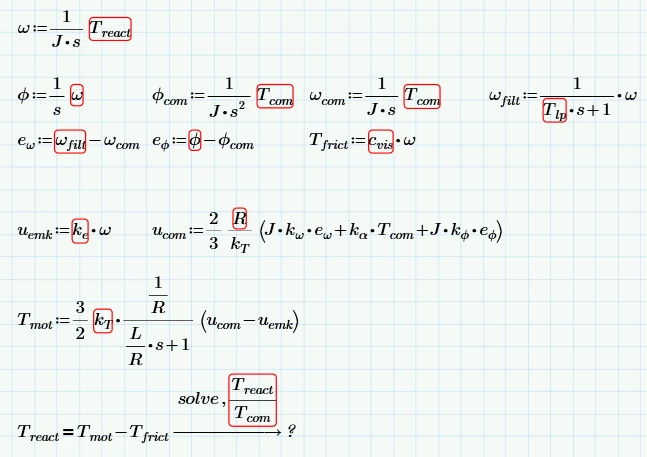
 

MathCADForum.png

Best answer by Werner_E

How about

Werner_E_0-1736425906188.png


Prime 10 sheet attached


2 replies

23-Emerald IV
January 9, 2025

Welcome to the forum.

You should attach your worksheet and state which version of Prime you are using.


To answer your question:

Solve for the two variables (make sure you have two independent equations then), or define a single variable e.g. Tratio, and solve for that.


Note that the solve you display doesn't work because Treact and Tcom are not part of the equation Tmot-Tfrict.

If you want to use something like this, you have to define Tmot and Tfrict as functions of Treact and Tcom (and that ripples through to the beginning of your definitions.


Success!
Luc

10-Marble
January 9, 2025

Thanks for the reply. I added the worksheet with the MathCAD Prime Version 10.0.1.0.

I tried implementing your solution, but I don't fully understand what you mean. I used Tratio as a variable for Tmot and Tfrict and tried to solve Tmot-Tfrict for Tratio, which isn't working,

23-Emerald IV
January 9, 2025

You defined Tmot(Tratio) , but Tratio does not appear to the right of the definition symbol, so it is actually not a function of Tratio.

You have more work to do. I think you would be better off with two equations, like this:

LucMeekes_1-1736418633151.png

Note that I would rather do this like:

LucMeekes_3-1736418737333.png


But I cannot decide what the right equations would be for your problem.


Success!

Luc

Werner_E25-Diamond IAnswer
25-Diamond I
January 9, 2025

How about

Werner_E_0-1736425906188.png


Prime 10 sheet attached


10-Marble
January 9, 2025

Thanks alot, that is exactly what I wanted!

