14-Alexandrite
January 19, 2025
Solved

How to generate a table from input using programming

  • January 19, 2025
  • 1 reply
  • 1251 views

Hi there , 

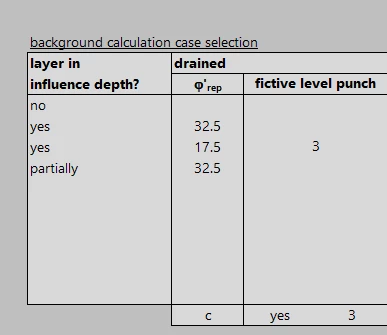
I need to create this table using programing

YA_10963798_0-1737292938654.png

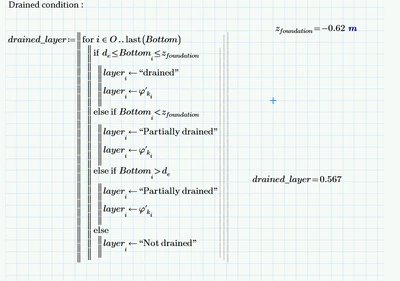
I wrote this program , but it doesn't give me the answer I want: 

YA_10963798_1-1737293000978.png

What I wrote in the program is 

if the bottom value is between z and d .....> the layer is drained and use the angle (alfa) 

if the bottom is greater than d and smaller than z ....> the layer is partially drained and use the angle (alfa)


otherwise write the layer is not drained 


I need the answer two have 3 columns

1# ( layer ( drained-partially- not drained)

2# the angle if it is  drained or partially drained .. if not drained show zero 

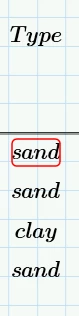
3# if it is possible this column as well which is the layer kind it is in the table in the sheet as input 

YA_10963798_2-1737293451952.png

Thanks 

Yusra


The sheet is attached prime 10

Best answer by Werner_E
  • You overwrite "layer[i" ("drained", etc.) immediately with the angle and so you lose that information. Either use a different variable for the angle vector and augment the vectors when you return the result or create "layer" as a matrix with two columns, using a second index (O and O+1).
  • Additionally you forgot to return the vector(s) you created and so the return value of your program is just the last result of the loop.
  • When you create your input table you have to use text (strings) for "sand" and "clay", otherwise you get the error as of undefined variables. It was easier for me to define the two variables with string values but of course normally you would type the strings directly in the table.
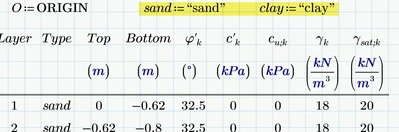
Werner_E_0-1737300748977.png


This is what it would look like using a second vector for the angle and returning the augmented result
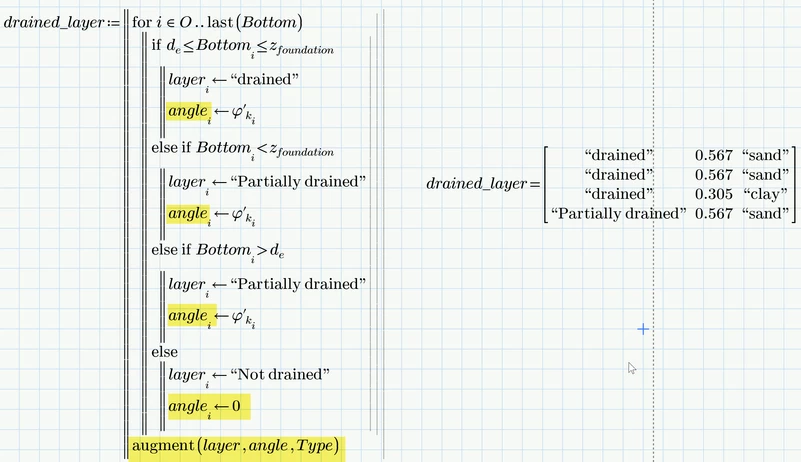
Werner_E_0-1737299601977.png

You could also do without the vector 'angle" as is it is the very same as the vector phi in your input table!


But it looks to me that you use a faulty logic as you never can arrive at the "not drained" branch.

You have four different branches in your program but there only are three different locations for 'bottom'!

It can be

1) larger than z (above -0.62,)

2) between d and z (between -2.4 m and -0.62 m)

or

3) lower than d (below -2,4 m).


I don't know which of the three sections you would call "drained", "partially drained" or "not drained".
But you sure don't need four branches in your program to distinct between the three different locations.


The logic in your program is that a value between d and z is called "drained" and everything else is called "partially drained".
I guess that's not as it should be,


Prime 10 sheet attached

1 reply

Werner_E25-Diamond IAnswer
25-Diamond I
January 19, 2025
  • You overwrite "layer[i" ("drained", etc.) immediately with the angle and so you lose that information. Either use a different variable for the angle vector and augment the vectors when you return the result or create "layer" as a matrix with two columns, using a second index (O and O+1).
  • Additionally you forgot to return the vector(s) you created and so the return value of your program is just the last result of the loop.
  • When you create your input table you have to use text (strings) for "sand" and "clay", otherwise you get the error as of undefined variables. It was easier for me to define the two variables with string values but of course normally you would type the strings directly in the table.

Werner_E_0-1737300748977.png


This is what it would look like using a second vector for the angle and returning the augmented result

Werner_E_0-1737299601977.png

You could also do without the vector 'angle" as is it is the very same as the vector phi in your input table!


But it looks to me that you use a faulty logic as you never can arrive at the "not drained" branch.

You have four different branches in your program but there only are three different locations for 'bottom'!

It can be

1) larger than z (above -0.62,)

2) between d and z (between -2.4 m and -0.62 m)

or

3) lower than d (below -2,4 m).


I don't know which of the three sections you would call "drained", "partially drained" or "not drained".
But you sure don't need four branches in your program to distinct between the three different locations.


The logic in your program is that a value between d and z is called "drained" and everything else is called "partially drained".
I guess that's not as it should be,


Prime 10 sheet attached

14-Alexandrite
January 19, 2025

Hi Werner,


Yes I wrote the conditions wrong . They should be as you suggested. 

Thank you 

25-Diamond I
January 19, 2025

As the angle and the type are just taken from the input table, you may also use something like this:

Werner_E_1-1737310455049.png


I used "lower"; "between" and "higher" because I am still unsure which depth should be named "drained", etc. 😉


Instead of using the if-function as shown above you could also use the programmed if-condition. It looks clearer, I think, at the cost of taking up much more vertical space. I also added a row to the input data so that  all three possible cases can be checked.

Werner_E_2-1737310838600.png