1-Visitor
October 7, 2019
Solved

how to stack a range variable

  • October 7, 2019
  • 2 replies
  • 3549 views

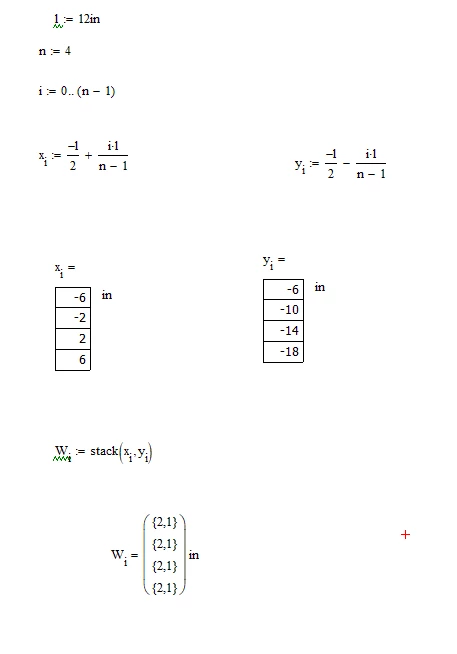
hi, i just started using mathcad. can anyone tell me the mistake i am doing here and how to stack the x[i and y[i into one column matrix. i am using mathcad 15.


Thank you1.PNG

Best answer by LucMeekes

You can only stack vectors or matrices.

A range variable is NOT a vector (or matrix), it is sort of an iteration operator. You cannot stack range variables.


You can use a range variable to create vectors and matrices, or use them as an index to their elements.

Further use of range variables is in for statements in a mathcad program, and for supplying the independent variable in a plot. I guess that's about it.

In short: you must create vectors, if you want to stack.

Your case: x and y are vectors, and you properly used range variables to create them.

If you want to stack them to create a new vector W just state:

W:= stack(x,y)


Success!
Luc


Some further advice:

The index of the first element of a vector (or row or column of a matrix) is ORIGIN. It's default value is 0, but it can be set to any value (within limits). The most common other value is 1. You can type ORIGIN= to see that (in your case) it's value (is 0).

To display a vector, such as x, instead of x[i= you'd normally just type

x=

With the statement W[i := stack(x[i,y[i) you've instrcuted mathcad to create a new vector W element by element (the iteration operator). The first element (at index 0, so W[0  ) consists of the stacking of x[0 and y[0.

Stacking x[0 and y[0 gives a two element vector (x[0 on top of y[0). The second element of w, that is w[1 becomes a 2-element vector likewise.

When you evaluate W[i, you get this funny display that says each element of W is a vector, 2 rows and 1 column; that is, a 'nested array'.

You can double-click the result and set display properties. Choose 'expand nested arrays' to show its full beauty...

2 replies

LucMeekes23-Emerald IVAnswer
23-Emerald IV
October 7, 2019

You can only stack vectors or matrices.

A range variable is NOT a vector (or matrix), it is sort of an iteration operator. You cannot stack range variables.


You can use a range variable to create vectors and matrices, or use them as an index to their elements.

Further use of range variables is in for statements in a mathcad program, and for supplying the independent variable in a plot. I guess that's about it.

In short: you must create vectors, if you want to stack.

Your case: x and y are vectors, and you properly used range variables to create them.

If you want to stack them to create a new vector W just state:

W:= stack(x,y)


Success!
Luc


Some further advice:

The index of the first element of a vector (or row or column of a matrix) is ORIGIN. It's default value is 0, but it can be set to any value (within limits). The most common other value is 1. You can type ORIGIN= to see that (in your case) it's value (is 0).

To display a vector, such as x, instead of x[i= you'd normally just type

x=

With the statement W[i := stack(x[i,y[i) you've instrcuted mathcad to create a new vector W element by element (the iteration operator). The first element (at index 0, so W[0  ) consists of the stacking of x[0 and y[0.

Stacking x[0 and y[0 gives a two element vector (x[0 on top of y[0). The second element of w, that is w[1 becomes a 2-element vector likewise.

When you evaluate W[i, you get this funny display that says each element of W is a vector, 2 rows and 1 column; that is, a 'nested array'.

You can double-click the result and set display properties. Choose 'expand nested arrays' to show its full beauty...

rizz121-VisitorAuthor
1-Visitor
October 7, 2019

Thank you so much. it worked.

23-Emerald I
October 8, 2019

First off, you're not stacking range variables.  You have one properly defined range variable, " i ", which you're using as an index to create two vectors " x ", and " y ".  Then you use the same range variable to create " W ",  where W[i := stack(x[i,y[i).  This creates a vector of arrays, one element of x is stacked with one element of y to create a two-row, single column array which is one element of W.


The proper command would be W := stack(x,y), which puts the two vectors properly stacked.


rizz121-VisitorAuthor
1-Visitor
October 8, 2019

thank you