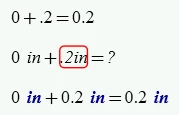
The reason you can't type ".2in" is because the dot is a valid leading character in an identifier name.
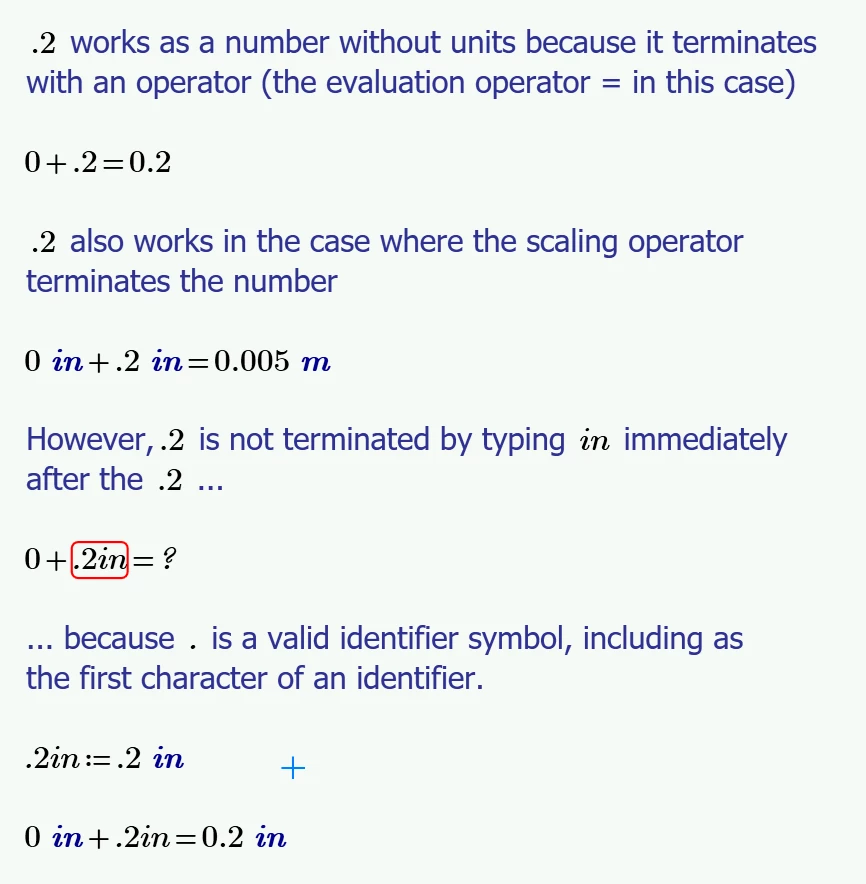
When the number begins with 0, Mathcad Prime recognises a non-numerical character as the number string terminator (unless that character is an i or a j, in which case Mathcad interprets the number as imaginary).
Stuart
From the Mathcad Prime 10 Help:
Variable and Function Names
Variable names, function names, unit names, constant names, etc, are generically referred to as identifiers.
Identifiers can contain any valid Unicode character from the Base Multilingual Plane (BMP) with the exception of white space and control characters, and with the additional limitation that the first character cannot be a decimal digit (0-9). Unicode BMP characters are defined as having a code in the range 0-65535.
The label associated with an identifier is considered part of its name when distinguishing it from another identifier. This makes it possible to define a new function mean with the Variable label, and still be able to refer to the built-in function mean by specifying the Function label. However, if you define a new function mean with the Function label, you will be hiding the built-in definition of that function.
Identifiers are case-sensitive, can be of any length, and may contain any combination of valid characters:
•Letters—Uppercase and lowercase letters.
•Digits—0 through 9, but not as the first character of a name. PTC Mathcad interprets leading digits in combination with letters as either an imaginary number (2i or 3j) or as a number times a variable (3x).
•Dot—A single, punctuation character, period can be used any where; including as the first character.