1-Visitor
July 28, 2018
Solved

Local assignment within an equation

  • July 28, 2018
  • 1 reply
  • 2252 views

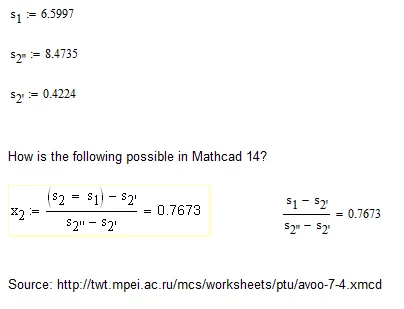
How is the following possible in Mathcad?

Untitled picture.png

 I can not even type (S2 = S1) within the equation.

Thanks.

Best answer by LucMeekes

There's no problem. Just use Mathcad and a little magic...


To get the assignment type the following (exactly):

(s.2{s.1)

Now you have to set the display of the 'local definition' operator from a left-pointing arrow, to an equals sign. Use the menu: Tools > Worksheet options

then choose the 'display' tab and you should find that operator listed there.

Note that it is bad practice to do this, because it conceals what is actually happening. At first glance it would seem that a boolean comparison ( does s.2 equal s.1 ?) is made, which should/would result in either True (=1) or False (=0).


Success!

Luc


1 reply

LucMeekes23-Emerald IVAnswer
23-Emerald IV
July 28, 2018

There's no problem. Just use Mathcad and a little magic...


To get the assignment type the following (exactly):

(s.2{s.1)

Now you have to set the display of the 'local definition' operator from a left-pointing arrow, to an equals sign. Use the menu: Tools > Worksheet options

then choose the 'display' tab and you should find that operator listed there.

Note that it is bad practice to do this, because it conceals what is actually happening. At first glance it would seem that a boolean comparison ( does s.2 equal s.1 ?) is made, which should/would result in either True (=1) or False (=0).


Success!

Luc
 

25-Diamond I
July 28, 2018

I can only second what Luc said. Its something you should avoid in any case.

Valery (Ochkov, one of the authors of the WaterStemPro) loves to confuse people with that kind of baubleries and gadgetry.

There is no benefit in doing so other than disturb and deceive people with.

Furthermore I see no need for any inline assignment here anyway. Just type s.1 and if s.2 is used later, then type s.2:=s1 in a separate region in the worksheet. Thats much clearer and less failure prone.


23-Emerald IV
July 29, 2018

"Furthermore I see no need for any inline assignment here anyway. Just type s.1 and if s.2 is used later, then type s.2:=s1 in a separate region in the worksheet."

I fully agree with the first sentence, not with the second.

Note that it really is a local assignment. Following the equation that contains the local assignment, s.2 has the same value as it had before the equation. That is different from assigning s.2:s.1 in a seperate assignment!


Luc
