
16-Pearl
July 1, 2025
Question

Mathcad Community Challenge July 2025: Projecting with Non-Euclidean Geometry

  • July 1, 2025
  • 9 replies
  • 7680 views

This month we have another 3D geometry challenge. We are projecting squares onto cylinders and spheres and measuring the perimeter. Create a worksheet that calculates any of the following:


Challenge 1: Perimeter

Calculate the perimeter of a square with a side length of 50 onto the following:

  • A sphere of diameter 100.
  • A cylinder of diameter 100 and length 100.

Clarifications:

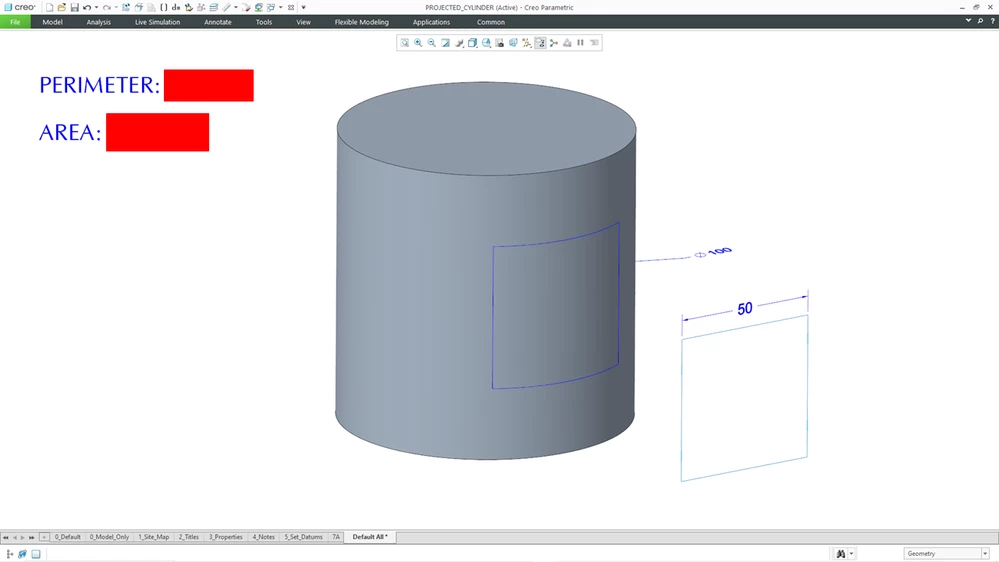
  • Note that the square is projected from a plane that is parallel to a plane tangent to the sphere or cylinder. It is projected in a normal direction from the tangent plane as in the accompanying images.
  • For the sphere, the square is centered on the point of tangency for the plane to the sphere.
  • For the cylinder, the square is centered on the middle of the cylinder and the tangent point.
  • If the intention is unclear, please refer to the images or post a comment where the community can help explain the scenario to you.
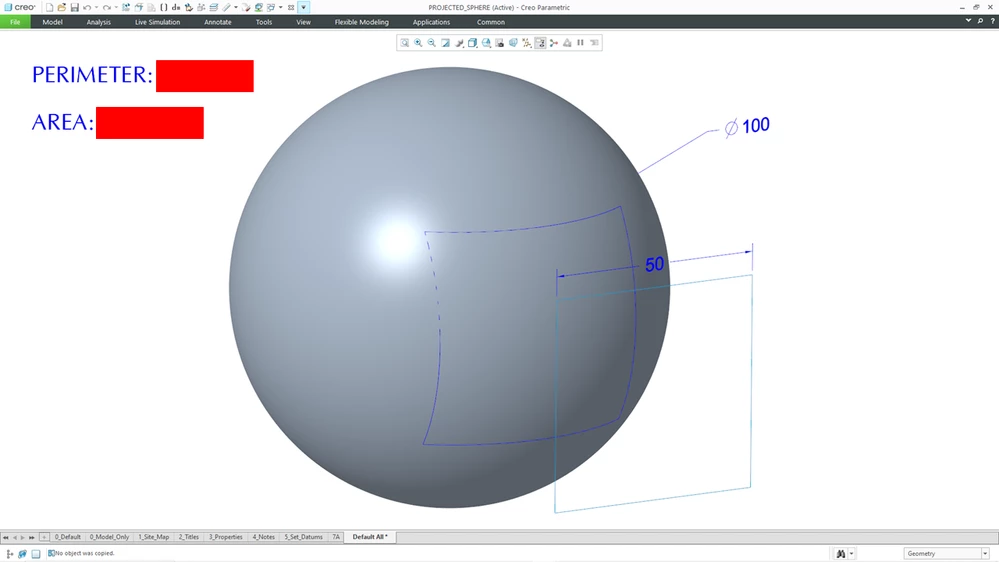
Sphere Challenge Hidden.png


Cylinder Challenge Hidden.png


Challenge 2: Area

Calculate the area of the above projected squares.


Challenge 3: Function or Program

Write a function or program that computes the perimeter or area of the projected square where the inputs are the length of a side of the square and the diameter of the sphere / cylinder.

Can you incorporate error checking in situations where the projected square goes beyond the boundaries of the square or cylinder?


Bonus Challenge – Graphing:

Use the XY Plot, 3D Plot, or Chart Component to depict the change in perimeter or area as a function of the length of one side of the square.


Bonus Challenge – Advanced Input Controls:

Incorporate advanced input controls (e.g., sliders, radio buttons, etc.) to allow people to change the inputs (e.g., length of the side of a square, diameter of the cylinder / sphere) to change the results.


You can submit partial worksheets. For example, you can solve the first challenge and submit additional worksheets later in the month as you solve later challenges.

3D CAD models created in Creo Parametric 7 have been attached to this challenge if anyone wants to verify their calculations.


Find the Mathcad Community Challenge Guidelines here!


9 replies

25-Diamond I
July 9, 2025

Hmm, a little more than a quarter of July has already passed and still no contribution has been received.
Then I would like to open the round dance.

Werner_E_0-1752031074792.png


Incidently, I would not say that we are practicing non-Euclidean geometry here. 😉


EDIT: BTW, how about adding a Gnomonic projection?

Werner_E_0-1752124596647.png


Prime 11 sheet and pdf print attached

19-Tanzanite
July 11, 2025

Here is my attempt. 

I've only done the sphere so far; I might have a go at the cylinder if I find the time before the end of the month..

Although I adopted a straightforward  deterministic approach to calculating the perimeter, I decided to calculate the area using a Monte-Carlo method - just for the hell of it!


Alan

25-Diamond I
July 11, 2025

New version of my sheet.

Added the Gnomonic projection and a few bits and pieces here and there.

I would really wish the sliders to work more smoothly and precisely and not wait for subsequent calculations before displaying another change. Subsequent calculations that depend on them should be canceled when the slider is moved.


Not sure if a stereographic projection (central projection with center ( 0 | -d/2 | 0)  ) would be worth dealing with...

Werner_E_0-1752254296604.png


ttokoro
21-Topaz I
21-Topaz I
July 17, 2025

Dear Werner_E 
I try to plot your last image. How about the perimeter or area of the projected square?

image.png

t.t.
25-Diamond I
July 17, 2025

As I have already written, I was not sure whether it would be worth dealing with this case as well (meaning that I am not sure whether I would be willing to spend the time necessary 🙂  ).
I haven't dealt with this challenge since then either. There are therefore no results (yet??) for perimeter and area. The circumference should not be too difficult to determine from the four arcs. It may be an additional challenge to determine the size of the square (or rather the ratio square side/sphere radius) where the perimeter is a maximum. When the square side a is changed from 0 to infinity, the perimeter starts at zero and approaches zero again when the square side a approaches infinity.
For the area, I could imagine an implementation of Alan's Monte Carlo approach for a change. Of course the area must approach the full surface area of the sphere when a approaches infinity.
But as I said, at the moment there is only the drawing of the stereographic projection, which was easy to adapt from the existing ones.


19-Tanzanite
July 12, 2025

Ok, so I have extended my earlier worksheet to include the cylinder and a couple of the other challenges.


Alan


19-Tanzanite
July 13, 2025

EDIT:

Small (but important!) correction to error check included

Alan


16-Pearl
July 21, 2025

Abandoned Challenge.png

Just an aside as we are 2/3 through the challenge. Sometimes (often?) when I come up with these things, I don't know how hard they are to solve. I initially thought, "Project a square onto a sphere? Too easy! Let's throw another angle into the mix."

Playing around in CAD, I realized that adding a tilt angle into the challenge really blows things off. The projected curve shapes get crazy even at small angles and it doesn't take much for the projection to miss intersecting with the sphere.

Anyhow, just wanted to share an element of the challenge that could have been.


ttokoro
21-Topaz I
21-Topaz I
July 22, 2025

Even set the square z>0, the area of projected on the sphere is about 594. So, 883 must need special conditions. 

image.pngimage.png

t.t.
25-Diamond I
July 22, 2025

@ttokoro wrote:

Even set the square z>0, the area of projected on the sphere is about 594. So, 883 must need special conditions. 


@ttokoro 

I agree - the exact requirements are not really clear from Dave's sketch. On the other hand, his contribution was not to be understood as an additional task, but rather as a “historical review” of how the task came about.


I strongly suspect that the projection rays should not run in the y-direction this time, but (basically as in the original challenge) at right angle to the square's plane.

The location of the square and the meaning of the measure “75” is also not clearly outlined, but I think that the center of the square is again on the y-axis and 75 units of length away from the center of the sphere

Werner_E_0-1753180813194.png

Could you confirm Dave's results with these specifications?

25-Diamond I
July 26, 2025

While I was working on the area calculation for the tilted square plane  (the bee which @DaveMartin  had put in our bonnet 😉 ) I thought that I could also finalize the additional challenge of stereographic projection that I had set.


The attached third version of now includes the original challenges as well as Gnomonic and Stereographic projection.


I had a hard time to figure out a very strange effect which I could not understand as the calculation in the final Prime sheet would not work while it does perfect in the original Mathcad 15 sheet and also in its converted Prime sheet. I finally found that the option "Units/Constants in Symbolics" was the origin of the problem (its turned on usually in my sheets but wasn't in the converted sheet) because Prime decided to auto-label variable "h" as the predefined constant now and then (seemingly arbitrary). After manually relabelling the variables as such the sheet finally also works with the option turned on. Very annoying and time consuming! Did I already mention that I ever so often start to hate this auto-label "feature"?


I also added initial values for the input parameters which the slider would take into account. But in the attached sheet I had disabled all those sliders because the way they and Prime's auto-calc are implemented, it was sure not fun working with the sliders. Enable them at your own risk 😉


Prime 11  sheet and PDF print attached

25-Diamond I
July 26, 2025

Here is my forth and last version of my sheet.

In addition to the required specifications, gnomonic and stereographic projections have been implemented, and now Dave's non-challenge (i.e., parallel projection orthogonal to the square plane,  where that plane can be  rotated around parallels to the x and z axes) has also been added,
A consistency check of the input values has been omitted this time, which is why it can easily happen that the projection of the square does not fit entirely on the sphere. This situation is not specifically intercepted and can take up increased computing time. In this case, the results obtained are probably also unusable.

Here is an overview of the five projections covered in this sheet

Werner_E_0-1753642620326.png


Prime 11 sheet Rev. 4.1 and PDF print are attached


DJNewman
18-Opal
July 29, 2025

July 2025 ends in a couple of days, and so will the submission period for this challenge with it.


So... if there's any other ideas that other users (or lurkers willing to come forward) would like to contribute, now's the time!

PTC Marketer Creo and Mathcad. I run their YouTube channels, some Creo campaigns, and all Mathcad campaigns and communications.
DJNewman
18-Opal
August 21, 2025

Congrats on being declared the "winner", Werner: https://www.mathcad.com/en/blogs/community-challenge-projection 

PTC Marketer Creo and Mathcad. I run their YouTube channels, some Creo campaigns, and all Mathcad campaigns and communications.