1-Visitor
January 3, 2020
Solved

Mathcad Prime: Ignore Units in Text Statement

  • January 3, 2020
  • 1 reply
  • 4139 views

I am trying to create a conditional program, that returns a value if the input is within a data set, but an error if the input value is outside the bounds of the data set. Unfortunately, the return value is in a non-default unit (psi*ms). Thus, if I just set the formula to show the default result, the displayed units are not what I want. However, if I go in and set the units to my desire value in the result, the display will then "crash" if it tries to return the error message.

Is there a way to get mathcad to "ignore" the units if it is returning text?

The worksheet in question is very busy, so I have isolated an example of the idea in the attached sheet.

Basically, I want Impulse(6) to return a value in psi-ms, but Impulse(2) to return the error message.

Is there any way to get Mathcad Prime to do this?

Thanks in advance,

Best answer by Werner_E

You may consider replacing the text by NaN (still not looking like what you want to see, I know).

The problem is that Prime won't let you multiply a text by a unit.

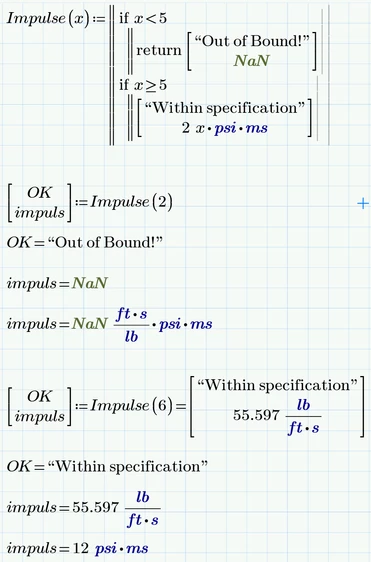
Here is an approach which separates the message text from the resulting value:

Werner_E_0-1578084954780.png


1 reply

Werner_E25-Diamond IAnswer
25-Diamond I
January 3, 2020

You may consider replacing the text by NaN (still not looking like what you want to see, I know).

The problem is that Prime won't let you multiply a text by a unit.

Here is an approach which separates the message text from the resulting value:

Werner_E_0-1578084954780.png


1-Visitor
January 3, 2020

That does address the issue of the formula not running, but my bigger desire is to make it convey the desired information. I'd prefer the formula to actually display the specific error message so someone reading the worksheet can easily interpret what's happening. I don't feel like the "not a number" solution really conveys anything that the current "?" result doesn't already convey.

25-Diamond I
January 3, 2020

So separating the message from the numeric as added to my above result may be an option. The NaN "value" assures that calculations done with that value will fail (in the sense that the result is again a NaN and so can easily be spotted. The message text part can explain in detail why.

BTW, your routine does not cover the case x=5 .