4-Participant
February 12, 2025
Question

Matrix issue PTC Mathcad 10.0.1.0
  • February 12, 2025
  • 5 replies
  • 1421 views

MW_1302355_0-1739393299713.png

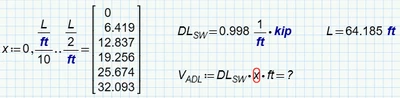
Sorry, I don't know how to get the Vadl value? Could anyone help me please?

5 replies

ttokoro
21-Topaz I
21-Topaz I
February 12, 2025

image.png

t.t.
4-Participant
February 13, 2025

Awesome! It make perfect sense.

Thank you for your help.

~~~~~~~~~~~~~~~
Md. Wahiduzzaman
Bengal Engineering, Inc.

4-Participant
February 12, 2025

Thank you so much for your help. 

14-Alexandrite
February 13, 2025

Also consider that you defined "i" as a range value and not an array.  A simple way to do it is define "i" as a range of numbers defining the indices of the elements of an array, then do the math to define each element (also using "i").  Alpha is just the rate that you want each calculation to increase by


SPauliszyn_0-1739405538617.png


4-Participant
February 13, 2025

Thank you so much!

~~~~~~~~~~~~~~~
Md. Wahiduzzaman
Bengal Engineering, Inc.

25-Diamond I
February 13, 2025

OK, in the meantime you already know that the problem was that you defined x as a range and not as a vector.

Instead of using an extra variable i to index the vector to create or to use a utility function to turn a range into a vector, you could also use a utility function which created the vector right ahead - similar to a range definition by providing the first, second and end value.

Furthermore it makes not much sense to me that you strip the unit feet when defining the range/vector "x" just to add the unit again when using "x" in the definition of V.ADL. You don't have to strip the units when defining a range or a vector.

Werner_E_0-1739417783398.png

In case of this simply calculation it would not have been necessary to use vectorization (the arrow over the expression). But its good style and I would suggest to always use it when applying a scalar calculation to vector arguments.

If D would be a vector as well, vectorization would be absolutely necessary as otherwise the multiplication would be done as dot-product (scalar product) and the result so would be a single value and not a vector with 6 values.


BTW, what you did  - following the definition of the range immediately by an evaluation (the = sign at the end) - automatically turned the range into a vector in older Prime versions. So what you did would work without problems in versions of Prime up to P9. Prime 10 is the first version where this undocumented trick does not work anymore. That's the reason you have to resort to other methods to define x as a vector. Three methods to do so where shown in this thread. PTC promised to provide a easier built-in way (either to turn a range into a vector or to create a vector similar to a range, I don't know) in Prime 11.


Prime 10 sheet attached


23-Emerald IV
February 13, 2025

I think it's a serious BUG.

If, with the definitions of L and DLsw as given, this is allowed:

LucMeekes_0-1739431379409.png

LucMeekes_1-1739431386785.png

Then this should be equally allowed:

LucMeekes_2-1739431423294.png

LucMeekes_3-1739431433047.png

There was no such problem with Mathcad (11):

LucMeekes_4-1739431987641.png

Success!
Luc


25-Diamond I
February 13, 2025

There was no such problem with Mathcad (11):

Are you sure? In your last picture of MC11 you did not try to assign the expression to a variable V.ADL !


The main difference and cause of the problem is this attempt to assign the 'calculation' to a variable!
And as far as I remember it was the very same in real Mathcad, too. At least it is in Mathcad 15:

Werner_E_1-1739447798271.png

Its a mis-use of a range variable. The bug, if we want to call it such, is that Mathcad allows the evaluation of an expression like 2*r with r being a range without throwing that very error, not that it refuses the assignment to a variable.

A range is kind of an implicit loop and and an expression using a range seems to be kind of an invalid object (so it can't be assigned a variable) but still can be displayed on its own without an error (which sometimes may be convenient).

So the behaviour in Prime is the very same as its in Mathcad(15)

Werner_E_2-1739448051707.png


23-Emerald IV
February 13, 2025

I'm afraid you're right (again!).

Luc