
14-Alexandrite
February 4, 2026
Solved

Plot Issue

  • February 4, 2026
  • 2 replies
  • 327 views

I'm relevely new to Mathcad. and today i run into a weird issue.

I have created a plot. and the first trace works as expected. The second one... the data is there but it isn't plot the way as i expected.

With symbols on i see the dots. but the line in between isn't plotted, and i don't have a clue why it isn't plotted at all.
I have tried to change the circle to also have 3 points what works perfect. The example here defines also data and works also. I tried changing data; plot types; etc, but nothing works.
I hope somebody here has an idea
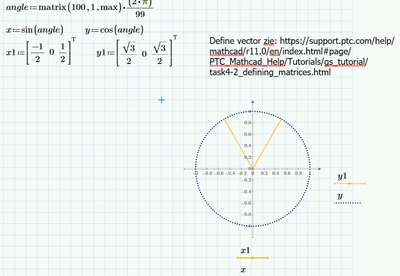
Best answer by rgunwaldsen

Make x1 and y1 column vectors by transposing definition row vectors.


rgunwaldsen_0-1770222849642.png


2 replies

15-Moonstone
February 4, 2026

Make x1 and y1 column vectors by transposing definition row vectors.


rgunwaldsen_0-1770222849642.png


25-Diamond I
February 4, 2026

The plot works as expected and you correctly had linked to an example for the so called "waterfall" plot.

Here a couple of vectors is plotted over other vectors.

In this example you can three separate traces because the matrix with the most columns has three columns (the y-matrix). Therefore the last column of the two-column x-matrix is also used for the third trace.

Each trace consists of just three points because the matrix with the least number of rows has just three rows. The fourth row of the y-matrix is not used at all. (And yes, one could certainly argue that it is somewhat inconsistent to use the maximum number of columns for the number of traces, but the minimum number of rows for the points to be plotted for each trace.)

The points of each trace are connected (depending on the line style selected in the plot menu), but the three traces are NOT CONNECTED to each other.

Werner_E_0-1770224950878.png

As is explained in the example you linked to, that's similar to creating three separate traces. The difference is that if you create three separate traces you could select color, line style. etc. for each trace separately, while in a waterfall plot all share the same settings.

Werner_E_1-1770225121828.png


In your example you provide two matrices with three columns but just one row.

That way you get three not connected traces but each of them consists of just one point (because there is only one row).


If you follow the advice of @rgunwaldsen  and transpose your matrices you get just one trace (because you provide just one column) which consists of three connected points (beacuse you provide three rows), which is what you seem to have expected.

As its just one simple trace we won't call it "Waterfall" plot, though 😉


15-Moonstone
February 4, 2026

Werner - as usual, your explanation is cogent and correct. But I think the user was simply asking how to make his 3 points of data display like his circular data; i.e. X versus Y where X and Y are vectors. A waterfall plot would typically be used for 3 dimensions of data; for example a sonar display showing time histories of bearing versus frequency data.

25-Diamond I
February 4, 2026

I only commented on the waterfall plot because @jw_CS  had mentioned and provided a link to an example page where the usage of waterfall plots is shown and he was confused why it works in that example and not for his approach as he wrote "The example here defines also data and works also". That's the reason I explained what waterfall plots actually are meant for and how they work.

And so I also tried to explain that he, because he was defining row vectors instead of column vectors, mistakenly and certainly unintentionally created a waterfall plot where each trace would consist of one point only.

I agree that he sure simply intended to create the plot you had shown