
6-Contributor
February 28, 2026
Solved

Plot variables over a common X-Axis

  • February 28, 2026
  • 2 replies
  • 104 views

Hi PTC Community -


I have two variable quantities (Water & Ammonia) evaluated over two different temperature ranges over which only they are each valid.

I would like to plot both with a common x-axis range (-70°C to +370°C), and not be limited to either the T1 or T2 (MIN, MAX) range.

See how the Ammonia (pink) plot is being limited to the MIN(T1) value of 1°C.


See attached. I am using Mathcad Prime 11.0.1.0.


Your tips and suggestions for a fix will be appreciated.


Regards,

thodij
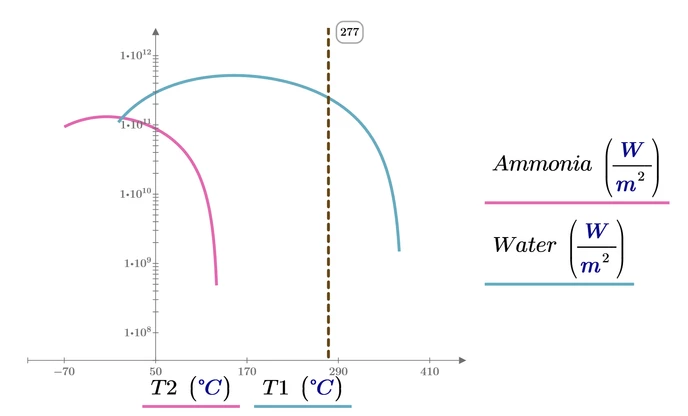
Best answer by Werner_E

Like this?

grafik.png

You can add expressions at the abscissa the same way as you did at the ordinate - either via the menu using "add trace" or by the keyboard short Ctrl+Enter

2 replies

23-Emerald IV
February 28, 2026

Add a second ordinate expression, match the order up such that you have the right T(2?) to go with the ammonia and then T(1?) with water.


Success!
Luc


thodij6-ContributorAuthor
6-Contributor
February 28, 2026

Luc,


Thank you for your response.

I do not see how to do that from the plots menu.


Thanks,

thodij

23-Emerald IV
February 28, 2026

Put your cursor on the T1 (X-axis variable) and select "Add trace" from the Plots menu.

Now the order of X-axis expressions must match what is needed for the corresponding Y-axis expression.  If there are less X-axis expressions then Y-axis expressions, the last X-axis expression is used for every subsequent Y-axis expression. That is what you had (1 X-axis expression for the first, and the second Y-axis expression).
In the mean time, Werner has shown what it looks like.


It's as simple, and intuitive as every other interface of Prime.


Success!
Luc


Werner_E25-Diamond IAnswer
25-Diamond I
February 28, 2026

Like this?

grafik.png

You can add expressions at the abscissa the same way as you did at the ordinate - either via the menu using "add trace" or by the keyboard short Ctrl+Enter

thodij6-ContributorAuthor
6-Contributor
February 28, 2026

Perfect!


This is what I am looking for.


Thanks to Werner, and Luc.


Regards,

thodij