
24-Ruby III
March 25, 2016
Question

PTC Mathcad Prime Roadmap (2015/2016 update)

  • March 25, 2016
  • 30 replies
  • 26776 views

At the last event "PTC LiveWorx Europe 2015" in November of 2015 it was presented a roadmap for the development of Mathcad Prime 4.0 and some future steps (themes) for Prime direction. PDF "PTC Mathcad Roadmap_2015" can be found in attachment. You can see what updates are planned for version 4.0 (now the release of version 4.0 is scheduled for the 4th quarter of 2016 year) and is scheduled for subsequent releases after 4.0.


Update_June 2016: New timeline (at time of June 2016) for Mathcad/Mathcad Prime product:
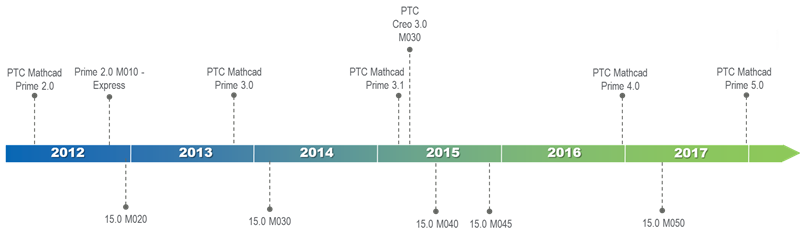

Roadmap.png


Update_Jule 2016: In June of 2016 year within an annual meeting conference "PTC LiveWorx 2016" the new program of development for Mathcad Prime was submitted. For future release of Mathcad Prime 4.0 the same new planned features were shown in the program about which I wrote earlier here (except for expanded options of creation of 2D plots - this feature is transferred it for 5.0 version😞 Mathcad Prime 4.0: some new updates

PDF "PTC Mathcad Roadmap_2016" can be found in attachment.


Update_February 2017: Added the presentation about Mathcad Prime 4.0 from the PTC Forum Europe which was in November 2016.


30 replies

1-Visitor
December 3, 2016

Try Maple. Mathematica is also very good. But probably not an ideal MathCAD replacement. 

24-Ruby IV
December 4, 2016

I use Mathcad and Maple.

About Mathcad see please this forum.

About Maple see Application Author: Prof. Valery Ochkov - Application Center

24-Ruby IV
December 4, 2016

ian williams написал(а):

I think PTC has probably killed MCAD.

I think PTC is trying to save Mathcad after MathSoft threw (sold) it.

24-Ruby IV
December 4, 2016

ian williams написал(а):

Try Maple. Mathematica is also very good. But probably not an ideal MathCAD replacement.

It is one main idea of my book Физико-математические этюды с Mathcad и Интернет

1-Visitor
December 4, 2016

Very impressive!  To be honest, one of the things I loved most about MathCad (I still have the distribution disks for MathCad 2000i, and had been using it for maybe a decade before that) was the ability to easily compose "math-looking" formulas just by typing, with no need for mouse-clicking to group numerator/denominator, do subscript/superscript, exponentiate, etc.  I also found writing MathCad functions fairly intuitive, and loved the symbolic stuff.

I'd tried Mathematica, but found myself at odd with Wolfram's decision to "invent a new syntax" for programming notation and for mathematics (one of my earliest issues was dealing with 3D rotations and the appearance of yet another Wolfram coordinate system).  I ran into Maple at a trade show, and knew that it shared some kinship with MathCad (PTC had taken over by this point, and MathCad wasn't "progressing" as it had been), so I gave it a try.  Again, I was really looking for something I could both use (to get an answer) and document/publish (i.e. have Math look like Math, Text look like Text, and have them easily and naturally co-exist).  I confess I probably didn't spend enough time with Maple -- as I still have it, maybe I'll spend some more time with it, if only to appreciate your examples.

Bob Schor

24-Ruby IV
December 5, 2016

One example from my book Physical and Math Studies with Mathcad and Internet

Физико-математические этюды с Mathcad и Интернет

Mathcad and Maple have no solution

10-17-infinity.png

Wolfram Alfa has no solution too but points one way to solution

10-18-Wolfram.png

After this Mathcad has solution

10-19-solve.png

1-Visitor
December 5, 2016

Hi Valery,

Not sure what you've done with Wolfram Alpha.  But, as far as I can see, Mathematica proper (V11) provides the same solution as Mathcad. And in one easy step - see below.  In my experience Mathematica is probably the best of the bunch for stuff like this.  But isn't so good at some of the simpler things.  Like laying out straightforward, traditionally formatted calculations and units handling.  Mathcad and Maple are better at that.  In my opinion 😉

All the best,

Ian

PTC_Forum_Example.PNG

24-Ruby IV
December 5, 2016

Sorry, I have not Mathematica. It's own want to have not me but my money.

1-Visitor
December 5, 2016

Why do people make more worse versions with lesser function in a newer Program and higher price?

Is there a reason i want understand. Is it possible to say in which Prime version (120? lol) same features as in Mathcad 15 are?

And when i can update to Prime?

We need less programming code in company only very few stuff. Only have really long and complicated formulas. Some stuff needs to be iteratively solved.

In my latest iteration code which is really long i had problems with mcad (very slow writing until impossible rowbrake not possible in code). I dont know why it gets so slow. I need better writing features. Not want to copy every Mcad page into word to make my 400 pages report with 99 percent copied mcad pages.

Still not knowing if there is a solution.

Why is it so complicated to add more word stuff?

(Content page etc.)


Is Maple better in that way? Seems to be no alternative solution to the white board freely formula droping  place system in Mcad?

Thx in advance

Regards Stefan

1-Visitor
December 5, 2016

If you want Mathematica for personal use only, Wolfram will sell you a license for about £200 (that's UK Sterling). This gives you the full system with nothing stripped out.  That's a fraction of its full cost (circa £2,000).  And substantially less than Mathcad which sells for about £1,000 (and doesn't offer a personal use license, although the stripped down and somewhat crippled express flavour is freely available).  I think MapleSoft also offer a personal use license for around £200.

Or, if you want something that's free, you could take a look at Anaconda.  I've not used it.  But, based on a brief peek, it looks like it could be a viable alternative to the three Ms.

All the best,

Ian