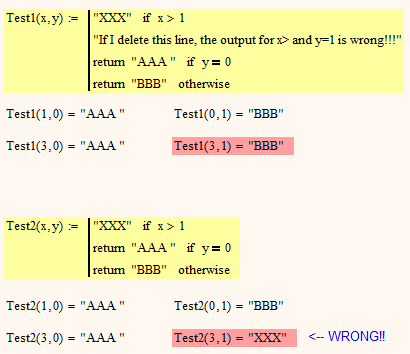
I only wonder why I didn't came across that descrepancy sooner, or did I? |
You got lucky?
In MC15 the only ways to terminate a conditional block is with either an "otherwise", or a line with no conditional statement in it. Since the only conditional statements available are "if" and "otherwise", there had to be a choice between evaluating all consecutive if statements, or exiting the block when any one was true. I guess it was decided the lesser of two evils was to evaluate all of them (a decision I personally agree with). Since the "otherwise" is only meant as a trap when none of the conditions are met, in my opinion it is logical that it is not evaluated unless none of the conditions are met. So your test1 program has two conditional blocks, but your test2 program has only one. It's made even more confusing by the fact that you don't have a return statement on the first line. It means that in test1 the line actually has no effect at all.
You are not the first person to be confused by this behavior (surprise!). Even if you know how it works, it can also make it hard to figure out what a program will actually do. It's also rather limiting, because sometimes what you want is an "else if" or case statement, but that is not easy to create in MC15. Hence the changes in Prime. There are things I don't like about Prime, but IMHO the new conditional structure is a huge improvement.