16-Pearl
July 20, 2017
Solved

Successive solve blocks

  • July 20, 2017
  • 2 replies
  • 6074 views

I have a few questions for our resident experts.  I am working on a sheet that I'd like to have use multiple solve blocks.  The first block feeds results to the second block.  While I can do it - I wonder if there isn't a simpler way.  It's rather cumbersome to set everything up this way.  


I'm also curious about how MC works in regards to solving - as it seems sluggish.  Is MC solving the same solve block over and over every time I call the functions (e.g. When I solve for L(alpha) and K(alpha) does it solve the 2nd block twice and the first block 4 times)?


Here's a picture of a very simplified version.  MC4.0 attached.  (note: actual sheet is 18 pages with dozens of variables and I'm using multiple blocks because using one block has become unmanagable.  It also allows me to use existing calculation templates without merging calculations.)  
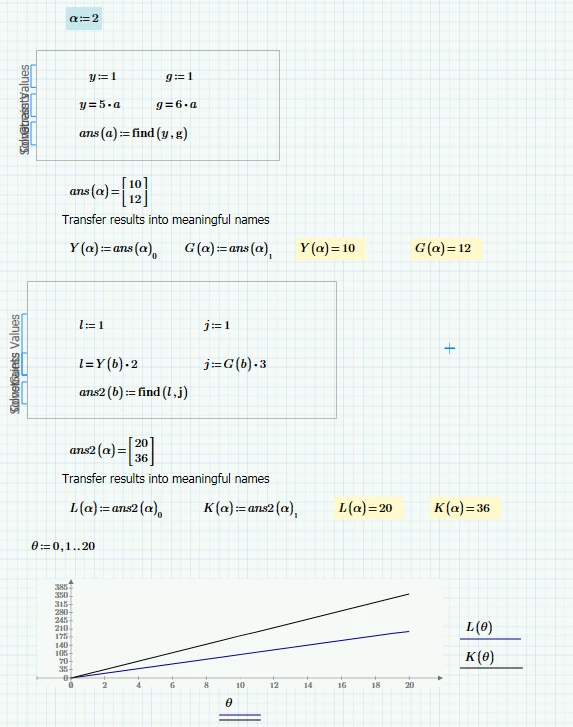
 

2017-07-20_8-31-41.png


Is there a better way?

Thanks,


Best answer by Werner_E

@dferry wrote:

Yes that's even better. 


I think I'd rather prefer the first variant, but I guess you will like the third one here 🙂

Pic.png


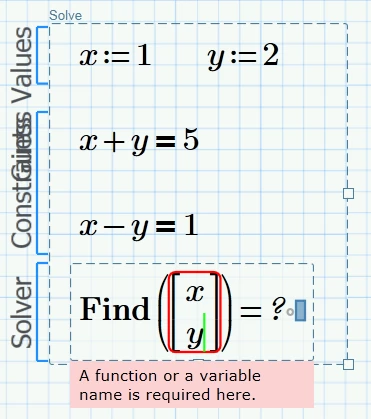
Is there any way the find command could be broken up with matrices or similar to shorten it.

I don't think so. "Find" won't accept vectors or vector elements as arguments.

But I waas surprised as of the error message we get. How would we use a function as argument in the find command??

 Pic2.png

2 replies

23-Emerald I
July 20, 2017

I don't know of a different way. 

25-Diamond I
July 20, 2017

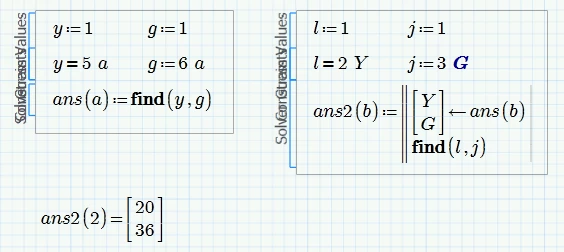
Get rid of the fundtions Y and G

The argument of the second solve block should rather be a 2-element vector (and used accordingly)

The call should be ans2(ans(b))=...

Thus avoiding the repeated call of the first solve block.

Functions K and L still call the solve block twice which is not efficient but the only way to get around this is to use a vector theta (rather than a range) which is fed in ans2(ans(theta)) and the result will have to be separated in two vectors K and L. A lot of work to avoid the double call of the block, so I have not implemented it below:

Pic1.png


> (e.g. When I solve for L(alpha) and K(alpha) does it solve the 2nd block twice and the first block 4 times)?

Even worse! When you evaluate L(2) then the 2nd solve block ist evaluated once and when you evaluate K(2) the same calcuation is done again (unneccesary, but I can't think of avoiding this if you need distinct functions K and L.

Oc course you could always use something like stack(K,L):=ans2(2). to get the values with just one call to the solve block.

BUT .... whenever you evaluate L(2) the way you had set it up the first solve block ist called twice with every iteration the second block does. If (for a more complex constraint) each block needs 50 iterations to get its result, L(2)=  would call the first solve block 100 times!

For the plot of L(theta) the first solve block would be called 2100 times.

With my modification L(2) calls the first solve block only once and plotting L(theta) calls it 21 times.

DJF16-PearlAuthor
16-Pearl
July 20, 2017

Thanks Werner.  Seems like there is no good solution.  If I set it up your way it's faster, but I wind up having to call variables "vector [ subscript" instead of something meaningful like "Velocity" & "Pressure" - kind of defeating the readability of a mathcad file and making future changes difficult.  But doing it my way I'm re-solving things many, many times.  sigh.  I think I'll just do it my way as my baseline calculation & documentation - and then transfer everything to a different program to solve it quickly.

23-Emerald IV
July 20, 2017

You don't show the full problem, I accept that....But:

Is there no way to solve your individual problems analytically (symbolically), thus avoiding the solve-block hassle...?


Luc