14-Alexandrite
July 6, 2023
Solved

Unable to extract a value from a matrix

  • July 6, 2023
  • 3 replies
  • 3199 views

Greetings all,


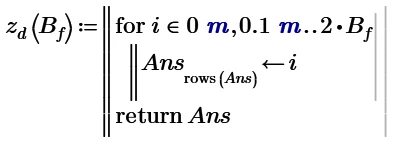
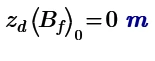
I am trying to extract value  from a randomly defined matrix but I am unable to do so. I have attached the file and image for reference. Please help.
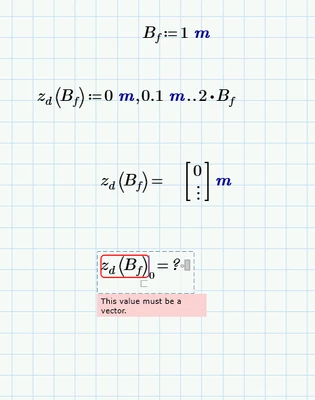
 

fahmed2_0-1688674018788.png

 Thank you,


Best answer by ttokoro

image.pngimage.png

3 replies

ttokoro
21-Topaz I
21-Topaz I
July 6, 2023

image.pngimage.pngimage.png

t.t.
ttokoro
21-Topaz I
ttokoro21-Topaz IAnswer
21-Topaz I
July 6, 2023

image.pngimage.png

t.t.
14-Alexandrite
July 6, 2023

As @ttokoro  has illustrated, you should first assign the function to a variable and then evaluate it. Once you've done this, you will be able to access the elements:

EP_10515634_1-1688685988993.png

EP_10515634_2-1688686000710.png


EP_10515634_0-1688685972814.png

EP_10515634_3-1688686024738.pngEP_10515634_4-1688686038861.png

EP_10515634_5-1688686050919.png

EP_10515634_6-1688686062185.png

EP_10515634_7-1688686100441.png

EP_10515634_8-1688686117258.png


25-Diamond I
July 7, 2023

What you defined is not a matrix or vector but a range. A range can be seen as sort of implicit loop and not as a collection of values. So you can't access individual values like you can do with a matrix/vector.

Its a pity that in Prime there is no difference between the display of a vector and that of a range - they look the same and this always has resulted in some confusion. You sure are  not the first to fall into this trap.

Ranges should be used just for three purposes:
.) as abscissa values for plotting a function
.) in a prgram when using a for-loop
.) to index the elements of a vector or matrix


What @ttokoro and @Perez  had shown is an undocumented trick to turn a range into a vector by so called inline evaluation (evaluation by adding an equal sign at the end of a definition)

Werner_E_0-1688689543735.png

The screenshot is of Mathcad 15 and as you see in this version there was a little difference between the display of a range and a vector. Nonetheless ranges got confused with vectors in this version, too.

Using an undocumented trick may be a bit dangerous as it can change its behaviour without any notice in future versions. But I alsi use this trick ever so often because its so convenient 😉


@ttokoro also provided a more "legal" way to create a valid vector and there sure are different ways to create a valid vector. If you search the forum you will find different utility functions to create a vector, either by providing start, second and last value as with a range definition, or start and end value and number of elements or start, step width and end value, ...


fahmed-214-AlexandriteAuthor
14-Alexandrite
July 8, 2023

Thank you @Werner_E , @Perez  and @ttokoro for your generous solution. I am trying to make a soil settlement calculation sheet based off mathcad. I am having some issues in getting the total depth of soil thickness beneath the footing. In my worksheet, what I have done is if the footing base rests on the top surface, the value of FB is "-1" and "0" and so forth for the layers from top till bottom. I made a variable "z.depth.below.footing" to find the total soil thickness below the footing base.I realized when I put FB=0, it means that the footing base is resting on the first layer. It means it should have only two layers  beneath the footing base. However, inthe the sheet I see an extra value of "0" in the "z.depth.below.footing" output matrix. Please advise how to solve it.


fahmed2_0-1688774556828.png


Thank you


25-Diamond I
July 8, 2023

Maybe that way? Is this what you are looking for?

Werner_E_0-1688784158000.png

Your approach works equally well if you shift the indices of value accordingly

Werner_E_1-1688784423975.png

or, maybe simpler and straightforward, leave your approach unchanged and simply cut off the values below index i.f.base using the submatrix() function:

Werner_E_3-1688784645744.png

And her two last ones 😉

Werner_E_0-1688785374133.png

Werner_E_1-1688785389489.png