

1-Visitor
February 27, 2025
Solved

xmcd convert to mcdx, why so many errors in mcdx file

  • February 27, 2025
  • 2 replies
  • 551 views

hi ptc team,

i use PTC Mathcad Prime 9.0.0.0 convert xmcd file to mcdx, but there are so many errors in mcdx file,

how to resolve? please help.

Best answer by Werner_E

I think there is no need for you to manually change any labels.

Simply load the converted file in Prime and press F5 or F9 to let it recalculate. Doing so will automatically label the units correctly.

What remains are red line and arrows indicating that something has been changed and may no be displayed differently in Prime. You can ignore these annotations and remove them (ribbon Input/Output, Delete Annotations)

Werner_E_0-1740667599610.png


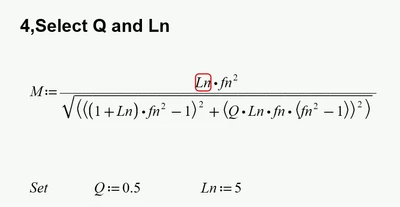
The remaining errors like this one (Ln is not defined)
Werner_E_1-1740667713689.png

are present in the original file as well
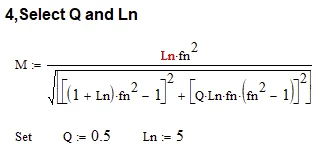
Werner_E_2-1740667770293.png


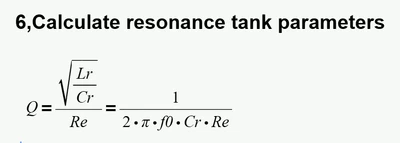
Mathcad is here used just an equation editor for reference purposes only, not for doing any calculation. It would have been better to use the Boolean equal sign (the fat = )  here instead of the assignment operator (:=).
Especially the expression in chapter 6 could be made much better looking that way
Werner_E_5-1740669521203.png


All that remains for you to do is reformatting the sheet so page breaks do not occur in midst of a region, maybe use a smaller font size, smaller margins so its easier to reformat the page avoiding regions to spill over the right margin, etc.
Unfortunately its still a lot of work to do as the converter isn't really doing a good job preserving the page structure.


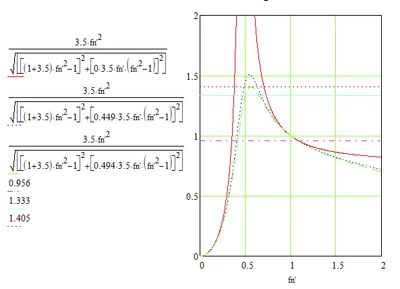
Maybe you also want to reformat the plot as it looks a bit differently in the original
Werner_E_3-1740668069483.png


You may use a smaller typeface to gain more horizontal space for the traces and/or you can move the y-axis expressions to a different position (something which could not be done in good old  real Mathcad).
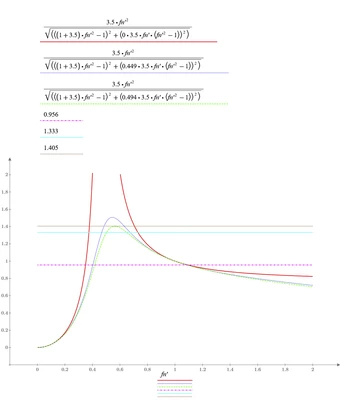
Werner_E_4-1740668267311.png

The three horizontal line which are realised as separate plot traces could be replaced by adding horizontal markers, so there is less room used for the y-axis expressions.


The plot in the original file shows a grid. The native plots in Prime unfortunately do not provide any means for grid lines.

If you need grid lines, you have three options:

1) Manually add them one by one using the option to add horizontal and vertical markers (something that I would not do voluntarily)

2) Use functions which were posted here in the past by LucMeekes and me which create a data structure which when plotted draw the grid lines

3) Don't use Prime's native plots but rather redo the plot in the Chart Component - a badly integrated third party tool. This is really slow, awkward to use and does not support units but it provides some features the native plots are missing, amongst them grid lines, secondary y-axis, etc.


If you need additional help don't hesitate and come back here and ask.

2 replies

21-Topaz II
February 27, 2025

Most of the errors  involve the converter not recognizing units.  Just highlight them  and change to Math | Style | label | Units.

Werner_E25-Diamond IAnswer
25-Diamond I
February 27, 2025

I think there is no need for you to manually change any labels.

Simply load the converted file in Prime and press F5 or F9 to let it recalculate. Doing so will automatically label the units correctly.

What remains are red line and arrows indicating that something has been changed and may no be displayed differently in Prime. You can ignore these annotations and remove them (ribbon Input/Output, Delete Annotations)

Werner_E_0-1740667599610.png


The remaining errors like this one (Ln is not defined)

Werner_E_1-1740667713689.png

are present in the original file as well

Werner_E_2-1740667770293.png


Mathcad is here used just an equation editor for reference purposes only, not for doing any calculation. It would have been better to use the Boolean equal sign (the fat = )  here instead of the assignment operator (:=).
Especially the expression in chapter 6 could be made much better looking that way

Werner_E_5-1740669521203.png


All that remains for you to do is reformatting the sheet so page breaks do not occur in midst of a region, maybe use a smaller font size, smaller margins so its easier to reformat the page avoiding regions to spill over the right margin, etc.
Unfortunately its still a lot of work to do as the converter isn't really doing a good job preserving the page structure.


Maybe you also want to reformat the plot as it looks a bit differently in the original

Werner_E_3-1740668069483.png


You may use a smaller typeface to gain more horizontal space for the traces and/or you can move the y-axis expressions to a different position (something which could not be done in good old  real Mathcad).

Werner_E_4-1740668267311.png

The three horizontal line which are realised as separate plot traces could be replaced by adding horizontal markers, so there is less room used for the y-axis expressions.


The plot in the original file shows a grid. The native plots in Prime unfortunately do not provide any means for grid lines.

If you need grid lines, you have three options:

1) Manually add them one by one using the option to add horizontal and vertical markers (something that I would not do voluntarily)

2) Use functions which were posted here in the past by LucMeekes and me which create a data structure which when plotted draw the grid lines

3) Don't use Prime's native plots but rather redo the plot in the Chart Component - a badly integrated third party tool. This is really slow, awkward to use and does not support units but it provides some features the native plots are missing, amongst them grid lines, secondary y-axis, etc.


If you need additional help don't hesitate and come back here and ask.