5-Regular Member
January 16, 2025
Solved

How to Polynomial Fit on Mathcad Prime 10

  • January 16, 2025
  • 2 replies
  • 1369 views

Hello Mathcadeers,

I am trying to polynomial curve fitting, but could not find any good example on how to do it.

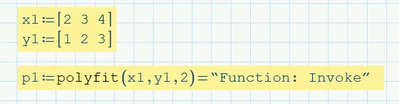
let say I have the following. How do I create a function y1(x1)? Seems Mathcad function "polyfit" function is not the right one.Thanks. 
AkmarulSalleh_0-1737040429564.png


Regards,

Ak


Best answer by terryhendicott

Capture.JPG

2 replies

21-Topaz II
January 16, 2025
5-Regular Member
January 17, 2025

Thanks @terryhendicott  and @Werner_E . You guys are awesom..!!


REgards,

Ak

25-Diamond I
January 16, 2025

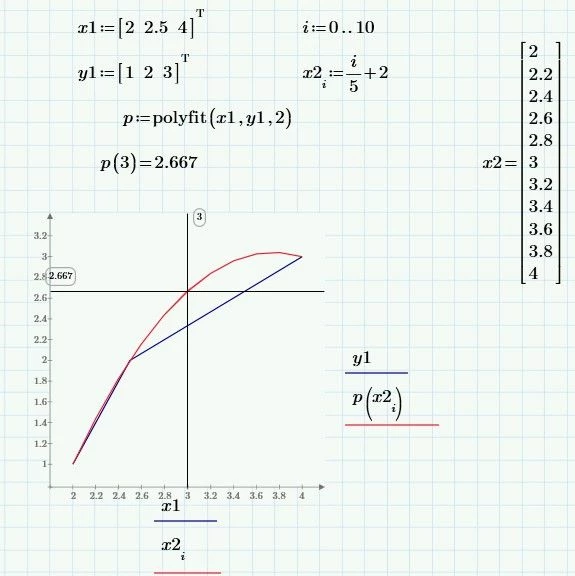
As Terry showed, the first two arguments of the "polyfit" function have to be vectors (= column vectors in Prime, n x 1 matrices).
Row vectors (1 x n matrices) are not seen as vectors in Prime!


Another error was that you tried to numerically evaluate (the = after the definition) this function.

You have also used unfavourable data, because your three points are collinear, which means that the polynomial function would only be linear, so the coefficient of the quadratic term would be zero. This would be no problem for Prime, of course. Nonetheless I changed your data slightly.

I also used X and Y for the data vectors so I have x free to be used in the plot.

polyfit returns a function you can use to evaluate at specific positions or to plot the graph of the function.

Werner_E_0-1737046920061.png

But polyfit will not display the function term! Maybe this was it you tried by adding the equal sign at the end.


To get the values of the coefficients you have to use the polyfitc function.

The second column of its result shows the coefficients, starting with the coefficient of x^0.

Of course we could also use these coefficients to define the polynomial function:

Werner_E_1-1737047196005.png

Prime 10 sheet attached