3-Newcomer
October 2, 2015
Question

Symbolic Evaluation Variable Assignment Problem

  • October 2, 2015
  • 2 replies
  • 5628 views

Hi all,

I was seeing some strange inconsistencies between sheets when attempting to evaluate expressions symbolically.  After some time I traced the inconsistency back to the "point" shown in the attached sheet.

The attached sheet shows what I expect to see.  After evaluating a function and assigning the result to a variable, the symbolic evaluation shows the result.

However, in a different worksheet, I see the following:
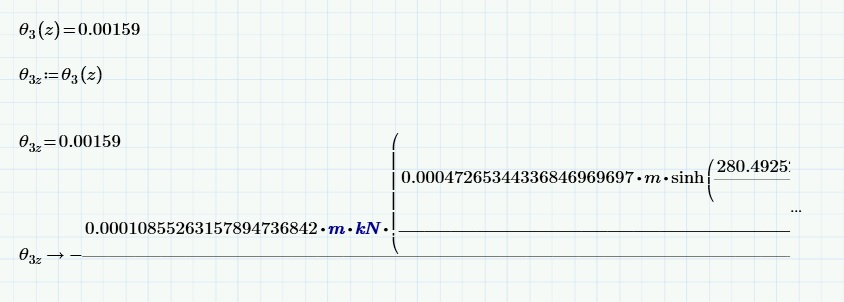
Mathcad inconsistency.jpg

For some reason, Mathcad is presenting the result as the original function.  I'll post the problem sheet if necessary, but as you can see here, Mathcad has already found a numeric solution and assigned it to a variable, and has even managed to display it when called up again.  But when I use the symbolic evaluation on it, it brings up the whole function.  But in the attached worksheet, it does not.

Any ideas why this happens?  Or at least, why the difference between worksheets?

Any advice is greatly appreciated.

2 replies

24-Ruby III
October 2, 2015

Hi Edward,

Please attach to the message your Mathcad Prime worksheet with the issue showen on screenshot above.

EddieP3-NewcomerAuthor
3-Newcomer
October 5, 2015

Attached is a sheet in which this problem occurs.

24-Ruby IV
October 5, 2015

Cannot read Mathcad Prime 3.1

23-Emerald V
October 5, 2015

Edward Plotkin wrote:

Hi all,

I was seeing some strange inconsistencies between sheets when attempting to evaluate expressions symbolically.  After some time I traced the inconsistency back to the "point" shown in the attached sheet.

The attached sheet shows what I expect to see.  After evaluating a function and assigning the result to a variable, the symbolic evaluation shows the result.

However, in a different worksheet, I see the following:

Mathcad inconsistency.jpg

For some reason, Mathcad is presenting the result as the original function.  I'll post the problem sheet if necessary, but as you can see here, Mathcad has already found a numeric solution and assigned it to a variable, and has even managed to display it when called up again.  But when I use the symbolic evaluation on it, it brings up the whole function.  But in the attached worksheet, it does not.

Any ideas why this happens?  Or at least, why the difference between worksheets?

Any advice is greatly appreciated.

What you're seeing is expected behaviour and is the result of the symbolic processor not being designed to handle units.  As far as symbolics are concerned, units are just names and have no special meaning.  Furthermore, they have no value, so the symbolic processor does what its name suggests and simply evaluates them as symbols. This will consist of basic simplification (eg, m/m = 1) until it can't reduce the expression anymore.   If you were to define all of the units (in Unit Label) as 1, or the appropriate multiple, you'd get a pure numeric answer from the symbolic processor. 

Try typing x:=1 m and then symbolically evaluate x.   It would be more obvious what was going on if the symbolic processor retained the Math Label.

If you type = in line with the symbolic evaluation, you will also get a correct numeric answer as the symbolic processor passes the expression to the numeric processor (which is units aware) before assigning the result to the variable.

Stuart

EddieP3-NewcomerAuthor
3-Newcomer
October 5, 2015

But how come in the sheet which is attached in my original post, it works fine?  It still has the same units (I think, I'll have to check when I'm at work again).  Why the difference between the two sheets?

23-Emerald V
October 5, 2015

Edward Plotkin wrote:

But how come in the sheet which is attached in my original post, it works fine?  It still has the same units (I think, I'll have to check when I'm at work again).  Why the difference between the two sheets?

Your units cancel (symbolically) in the first sheet, so you get a pure numeric result.   They don't cancel in the second sheet, so you get the symbolic result.   Try defining GPa:=1 at the start of the first sheet and you'll see that you get a result in Pa from the symbolic processor.

Stuart