
cancel
Showing results for 
Search instead for 
Did you mean: 
cancel
Showing results for 
Search instead for 
Did you mean: 

Community Tip - Need to share some code when posting a question or reply? Make sure to use the "Insert code sample" menu option. Learn more! X

Translate the entire conversation x

Class java.lang.string cannot be cast to class java.lang.integer when using a Reference Doc Template

IanW
10-Marble

Class java.lang.string cannot be cast to class java.lang.integer when using a Reference Doc Template

Version: Windchill 12.1


Use Case: I have created a Reference Document Template using an Excel Document.


Description:

When trying to create the first Reference Document using the new Template I get the attached error.  Not sure which field is creating this issue?
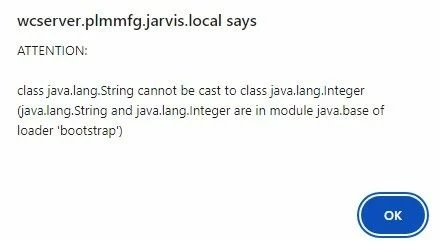
Catalina_0-1742917824103.jpeg


5 REPLIES 5
Catalina
Moderator
(To:IanW)

Hi @IanW 


Thank you for your question! 


I’d like to recommend to bring more details and context to your initial inquiry. For example:

  • How did you configure the Reference Document Template using the Excel document? Are there any specific fields or settings you customized?
  • Have you checked the field mappings between the Excel document and the Reference Document Template? Are there any fields that might be causing the issue?

Please refer to this guideline to make your questions more likely to receive a quick and useful answer. 

This will increase your chances to receive meaningful help from other Community members. 


Thank you for your participation and please let me know if you need further assistance! 


Best regards,


Catalina
PTC Community Moderator
PTC
HelesicPetr
22-Sapphire II
(To:IanW)

Hi @IanW 

The method server logs could help you to identify the root case.

The error just say. that you put string value in the integer type so it is not compatible


If your excel file contains some columns that are linked to the Windchill attribute, then be sure to use correct excel type column. 


PetrH

@HelesicPetr 

Petr,


I help Ian with this post.

You would not believe what I found.


The TemplatesUtilitly.changeFilename() method was failing while trying to get the filename truncation length from the preferences.

The line that failed is below.

Integer var14 = (Integer) PreferenceHelper.service.getValue("/com/ptc/windchill/enterprise/templates/doc/filenameTrunctionLength", "WINDCHILL", var13, var12);


The PreferenceHelper.service.getValue() method return an Object which happens to be a String in this case.  I did confirm this. And it is deprecated.

So, I hacked the class and changed it to a non-deprecated method to get the object and then create the Integer object.


Object obj = PreferenceHelper.service.getValue(var13.getContainerReference(), "/com/ptc/windchill/enterprise/templates/doc/filenameTrunctionLength", "WINDCHILL", var12);
Integer var14 = Integer.valueOf(obj.toString());


The hack works great.

I have passed this on to TS.

Curious to see what they come back with.


FYI, the PreferenceHelper.service.getValue() method is deprecated.  Not surprised by this.  I see this all the time with OOTB code.


This was good one.  Keep 'em coming 😊

David

avillanueva
23-Emerald I
(To:d_graham)

So it seems @IanW stumbled on a bug? Any way it can be worked around for now? Is this avoidable?

@avillanueva 

The OOTB .getValue() method return an Object.

The object is a String.

The developer simply tried to cast the String object to an Integer object. Good luck with that.


I think the easiest, bombproof solution is to do what I did which is hack the OOTB code.


To be honest it was fun figuring out where the code choked and why and then hacking it to get it to work.


As stated earlier, keep ‘em coming 😁

Announcements
Top Tags