How can we make a 3D Widget on HoloLens visible in front of me everytime ?
- April 6, 2020
- 13 replies
- 403927 views
How can we make a 3D Widget on HoloLens visible in front of me every time ?
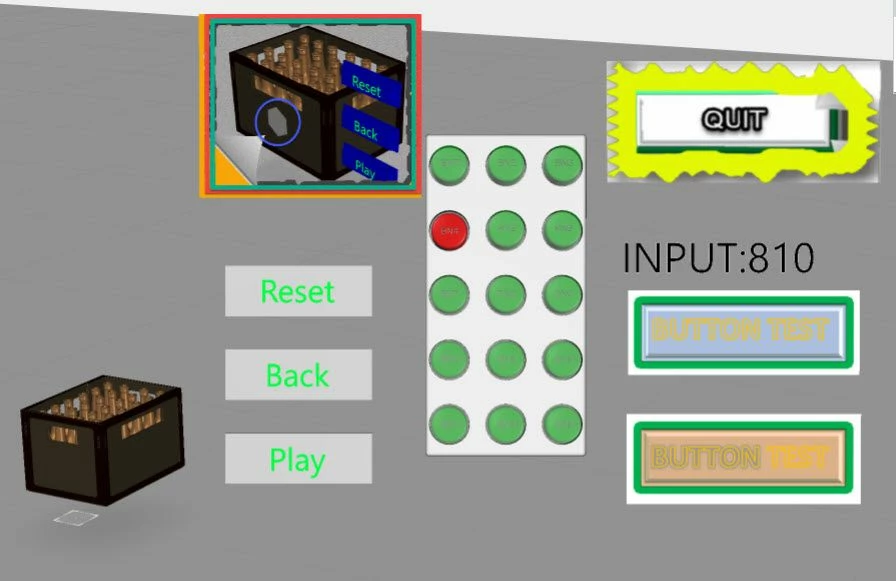
The goal here is to get a some UI containing 3D Widgets (3dButtons , 3dImages , 3d Labels and 3d Models) in front of current HoloLens view. For example after saying "show UI" the UI elements should appear in front view e.g. distance of 1,5 meters. Example:
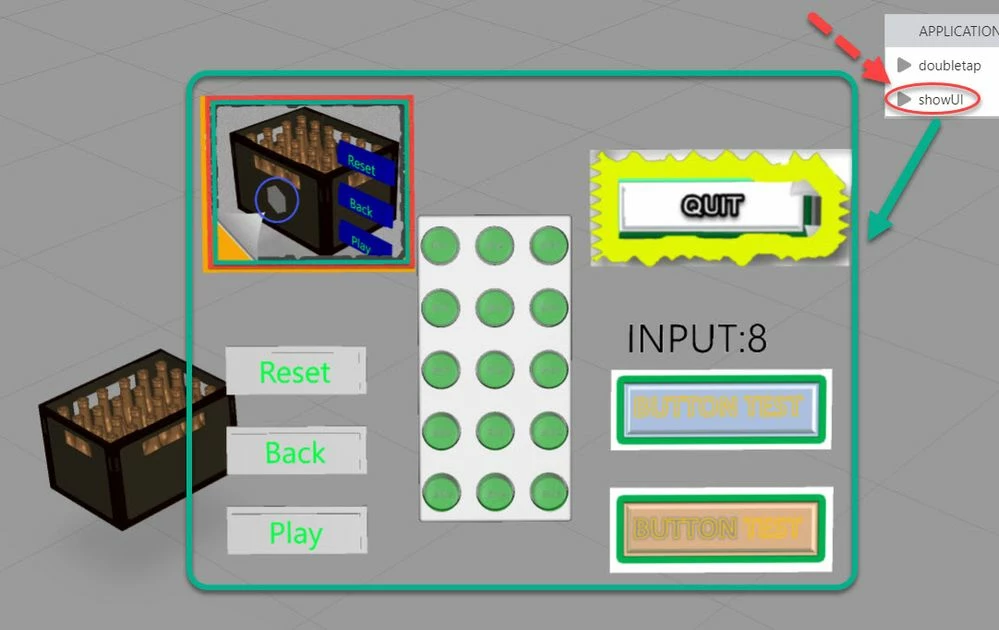
In the Tech Tip article "How to create a custom button pressable on HoloLens device?" is shown how to create a custom UI button. Now based on the example of this project the functionality will be extended by adding the possibility for dynamic display of the UI elements in front of the current view.
To be able to move the elements in front of us we need to calculated the current view matrix and the inverse matrix of if. For this goal we need to prepare some mathemtics function like , matrix inverse calculation, marix multiplication , matrix with vector multiplicaiton, vector product und dot vector product ... etc. When we sear in Internet there a lot of sources where we can find the informormation how to implement such mathematical tools.
- The first steps is to calculate the view matrix - e.g. some code:
...
function get_mat4x4_camera(eyepos,eyedir,eyeup)
{
 // printVector(eyepos, "eyepos")
 // printVector(eyedir, "eyedir")
 // printVector(eyeup, "eyeup")
 var mat4x4 =[[1.0,0.0,0.0,0.0],[0.0,1.0,0.0,0.0],[0.0,0.0,1.0,0.0],[0.0,0.0,0.0,1.0]];

 var i=0;
 var eyeZaxis 	= this.vec_normilize(eyedir);
 var eyeYaxis 	= this.vec_normilize(eyeup);
 var eyeXaxis 	= this.vec_normilize(this.vec_product(eyeYaxis,eyeZaxis))

 for (i=0;i<3;i++) mat4x4[i][0] = eyeXaxis[i];
 for (i=0;i<3;i++) mat4x4[i][1] = eyeYaxis[i];
 for (i=0;i<3;i++) mat4x4[i][2] = eyeZaxis[i];
 for (i=0;i<3;i++) mat4x4[i][3] = eyepos[i];
 //for (i=0;i<3;i++) mat4x4[i][3] = 0.0-eyepos[i];
 return mat4x4;
 //return this.transpondMat(mat4x4);
}
////////////////////// vector with length =1.0
function vec_normilize(ary1) {
ret=[];
 var len=this.vec_len(ary1);
 for (var i = 0; i < ary1.length; i++)
 ret[i]=ary1[i]/len;
 return ret;
 };
//vector product range =3
function vec_product(a, b) {

 var vecprod =[0.0,0.0,0.0];
 vecprod[0]=a[1]*b[2]- a[2]*b[1];
 vecprod[1]=a[2]*b[0]- a[0]*b[2];
 vecprod[2]=a[0]*b[1]- a[1]*b[0];

 return vecprod;
};
When we find programming code for mathematical operation we need to verify it by some examples where we know the results, because often there are some math sources which does not implement the correct solution.
I think a good resource are e.g.:
https://www.learnopencv.com/rotation-matrix-to-euler-angles/
https://en.wikipedia.org/wiki/Conversion_between_quaternions_and_Euler_angles
https://developer.mozilla.org/en-US/docs/Web/API/WebGL_API/Matrix_math_for_the_web
So that we do not need to re-invent the wheel, but we need to be careful to find the correct mathematical relations and to test and verify if they really work.
- Next step is to calculate the invert matrix of the view matrix. A good implementation I found is this one:
function matrix_invert(M){
 // I use Guassian Elimination to calculate the inverse:
 // (1) 'augment' the matrix (left) by the identity (on the right)
 // (2) Turn the matrix on the left into the identity by elemetry row ops
 // (3) The matrix on the right is the inverse (was the identity matrix)
 // There are 3 elemtary row ops: (I combine b and c in my code)
 // (a) Swap 2 rows
 // (b) Multiply a row by a scalar
 // (c) Add 2 rows

 //if the matrix isn't square: exit (error)
 if(M.length !== M[0].length){return;}

 //create the identity matrix (I), and a copy (C) of the original
 var i=0, ii=0, j=0, dim=M.length, e=0, t=0;
 var I = [], C = [];
 for(i=0; i<dim; i+=1){
 // Create the row
 I[I.length]=[];
 C[C.length]=[];
 for(j=0; j<dim; j+=1){

 //if we're on the diagonal, put a 1 (for identity)
 if(i==j){ I[i][j] = 1; }
 else{ I[i][j] = 0; }

 // Also, make the copy of the original
 C[i][j] = M[i][j];
 }
 }

 // Perform elementary row operations
 for(i=0; i<dim; i+=1){
 // get the element e on the diagonal
 e = C[i][i];

 // if we have a 0 on the diagonal (we'll need to swap with a lower row)
 if(e==0){
 //look through every row below the i'th row
 for(ii=i+1; ii<dim; ii+=1){
 //if the ii'th row has a non-0 in the i'th col
 if(C[ii][i] != 0){
 //it would make the diagonal have a non-0 so swap it
 for(j=0; j<dim; j++){
 e = C[i][j]; //temp store i'th row
 C[i][j] = C[ii][j];//replace i'th row by ii'th
 C[ii][j] = e; //repace ii'th by temp
 e = I[i][j]; //temp store i'th row
 I[i][j] = I[ii][j];//replace i'th row by ii'th
 I[ii][j] = e; //repace ii'th by temp
 }
 //don't bother checking other rows since we've swapped
 break;
 }
 }
 //get the new diagonal
 e = C[i][i];
 //if it's still 0, not invertable (error)
 if(e==0){return}
 }

 // Scale this row down by e (so we have a 1 on the diagonal)
 for(j=0; j<dim; j++){
 C[i][j] = C[i][j]/e; //apply to original matrix
 I[i][j] = I[i][j]/e; //apply to identity
 }

 // Subtract this row (scaled appropriately for each row) from ALL of
 // the other rows so that there will be 0's in this column in the
 // rows above and below this one
 for(ii=0; ii<dim; ii++){
 // Only apply to other rows (we want a 1 on the diagonal)
 if(ii==i){continue;}

 // We want to change this element to 0
 e = C[ii][i];

 // Subtract (the row above(or below) scaled by e) from (the
 // current row) but start at the i'th column and assume all the
 // stuff left of diagonal is 0 (which it should be if we made this
 // algorithm correctly)
 for(j=0; j<dim; j++){
 C[ii][j] -= e*C[i][j]; //apply to original matrix
 I[ii][j] -= e*I[i][j]; //apply to identity
 }
 }
 }

 //we've done all operations, C should be the identity
 //matrix I should be the inverse:
 return I;
}
- Further we need to extract from the inverse matrix the Euler angels for rx , ry, and rz:
//==============================
function lcs2Euler(	X1x, X1y, X1z,
				 Y1x, Y1y, Y1z,
				 Z1x, Z1y, Z1z) {

	var x=0;
	var y=0;
	var z=0;

 var sy = Math.sqrt(X1x * X1x + Y1x * Y1x);
 if (!sy < DBL_EPSILON) {
 x = Math.atan2( Z1y, Z1z);
 y = Math.atan2(-Z1x, sy);
 z = Math.atan2( Y1x, X1x);
 }
 else {

 x = Math.atan2(-Y1z, Y1y);
 y = Math.atan2(-Z1x, sy);
		z = 0;
		}
	//printVector	([pre,nut,rot],"lcs2Euler");
	return [x,y,z];
}- We already calucalted the rotation and now we need to calculate the x,y, z postion. This will be a point which is in front of use - along the gaze vector with particular distance and then x, and z corrinates of the view X and View Y vector:
$scope.setWidgetProp( wdgName, 'rx', rad2deg(EulerAnglesInv[0]) )
$scope.setWidgetProp( wdgName, 'ry', rad2deg(EulerAnglesInv[1]) )
$scope.setWidgetProp( wdgName, 'rz', rad2deg(EulerAnglesInv[2]) )

var eye_dir_norm = vec_normilize($scope.eyedir)
//projected to normal
 var eyeZaxis 	= eye_dir_norm;
 var eyeYaxis 	= vec_normilize($scope.eyeup);
 var eyeXaxis 	= neg_dir(vec_normilize(vec_product(eyeYaxis,eyeZaxis)))
 var newCalc = [];
 // here it will translate along the eye_dir and move in x and y axis
 for (var i=0; i<3; i++)
 		newCalc[i]= $scope.eyepos[i] + disScale*eye_dir_norm[i]
 + Xcomp*eyeXaxis[i] + Ycomp*eyeYaxis[i];

 //correction of the translation to the view plane in distnace of disScale
 $scope.setWidgetProp( wdgName, 'x', newCalc[0] )
 $scope.setWidgetProp( wdgName, 'y', newCalc[1] )
 $scope.setWidgetProp( wdgName, 'z', newCalc[2] )
So that now we can display the UI widgets with some calls like this:
 $scope.setWdgetPos('ShopingCard3DImage', 1.8, -0.25, 0.35)
 $scope.setWdgetPos('3DImage-1' , 1.6, 0.28, -0.1)
 $scope.setWdgetPos('3DImage-2' , 1.6, 0.28, 0.05)
 $scope.setWdgetPos('3DImage-3' , 1.6, 0.28, 0.3)
 $scope.setWdgetPos('3DButton-1' , 1.6, -0.25, -0.1)
 $scope.setWdgetPos('3DButton-2' , 1.6, -0.25, 0.0)
 $scope.setWdgetPos('3DButton-3' , 1.6, -0.25, 0.1)
 $scope.setWdgetPos('model-2' , 1.7, 0, 0.1 , 1)
 $scope.setWdgetPos('3DLabel-1' , 1.6, 	0.25, 0.14)
In this article I provided a demo project which is attached to this article as zip file. I attached also the javascript math function which I used.
Where we have the widget name, distance along the gaze vector from the device and the X and Y position /X and Y view vectors /screen
- To be able to get the device gaze , up(y) and the x vector we can use the 'tracking' event:
//====================
$scope.eyeMat=[];
$scope.eyeInvMat=[];
//====================
$rootScope.$on('tracking', function( tracker,fargs ) {

 for(var i=0; i<fargs.position.length; i++)
 {$scope.eyepos[i]	=fargs.position[i];
 $scope.eyedir[i]	=fargs.gaze[i];
	 $scope.eyeup [i]	=fargs.up [i];
 }

 $scope.eyeMat	=get_mat4x4_camera(fargs.position,neg_dir(fargs.gaze),[0,1,0]);
 $scope.eyeInvMat	= matrix_invert($scope.eyeMat)

 var EulerAngles		=transfMat2Euler($scope.eyeMat);
 var EulerAnglesInv	 =transfMat2Euler($scope.eyeInvMat);

 $scope.$applyAsync();
//////////////////////// finished tml3dRenderer.setupTrackingEventsCommand
})
The tracking callback function will save the current view vectors (gaze, up, postion) to a global variables which could be used later from the other functions.
I created a demo project which is one possible example showing how we can implement such functionality. The sample project is for the HoloLens - I tested with on preview mode and on the HoloLens 1 device and it was working fine. (- zipped project with password "PTC" - please, unzip it and import it to Studio)
A note about the attached file:
- the file project-"HoloLens3dFlexibleUI-article_ExampleProject.zip" should be unzipped to HoloLens3dFlexibleUI-article.zip - which is a project file for Vuforia Studio - demo project and could be imported in the Vuforia Studio UI. To unzip the project-example.zip you need a password simple: 'PTC ' - in capital characters
-the file: myMathFunc.zip contains the used mathematical function definitions (zipped js file) . The javascript file is also contained by the Studio project/ upload folder.
When we test the project:
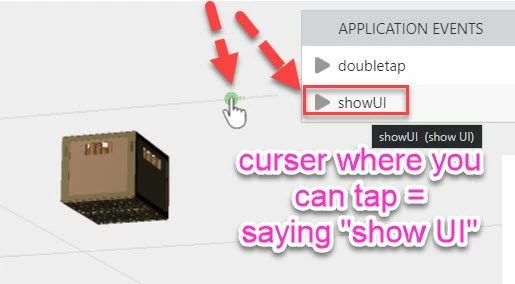
Where we see in front in the middle a cursor where we can tab or we can say show UI to display the UI: