

REST API Example - Creating a Software Package with File Upload
Today we're going to learn how to use the Axeda Platform SDK v2 APIs to upload a file to the platform and create a software package. This document is a work in progress, but we're going to show you everything you need to get started. In my case I am using the very useful and easy to use Postman REST Client app available from the Chrome Store. I'll be using some terms below (API Object Names) that can be found in the documents listed in the bibliography at the end of this article.
Assumptions (Replace these with your own versions):
- username: joe, password: password1!
- platform instance: axedaplatform.example.com
First things first, we need to authenticate to the platform and get a session id (header x_axeda_wss_sessionid).
(Note: Postman does not automatically URL encode query parameters - this can be especially important for the password)
You'll receive a response like this following:
<ns1:WSSessionInfo xmlns:ns1="http://type.v1.webservices.sl.axeda.com" xmlns:xsi="http://www.w3.org/2001/XMLSchema-instance" xsi:type="ns1:WSSessionInfo">
<ns1:created>2015-06-02T15:16:49 +0000</ns1:created>
<ns1:expired>false</ns1:expired>
<ns1:sessionId>1a5XXXXX-d9aa-47f2-ac4f-28765ce5dbc5</ns1:sessionId>
<ns1:sessionTimeout>1800</ns1:sessionTimeout>
</ns1:WSSessionInfo>
Excellent, now we have a session id!
For the rest of the API calls (unless otherwise indicated), all of the following headers are set to the following:
- x_axeda_wss_sessionid: 1a5XXXXX-d9aa-47f2-ac4f-28765ce5dbc5
- Content-Type: application/xml
- Accept: application/xml
The next step is to get our ModelReference:
POST: https://axedaplatform.example.com/services/v2/rest/model/findOne
<?xml version="1.0" encoding="UTF-8"?>
<ModelCriteria xmlns="http://www.axeda.com/services/v2">
<modelNumber>MyModelName</modelNumber>
</ModelCriteria>
Which will return output like:
<v2:Model xmlns:v2="http://www.axeda.com/services/v2" xmlns:xsi="http://www.w3.org/2001/XMLSchema-instance"
id="MyModelName" systemId="6141" label="managed" detail="MyModelName"
restUrl="https://sandbox.axeda.com/services/v2/rest/model/id/6141">
<v2:name>MyModelName</v2:name>
<v2:modelNumber>MyModelName</v2:modelNumber>
<v2:autoRegisterAssets>false</v2:autoRegisterAssets>
<v2:type>MANAGED</v2:type>
...
</v2:Model>
The key piece of information we need from that request is the systemId.
A little bit about our file (lorem-ipsum.txt):
Lorem ipsum dolor sit amet, consectetur adipiscing elit. Integer nec odio. Praesent libero. Sed cursus ante dapibus diam. Sed nisi. Nulla quis sem at nibh elementum imperdiet. Duis sagittis ipsum. Praesent mauris. Fusce nec tellus sed augue semper porta. Mauris massa. Vestibulum lacinia arcu eget nulla.
- File-size: 307
- MD5 Sum: 22b229c7ecc49cfa11255beb06c7f4fe
The next step is to create a FileUploadSession and upload our file. This will create for us the FileInfoReference we need to create our SoftwarePackage.
PUT: https://axedaplatform.example.com/services/v2/rest/file/session
BODY:
<?xml version="1.0"?>
<FileUploadSession xmlns='http://www.axeda.com/services/v2'>
<files>
<file xmlns:xsi='http://www.w3.org/2001/XMLSchema-instance' xsi:type='FileInfo'>
<filename>lorem-ipsum.txt</filename>
<md5>22b229c7ecc49cfa11255beb06c7f4fe</md5>
<filesize>307</filesize>
<contentType>application/text</contentType>
</file>
</files>
<expirationDate/>
<status/>
<updatedDate/>
<username/>
<version/>
</FileUploadSession>
And our response if all goes OK (HTTP 200) looks like the following:
<v2:ExecutionResult xmlns:v2="http://www.axeda.com/services/v2"
xmlns:xsi="http://www.w3.org/2001/XMLSchema-instance" successful="true" totalCount="1">
<v2:succeeded>
<v2:success xsi:type="v2:FileUploadSessionSuccessfulOperation">
<v2:ref>16265</v2:ref>
<v2:id>16265</v2:id>
<v2:uploadUri>sftp://DISABLED</v2:uploadUri>
<v2:session systemId="16265" label="16265" detail="16265"
restUrl="https://sandbox.axeda.com/services/v2/rest/file/id/16265">
<v2:files>
<v2:file xsi:type="v2:FileInfo" id="1068731" systemId="1068731"
label="lorem-ipsum.txt" detail="1068731">
...
</v2:success>
</v2:succeeded>
</v2:ExecutionResult>
In this case, we just need the value of <v2:file systemId>, which is 1068731.
TIME TO UPLOAD THE FILE CONTENTS!!!
PUT: https://axedaplatform.example.com/services/v2/rest/file/1068731/content/
Extra Headers:
- X-File-Name: lorem-ipsum.txt
- X-File-Size: 307
- Content-Type: multipart/form-data; boundary=----WebKitFormBoundary7MA4YWxkTrZu0gW
BODY: There needs to be a mime-part called 'file-content' that contains the contents or lorem-ipsum.txt
----WebKitFormBoundary7MA4YWxkTrZu0gW
Content-Disposition: form-data; name="file-content"; filename="cfk-lorem-ipsum.txt"
Content-Type: text/plain
----WebKitFormBoundary7MA4YWxkTrZu0gW
Note: If using Postman, SoapUI or other automated tool, this will be handled automatically for you - do not specify a Content-Type header in this case.
And our response, assuming an HTTP 200:
<v2:ExecutionResult xmlns:v2="http://www.axeda.com/services/v2" xmlns:xsi="http://www.w3.org/2001/XMLSchema-instance" successful="true" totalCount="1">
<v2:succeeded>
<v2:success>
<v2:ref>1068731</v2:ref>
<v2:id>1068731</v2:id>
</v2:success>
</v2:succeeded>
<v2:failures />
</v2:ExecutionResult>
This is just confirming our success! Excellent. Now we come to the SoftwarePackage. We need two key pieces of information, the ModelReference (6141) and the FileInfoReference (1068731):
POST: https://axedaplatform.example.com/services/v2/rest/softwarePackage
Headers: Our defaults, Content-Type and x_axeda_wss_sessionid
BODY:
<?xml version="1.0" encoding="UTF-8"?>
<SoftwarePackage xmlns="http://www.axeda.com/services/v2" xmlns:xsi="http://www.w3.org/2001/XMLSchema-instance">
<name>TEST-REST-PACKAGE</name>
<model systemId="6141" />
<version>1.0.0.1</version>
<primaryAgentsOnly>true</primaryAgentsOnly>
<retriesEnabled>true</retriesEnabled>
<instructions>
<instruction xsi:type="DownloadFileInstruction">
<file xsi:type="FileInfo" systemId="1068731"/>
<destinationDirectory>C:\temp</destinationDirectory>
<compressed>false</compressed>
<executable>false</executable>
<pathRelative>false</pathRelative>
<overwriteExistingEnabled>true</overwriteExistingEnabled>
</instruction>
</instructions>
</SoftwarePackage>
And our results:
<v2:ExecutionResult xmlns:v2="http://www.axeda.com/services/v2"
xmlns:xsi="http://www.w3.org/2001/XMLSchema-instance" successful="true" totalCount="1">
<v2:succeeded>
<v2:success>
<v2:ref>TEST-REST-PACKAGE||1.0.0.1</v2:ref>
<v2:id>45863</v2:id>
</v2:success>
</v2:succeeded>
<v2:failures />
</v2:ExecutionResult>
And PROOF!
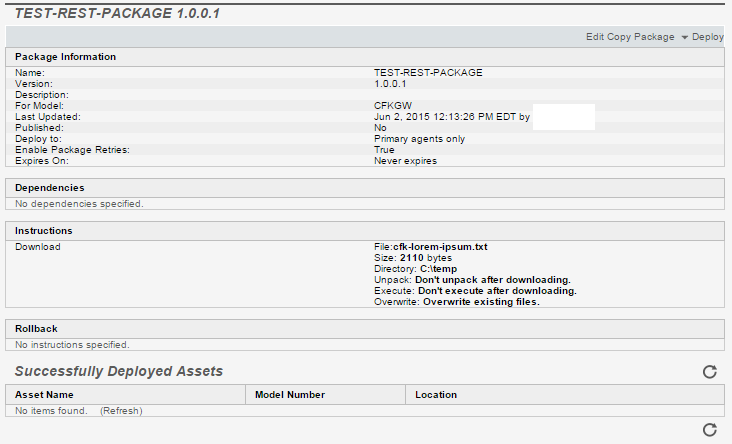 I hope this helps you in your projects, and helps demystify the Axeda Platform REST API a little for you.
Regards,
-Chris
Bibliography (Documents available from Support Portal):
- Axeda v2 API/Services Developer's Reference Guide_6.8
- Axeda Platform Web Services Developer Reference v2REST_6.8
Change History:
2015-09-24 : Change HTTP Methods of session create and content send to PUT from POST