

Using InfluxDB as ThingWorx 8.4 Persistence Provider
In this post, I will use an instance of InfluxDB and Chronograf.
See this post for installing both using Docker.
InfluxDB - Time Series Databases
InfluxDB is a time series database. It allows users to work with and organize time series data. The advantage of such a database system is that it comes with built-in functionality to easily aggregate and operate on data based on time intervals. Other types of databases can do this as well - but time series databases are heavily optimized for this kind of data structures which will show in storage space and performance.
Data is stored in the database with its timestamp, its value and one or more tags.
| Time | Temperature | Humidity | Location |
| 2019-01-24T00:00:00 | 23 | 42 | Home |
| 2019-01-24T00:01:00 | 22 | 43 | Home |
| 2019-01-24T00:02:00 | 21 | 44 | Home |
| 2019-01-24T00:03:00 | 23 | 45 | Home |
| 2019-01-24T00:04:00 | 24 | 42 | Home |
| 2019-01-24T00:05:00 | 25 | 43 | Home |
| 2019-01-24T00:06:00 | 23 | 44 | Home |
Values can be aggregated by intervalls, i.e. "give me the temperatur values within the last hour and take the average for 5 minutes". This would result in (60 / 5) = 12 results with a value that represents the average temperature within this 5 minute interval.
Example: Temperature Data averaged by 4 minutes
| Time | Temperature |
| 2019-01-24T00:00:00 | (23 + 22 + 21+ 23) / 4 = 22,25 |
| 2019-01-24T00:04:00 | (24 + 25 + 23) / 3 = 24 |
To find out more about InfluxDB see also https://www.influxdata.com/time-series-database/ and https://www.influxdata.com/time-series-platform/
InfluxDB in ThingWorx
The new ThingWorx 8.4 release comes with an option to setup InfluxDB as additional Persistence Provider. Meta Data like Entity Definitons will still be stored in PostgreSQL. Streams, Value Streams and Data Tables however can be stored in InfluxDB.
The InfluxDB Persistence Provider setup is delivered with the PostgreSQL installation package for ThingWorx. Currently ThingWorx does not allow any aggregation of data with its built-in InfluxDB capabilities.
Prepare InfluxDB
InfluxDB will need a user and a database.
Connect via Chronograf - the graphical UI to administer InfluxDB and create a new user via
- InfluxDB Admin > Users
- Default username = twadmin
- Default password = password
- Permissions = ALL
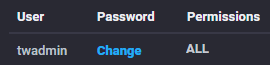
Create a new database via
- InfluxDB Admin > Databases
- Default database name = thingworx
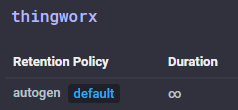
Configure ThingWorx
Create a new Persistence Provider for InfluxDB in ThingWorx - but don't mark it as active yet!
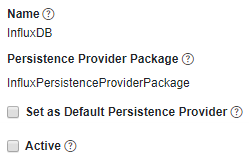
Switch to the Configuration and change the username / password, database and hostname to match your installation.
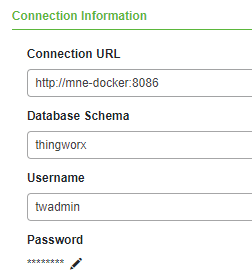
Save the configuration, switch back to the General tab and mark the InfluxDB Persistence Provider as Active.
Save again and a "successful" message will be shown. If the save action failed, the connection settings are not correct - check for the correct ports and for any typos.
Creating Entities & Testing
Streams, Value Streams and Data Tables can now be created using the new InfluxDB Persistence Provider.
To test with a Value Stream
- Create a new Thing with some NUMBER properties, e.g. 'a', 'b' and 'c' as properties - ensure they are marked as logged as well
- Name = InfluxValueStreamThing
- Create a new ValueStream based and change its Persistance Provider to the InfluxDB created above
- Name = InfluxValueStream
- Save both Entities
- Setting values for the properties will now automatically create the entries in InfluxDB - including the Entity name "InfluxValueStreamThing"
- Running the QueryPropertyHistory service on the Thing will return the results as an InfoTable
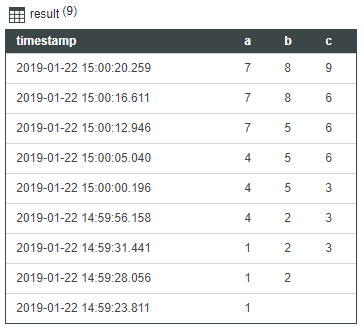
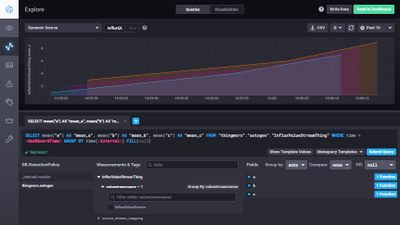
- In Chronograf this will display like this:
ThingWorx 8.4 will be released end of January 2019.
Be sure to check out and test the new Persistence Provider features!