1-Visitor
June 27, 2013
Solved

Sketching in 2d - Finding open loops..etc

  • June 27, 2013
  • 3 replies
  • 19522 views

Being fairly new at PTC/Creo, I often find myself in the middle of a complex 2d sketch and then when I try to save it gives an error like. Too many open loops.

I search over the sketch, re-examine dimensions, check lines... intersections... and eventually find a stray line bit or something not quite square.

The question is. Does anyone have any tricks, or perhaps there is a way in the software, to analyze the sketch and bring out these errors quickly. The amount of time wasted, searching or redrawing is pretty frustrating.

Thanks for any tips out there.

I'm attaching a file of a current problem I'm having. I can't find the problem.

- Brett Penza,
    Best answer by JoshH

    Hi Brett,

    1. Reduce the number of features in your sketch.

    You have a basic shape of a half disc, start with that

    The other circular cutouts can be patterned

    The slots can be patterned

    Center hole may be a single feature

    2. Use construction axes to help constrain features

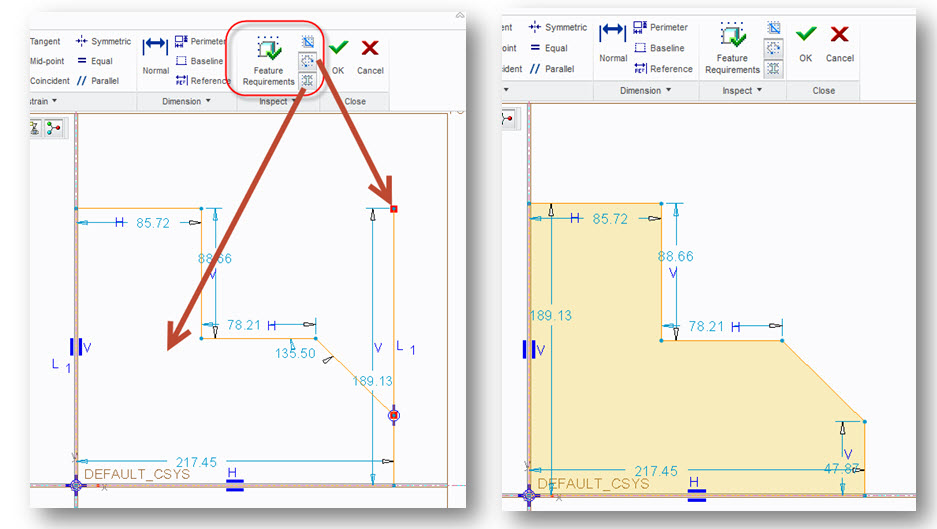
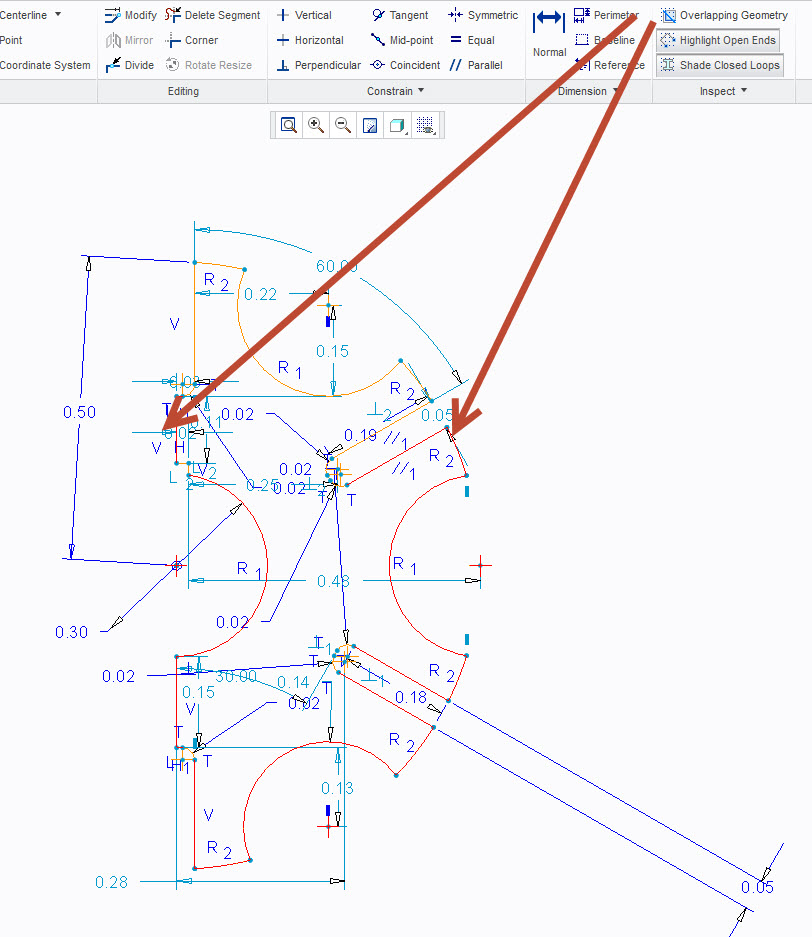
    3. Use the inspection dialog (second picture)

    Overlapping geometry highlighted below.

    overlapping.jpg

    sketch.jpg

    3 replies

    JoshH1-VisitorAnswer
    1-Visitor
    June 27, 2013

    Hi Brett,

    1. Reduce the number of features in your sketch.

    You have a basic shape of a half disc, start with that

    The other circular cutouts can be patterned

    The slots can be patterned

    Center hole may be a single feature

    2. Use construction axes to help constrain features

    3. Use the inspection dialog (second picture)

    Overlapping geometry highlighted below.

    overlapping.jpg

    sketch.jpg

    bpenza1-VisitorAuthor
    1-Visitor
    June 28, 2013

    Thanks very much Josh.

    I will take the advice. Makes a lot of sense. Break it down into pieces.

    Also, thanks for pointing out the Overlapping geo tools etc.

    What's strange is that when I click the Overlapping Geo or the Highlight Open Ends, I don't see what you saw.

    Maybe I just need to close and restart or a video issue. Not sure.

    But thanks very much.

    -Brett

    1-Visitor
    June 28, 2013

    Hi Brett,

    It does take some time. I used to be a machinist, so my thought pattern is actually fairly similar to machining a part. I start with a basic shape and start adding features.

    One thing that may be a challenge is developing a part with dimensions as you desire to see them in a drawing as well as maintaining your design intent.

    In regards to graphics, you may have to set the config option graphics = win32_gdi

    Have fun,

    Josh

    June 27, 2013

    Josh is correct, the first rule of thumb (especially for new users) is to make more features and simpler sketches. I would rather have a new user create a part using 5 simple sketches and extrusions rather than a very complicated sketch. As you get experience, you will find your sweet spot with this.

    In your example, the Overlapping Geometry tool highlighted many entities in red. They way I use the tool is to look for 3 entity chains that are highlighted, then delete the middle red entity. If you have an overlapping entitiy (one on top of another) you will see the entity below after deleting. If not, click Undo. Not perfect but the method I teach. In your section, the other arc had many arcs on top of one another. Removing them made the section closed.

    bpenza1-VisitorAuthor
    1-Visitor
    June 28, 2013

    Thanks Adam,

    Good tips. I am learning, slowly but surely. It is a little strange that I couldn't see the errors that you and Josh saw. Not sure if I have a lesser Video, or just need to reboot or what.

    I do appreciate your help.

    Thanks again,

    -brett

    June 28, 2013

    I would suggest updating your graphics driver. Hopefully this will fix your display issue.

    1-Visitor
    June 28, 2013

    Another clue is in your first sentence " I often find myself in the middle of a complex 2d sketch and then when I try to save it gives an error..."

    Every sketch starts with a single line and it's worth making sure the geometry is robust at ever stage of creating a sketch. If you have two lines that need trimming, do it straight away and don't leave all the trimming to last.

    Adam and Josh are spot on, keep sketches simple and have more features. It's easier to create and, when you want to make changes weeks later, way easier to find the dimension or feature.