Turn on suggestions
Auto-suggest helps you quickly narrow down your search results by suggesting possible matches as you type.
Showing results for
Please log in to access translation
Turn on suggestions
Auto-suggest helps you quickly narrow down your search results by suggesting possible matches as you type.
Showing results for
- Community
- Creo+ and Creo Parametric
- 3D Part & Assembly Design
- Radius on an open surface
Translate the entire conversation x
Please log in to access translation
Options
- Subscribe to RSS Feed
- Mark Topic as New
- Mark Topic as Read
- Float this Topic for Current User
- Bookmark
- Subscribe
- Mute
- Printer Friendly Page
Radius on an open surface


Sep 23, 2013
05:09 PM
- Mark as New
- Bookmark
- Subscribe
- Mute
- Subscribe to RSS Feed
- Permalink
- Notify Moderator
Please log in to access translation
Sep 23, 2013
05:09 PM
Radius on an open surface
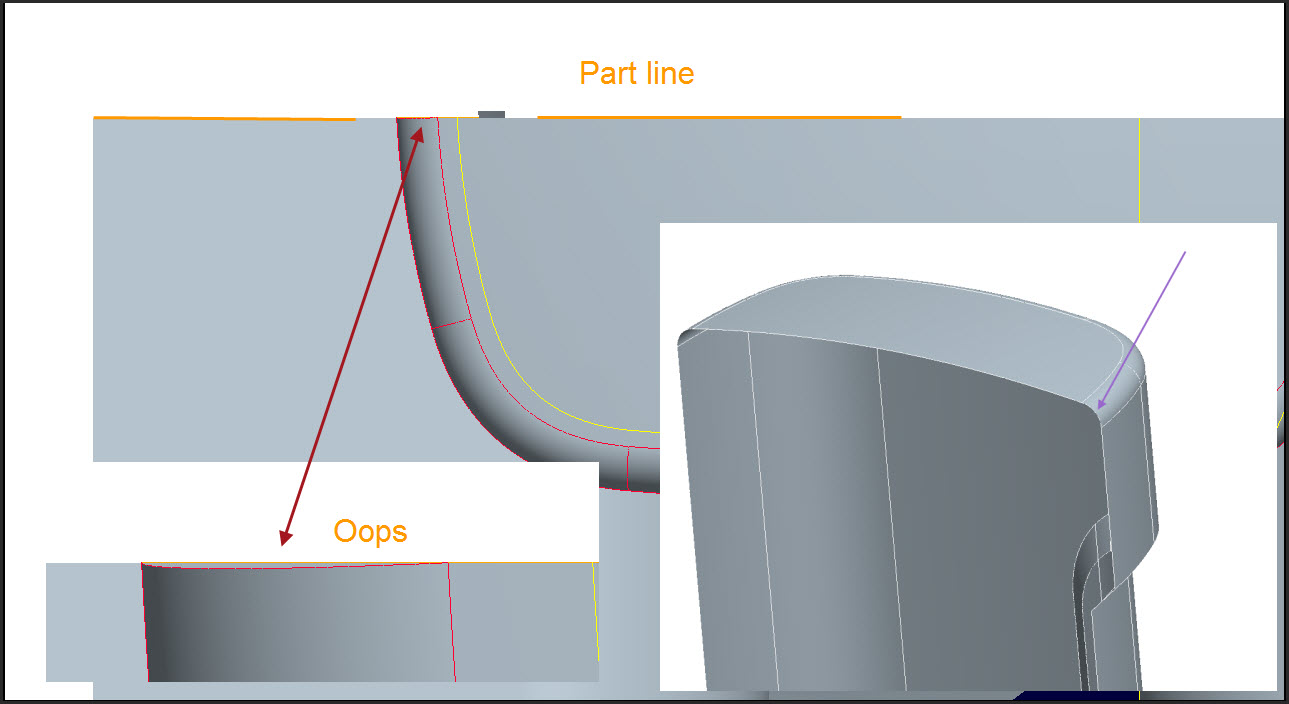
This has happened to me many times:
I have an open quilt and want to round a corner on it. The corner is where 2 surfaces meet. These surfaces have boundaries that lie on a plane. Where the round comes down to this plane, instead of lying on the plane, it kind of lifts up and away from the plane. Usually I have to mirror the quilt and merge the 2 quilts (to create a closed quilt, then a solid), because the thing is symmetrical. But of course, when I merge the two halves they don't close because of that round edge not lying on the plane.
Does anyone know a way of making it behave? I understand the geometrical reason why it does that... the trouble is I can't imagine a scenario where an engineer wants the edge of his radiused corner to lift away in a graceful spline tangential to the adjecent edges. Flat part lines are cheaper.
And no, I don't want to make it a closed quilt with a flat surface on the plane, for reasons I can't be bothered explaining as it's going-home time 
This thread is inactive and closed by the PTC Community Management Team. If you would like to provide a reply and re-open this thread, please notify the moderator and reference the thread. You may also use "Start a topic" button to ask a new question. Please be sure to include what version of the PTC product you are using so another community member knowledgeable about your version may be able to assist.
2 REPLIES 2


Sep 23, 2013
07:01 PM
- Mark as New
- Bookmark
- Subscribe
- Mute
- Subscribe to RSS Feed
- Permalink
- Notify Moderator
Please log in to access translation
Sep 23, 2013
07:01 PM
- Extend the surfaces and trim the extra after the round.
- Sweep the round along two guide curves on the surfaces and merge.
- Define the surfaces with the round as part of it.
- Extend the round and trim it.
What you are seeing is as expected.
When you start working with draft angles, 3D turns into 12D 
Sep 27, 2013
10:05 AM
- Mark as New
- Bookmark
- Subscribe
- Mute
- Subscribe to RSS Feed
- Permalink
- Notify Moderator
Please log in to access translation
Sep 27, 2013
10:05 AM
Yeah, I've done all of these, especially the extend ones. That of course addes 2 features every time I do it. Sweeping a surface doesn't usually give the same result as a round, and also doesn't always work.
I thought there may have been some setting I could have used. I don't know, for example, what "extend surfaces" means. I have tried that before but it makes no visible difference to the round.
Looks like another Product Idea coming up, as I can only see this as a flaw in the software. Like I said, I can't imagine why an engineer would not want the end of the round to lie on the same plane as the adjacent edges.