1-Visitor
January 5, 2017
Solved

How can I unbend square to ellipse blend in creo sheetmetal? I am using sketched rip.

  • January 5, 2017
  • 2 replies
  • 8778 views

Dear Creo users ,

I am using creo software for three years. I am stuck with a problem. I can unbend square to round creo blend sheetmetal but cannot unbend square to ellipse blend shhetmetal. i am currently using creo 2.0 but managed to use creo 3.0 also.In both softwares I am having problems unbending it. in PTC Creo learning exchange or You Tube  I could not find any tutorials regarding this.

My previous post was a mistake as I use full caps in my post. Other Creo users in community has pointed out .That was a mistake. I am so sorry and apologize for that. I am new in this community did not know the rules but now I know.

I need help regarding this problem. I have attached two creo 2.0 prt files. Anyone is free to answer this question. Other creo users in my company are also facing this problem in square to ellipse blend unbend problems. If this succeed it will be immense help for me.

With regards,

Soumya Bhattacharya
Best answer by psobejko

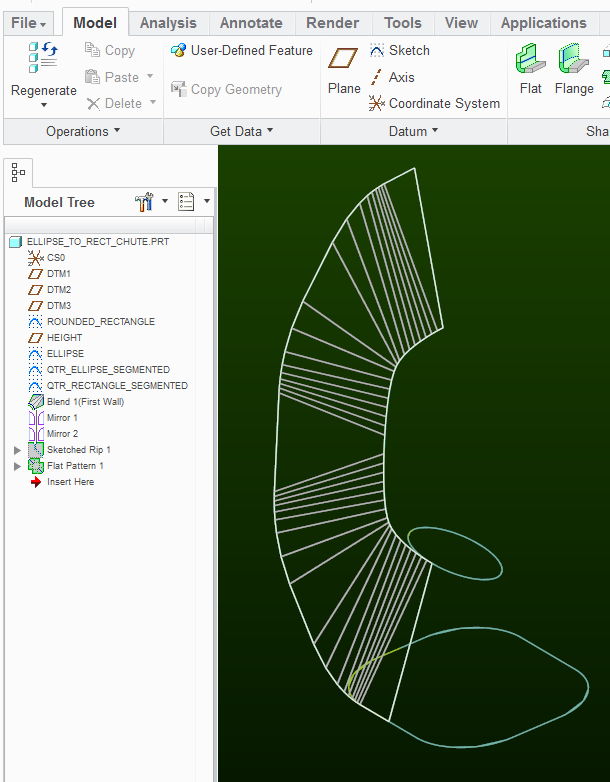
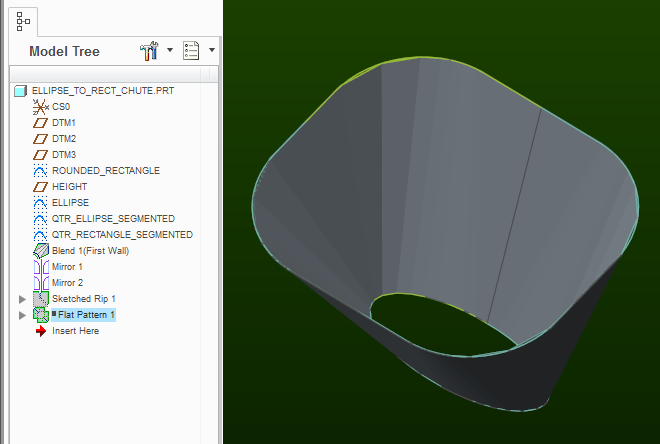
As others pointed out, blended sections can be developed into a flat pattern provided that the formed surfaces are not twisted.

The example ellipse to square transition, (or rather rounded square) is presented here:

ELLIPSE_TO_RECT_CHUTE-FORMED.png

ELLIPSE_TO_RECT_CHUTE.png

Examine the attached model (Creo 2.0).  By manually constraining the sketch entities, I ensured that edges in the rectangle 1/4-section are parallel to corresponding edges in the ellipse 1/4-section section.  There are a lot of variables as to what spacing between the vertices should be and this can be optimized but Creo just does not have an automated way of blending sections by "developing" / "triangulation" techniques (Solidworks does).  The method presented is by no means "easy to use", and the resulting model is rather rigid and brittle.

2 replies

23-Emerald III
January 5, 2017

Creo sheet metal will not work with the part as designed. Creo sheet metal requires constant radius bends. Your bends transition from a 20mm radius at the bottom to an ellipse at the top.

There are tools in surfacing to flatten surfaces but that is not something I use.

1-Visitor
January 5, 2017

Can I unbend any blended sheetmetal part with different profiles? Constant radius bend I think is not possible in complicated hopper type part which is circle or ellipse in one side and other is rectangle.

23-Emerald III
January 5, 2017

There is a significant discussion here Flat pattern of a part which was created using a Swept Blend about flat patterns for parts similar. Maybe it will help

1-Visitor
January 16, 2017

Hi creo users,

I request other creo users to create ant try to unbend a square to ellipse blend in creo sheetmetal. If you get any solution please reply in this post. with creo planar, extrude, flat and flange option a part sheetmetal can be unbendable but when you use sweep or blend the sheetmetal part is unbendable.What do you think?

With regards,

Soumya Bhattacharya

23-Emerald III
January 16, 2017

The links are how users do it for Creo and that are manufacturable without custom tooling.

Flat pattern of a part which was created using a Swept Blend

Part to unbend